 Log in


Hamburg, Germany


The Earth and its neighbors as a 3D globe and atlas for the Mac – maps and open geodata on real terrain.
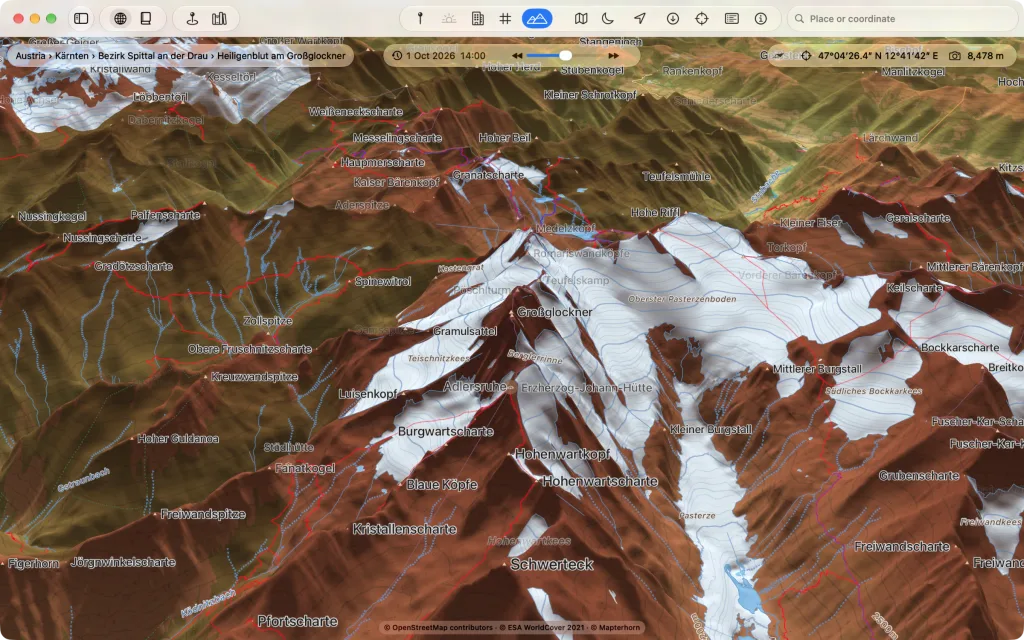
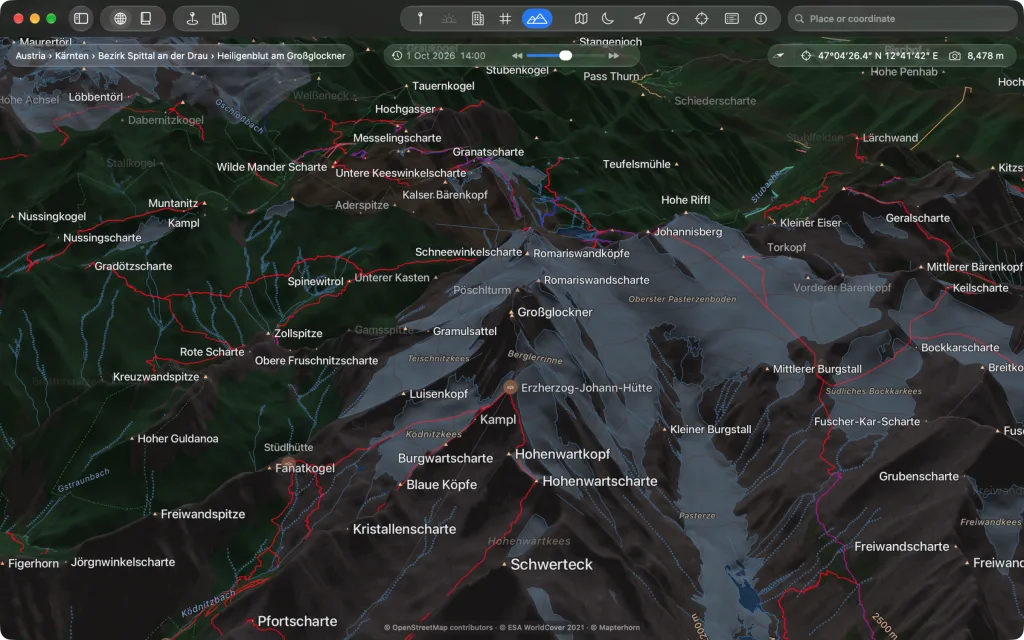
Kugelblitz shows the Earth and its neighbors as a globe and as an atlas you fly over smoothly like a pilot, even on an M1. Imagery, road map and topographic map lie on real terrain, joined by thousands of open maps from the Library. Everything comes from freely available geodata, straight from its publishers, OpenStreetMap from the Kugelblitz tile server; you need no account.
Everything loaded stays in the cache, and Kugelblitz instances in the same network share it with each other if you wish. Status windows tell how far the view has loaded, where you are looking and where its data comes from, and every source is listed with its license in “Sources and Licenses”. Kugelblitz speaks German and English and uses the units of your choice.
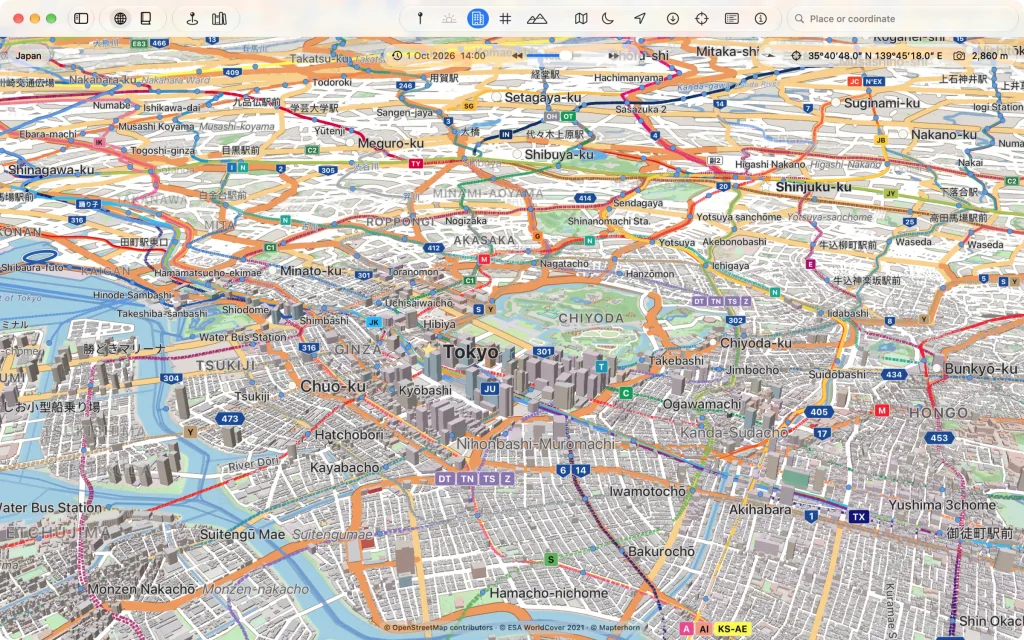
Drawn maps on real terrain
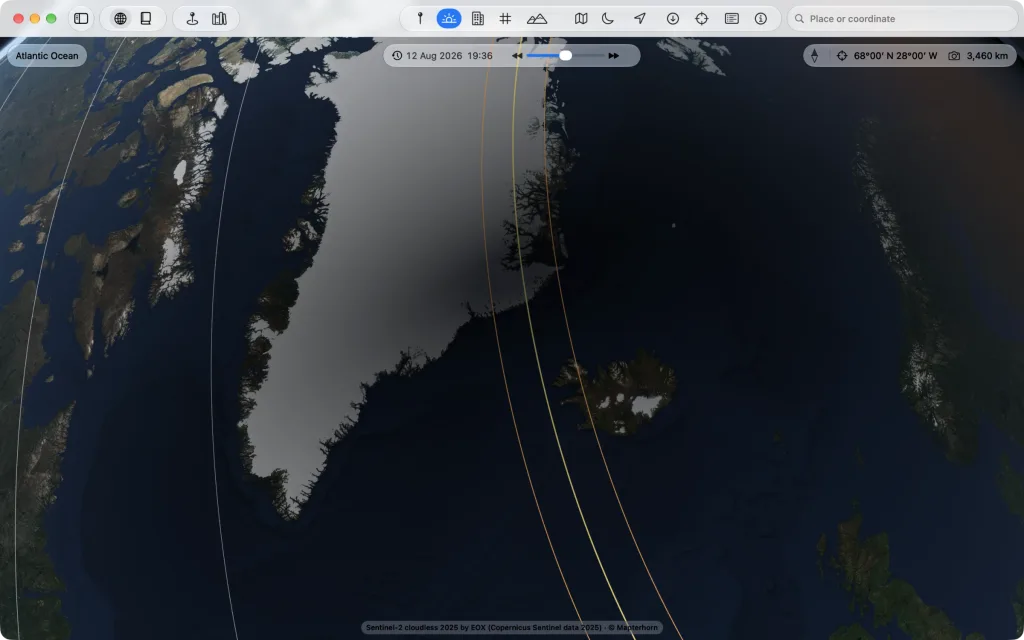
The Earth on three kinds of map, as a globe and as an atlas: Imagery, road map and topographic map. The two drawn ones do not lie flat beside it but on the globe's terrain, with buildings in 3D. A scene brings back a ready-made view in one move.
Every body flat as a printed map
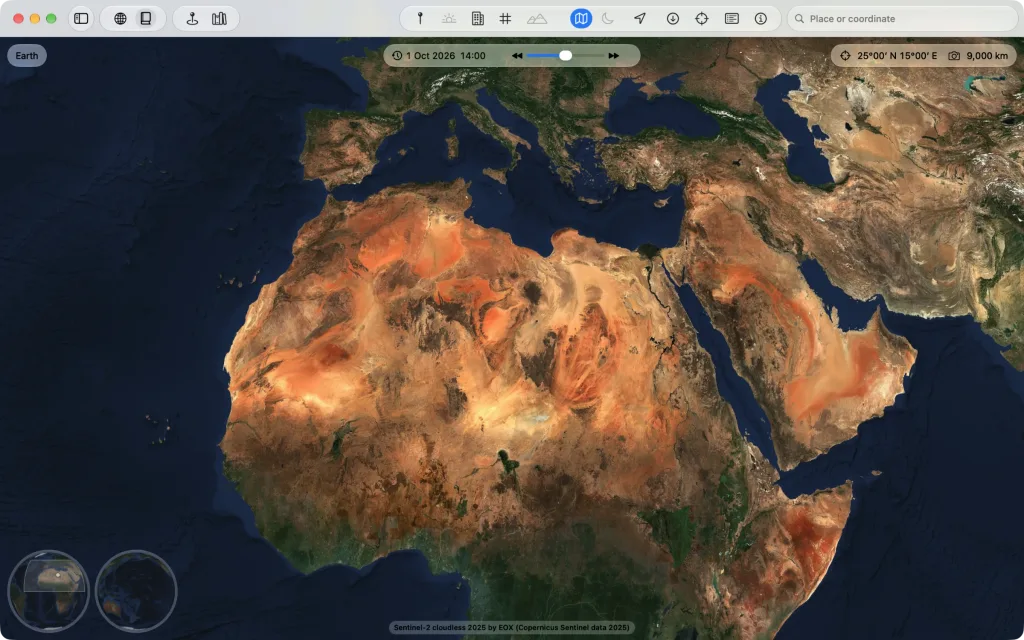
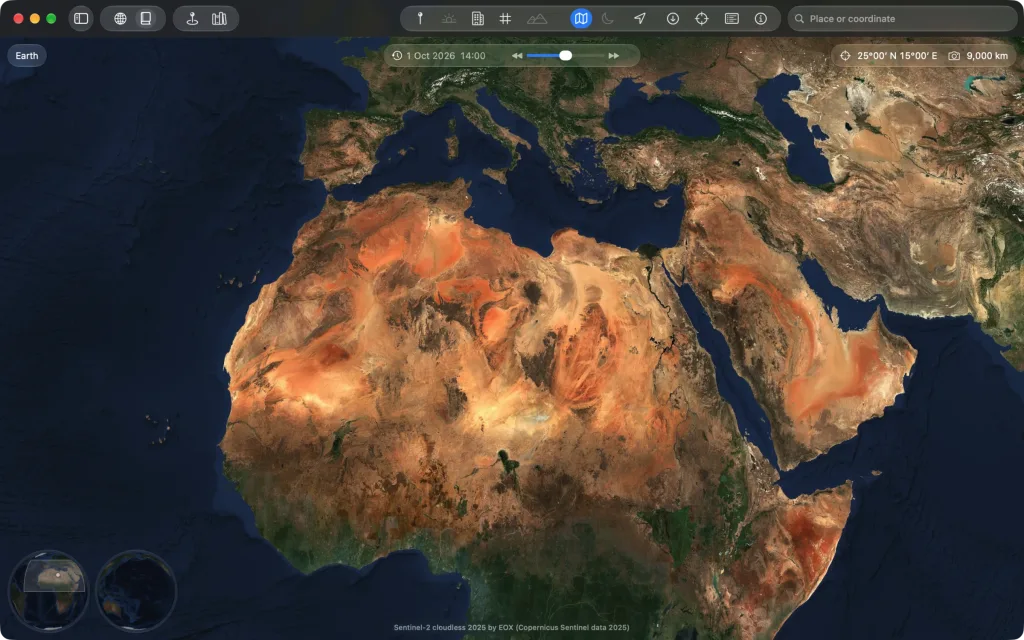
Beside the globe Kugelblitz shows every body as an atlas: the same data flat in five projections, from the whole sheet to the finest images. You switch in the title bar or with ⇧⌘A.
Search, view and add the world's open geodata
The Library (⇧⌘B) opens directories and geoportals with map services from all over the world: aerial images, satellite images, elevation models, maps and buildings in 3D. “On the Globe” shows any service at once, and one click adds it to “My Places”.
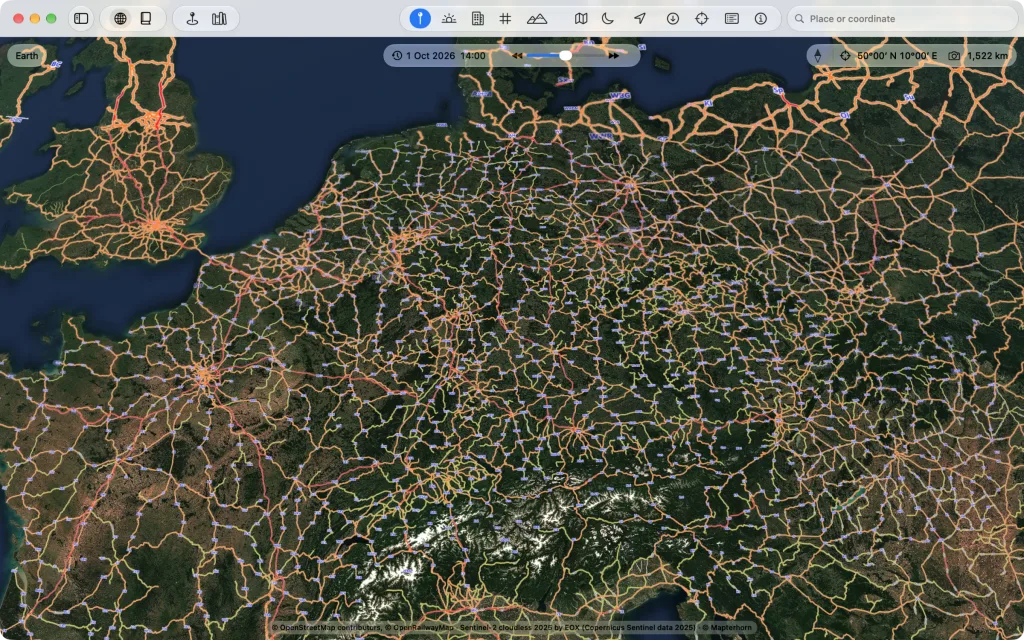
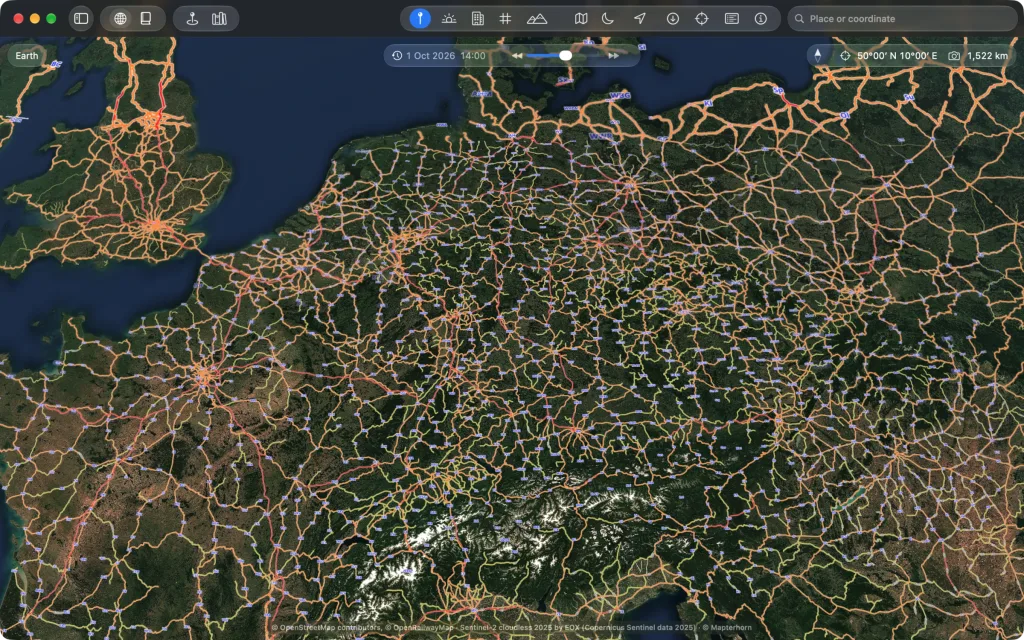
All of OpenStreetMap, without a download and without regions
OpenStreetMap comes from Kugelblitz's own tile server: the whole planet, prepared for Kugelblitz, in tiles only for the area you see, at the level the distance asks for. No regions, no large download, the same everywhere on Earth.

Fly like a pilot with a SpaceMouse
The SpaceMouse from 3Dconnexion is Kugelblitz's control stick: all movements at once, as fine as you move the cap, without a driver. Keyboard, trackpad and mouse work as well, all at once too.
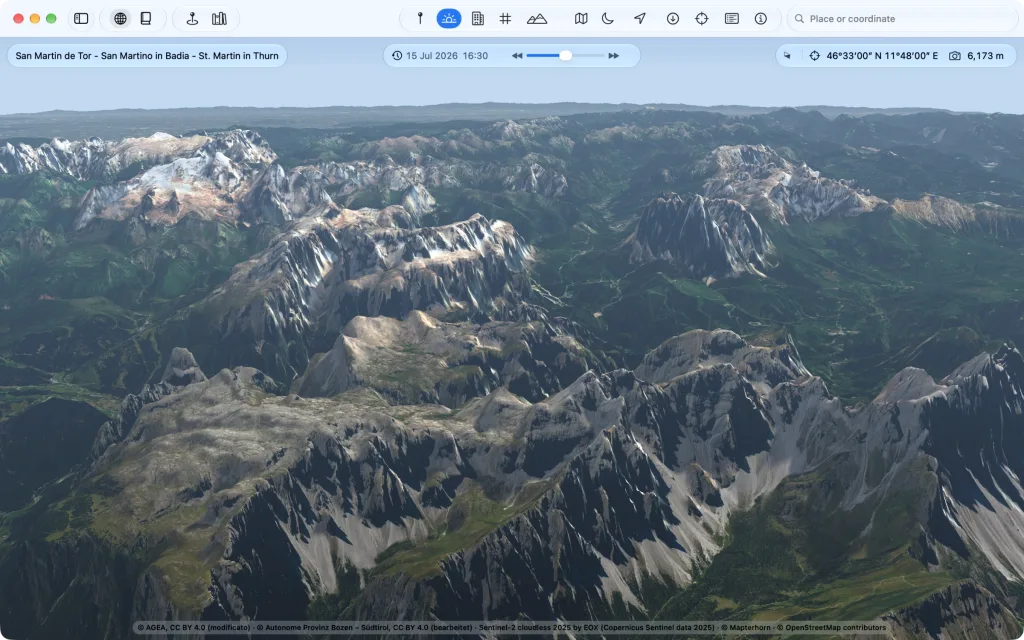
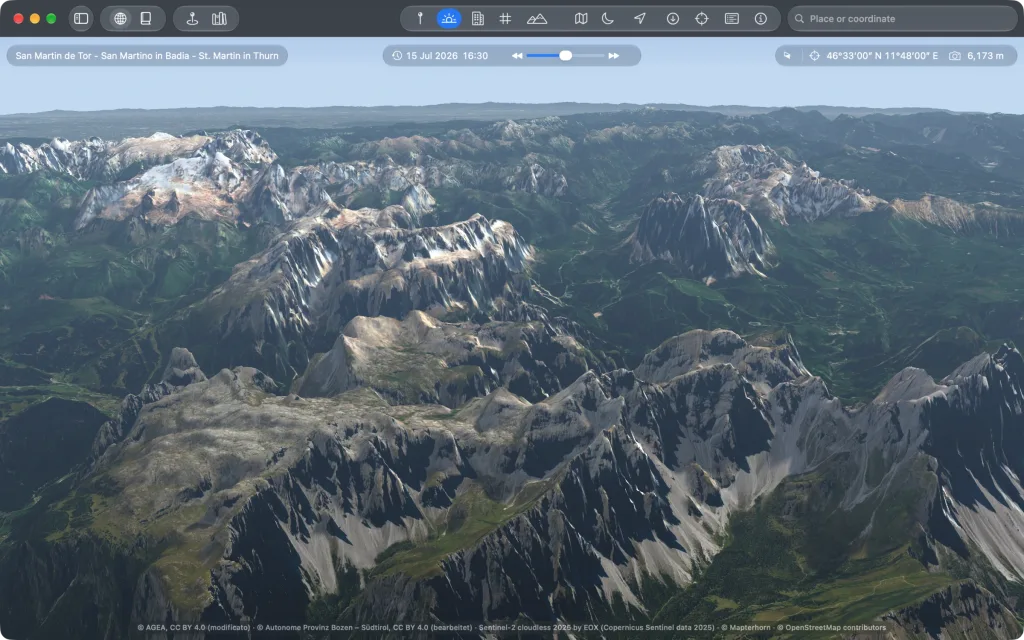
Smooth, even on an M1
Aerial image, terrain, buildings, roads and names at once, and the flight stays smooth. Kugelblitz is made and measured on a Mac mini with M1 and 16 GB.
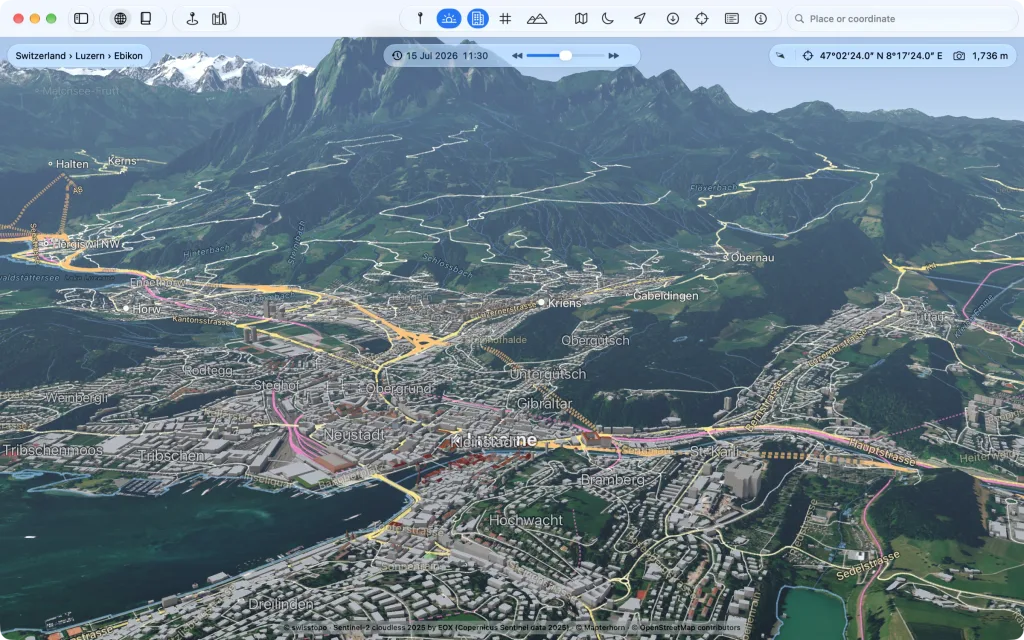
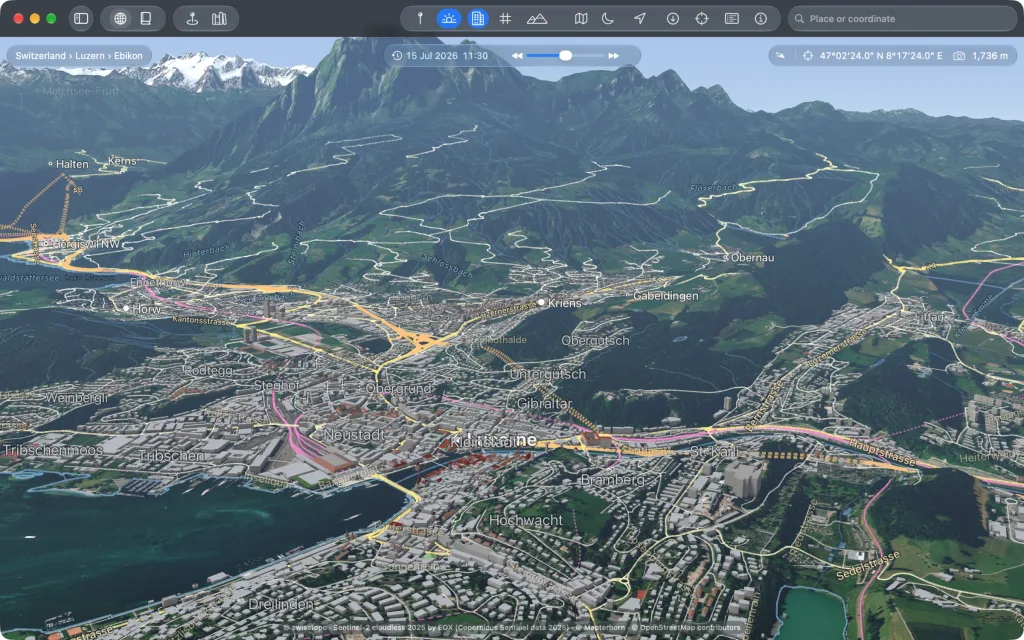
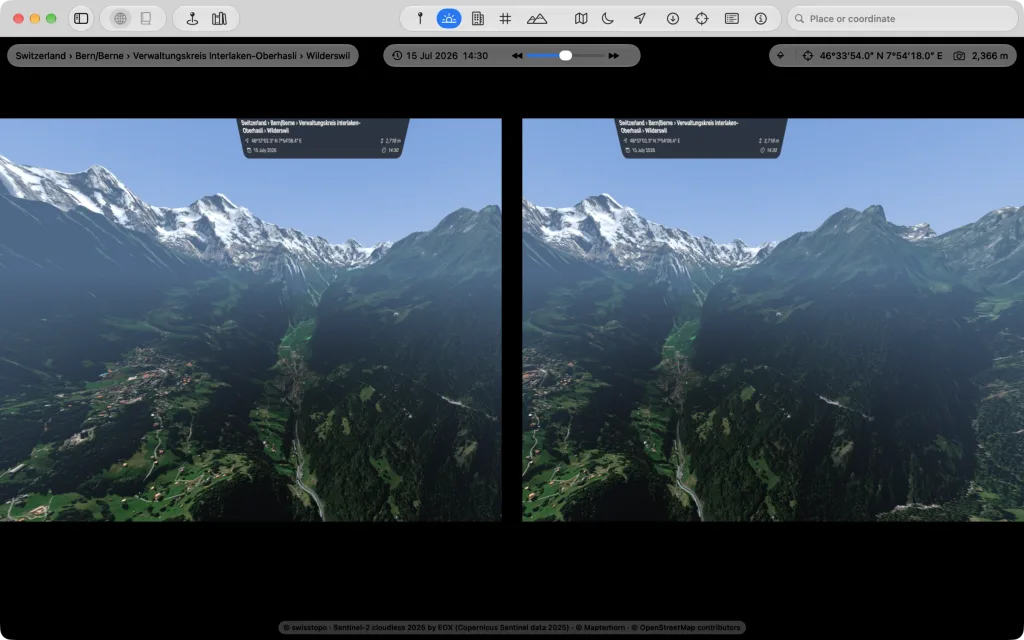
The Mac streams the globe into the headset
The Mac draws, the headset shows: View → “Show on Vision Pro…” (⌥⌘V) brings the globe all around you, without an app on the headset, from an M1 too. Checked with Mac and headset on 27.2.
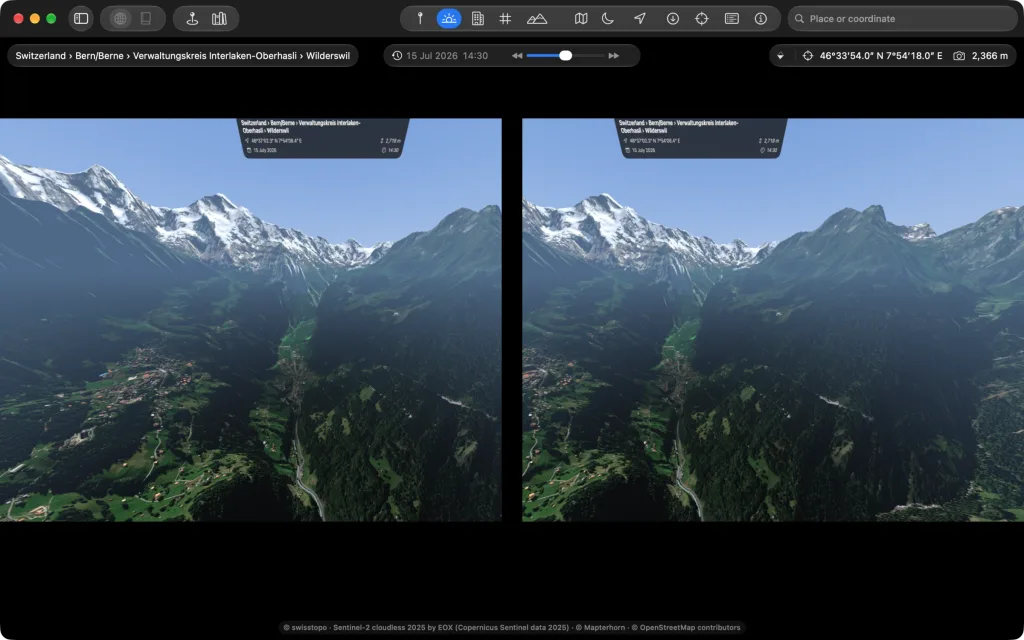
What happened, where and when
Eclipses over 5,000 years, computed rather than read from tables, as well as earthquakes, eruptions, tsunamis and fireballs at their place and time. Let the time shuttle run and you see them come and go.

Hamburg, Germany


Hamburg, Germany

• ~6,000 words • 30 minute read
There are many tools out there that help you visualize tokens and better understand how tokenization works with large language models. OpenAI has a pretty nice one, and there are a half-dozen other ones that are also great.
They generally work by passing text through an actual tokenizer, retrieving the resulting token boundaries, and highlighting them in the browser. It's a fast, accurate and perfectly reasonable approach.
So I did the slightly unreasonable thing and made a font that uses modern font witchcraft to visualize tokens as you type them, without actually tokenizing. The code is at:
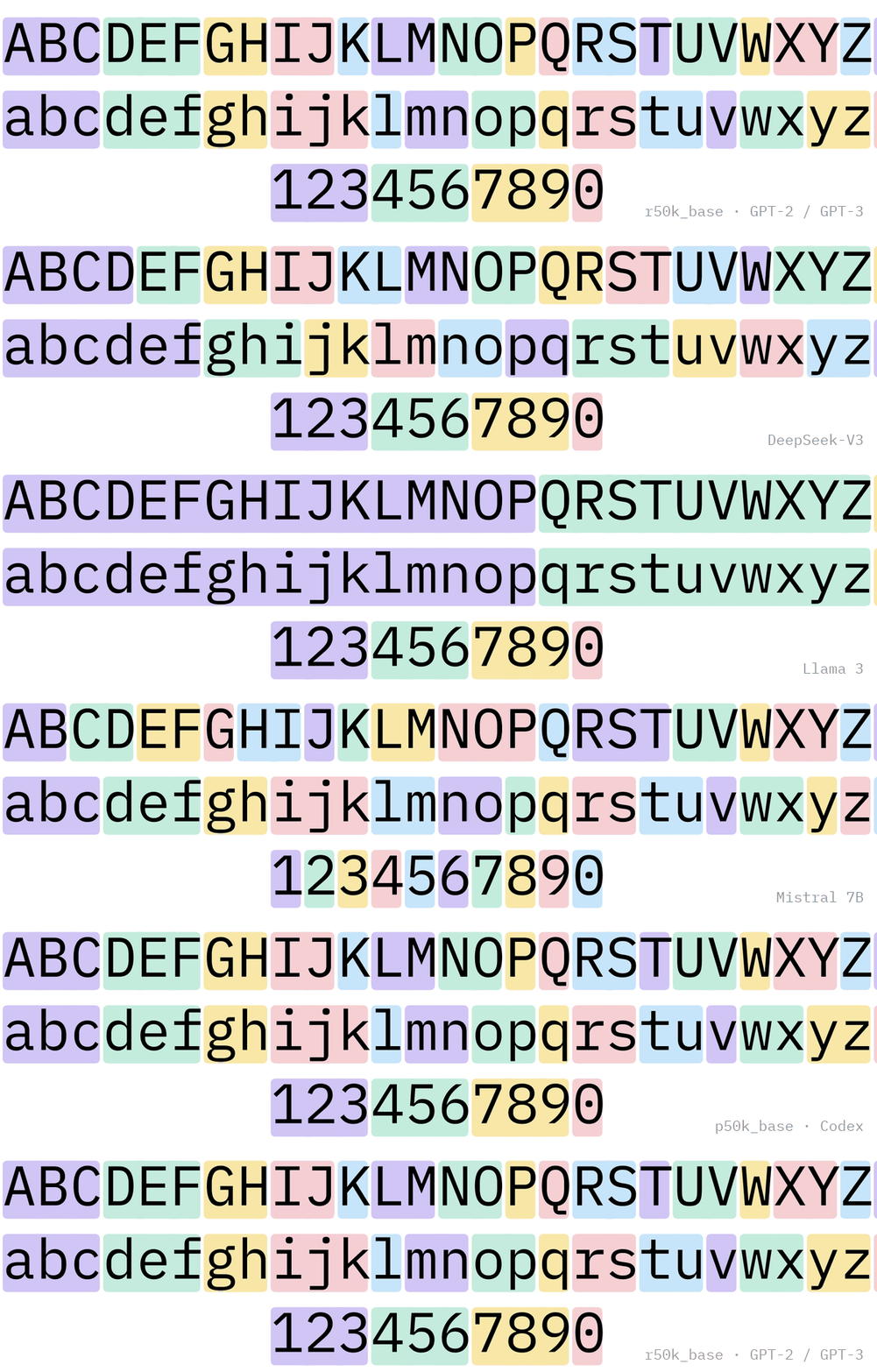
You can play with it below. Every highlight is drawn by the font. No scripting! The only JavaScript here is swapping which face is loaded.
OpenAI GPT-4, GPT-3.5, text-embedding-3; also Phi-4, OLMo 2, IBM Granite 4
What is a token?
A token is the basic unit of currency for a language model. It’s what the model actually reads and produces.
A token is generally a chunk of text: a character, word, word-part, or occasionally a longer sequence. Many modern LLM tokenizers have a fixed vocabulary of these chunks, typically somewhere between 50,000 and 250,000 entries.
And that vocabulary isn’t necessarily exclusively made up of conventional words. Common combinations of characters, punctuation, whitespace, and even sequences spanning multiple words can all earn their own entries.
Where does a vocabulary come from? Nobody writes it by hand. Almost every tokenizer in this post uses some form of byte-pair encoding (BPE), which builds the vocabulary by counting. In a simplified version of BPE, start with every character (or byte, in byte-level tokenizers) as its own token. Look through a big pile of training text for the pair of adjacent tokens that appears most often, say "t" followed by "h", and merge it into a new token "th". Now look again: maybe "th" followed by "e" is the most common pair, so "the" becomes a token.
Rinse and repeat this many thousands of times over. Every merge adds one entry to the vocabulary, and the list of merges, in the order they were learned, is saved along with it. To tokenize new text, the tokenizer breaks it into characters and replays those merges in the same order, so common words collapse into a single token and rare words stay in pieces. The exact split of a word depends on which merges rank higher, which matters later.
Over a long enough timeline, does the entirety of Alice in Wonderland become a single token? Every published version of something like the Bible? Interesting thought exercise.
While they aren't incorporating entire novels or religious texts as tokens yet (and I suspect there's a better technique that enters the room well before we push things to that scale), these vocabularies have been getting bigger! GPT-2 had 50,257 tokens; GPT-4's tokenizer has 100,277; GPT-4o's has 200,019.
Part of that growth reflects increasingly ambitious multilingual support: OpenAI's GPT-4o announcement shows the same Gujarati sentence dropping from 145 tokens to 33 under the new tokenizer, while English barely moved.
Sidenote: Rest of World has a nice article on the cost of AI for non-english languages which touches on this idea of multilingual support, tokens and how this manifests visually. I think not discussing Chinese at all—which can be more token efficient than latin script languages sometimes!—was kind of a miss.
So when something like Meta’s Muse product boasts giving you 1 billion tokens for free, that’s what we’re talking about: a billion units of text processed, not a billion words (The rule of thumb seems to have settled around 0.75 words per token, so if it helps you can multiply any token count by that and read it as words.). And depending on which tokenizer is doing the counting, that same text might consume a surprisingly different number of tokens!
Writing this makes me want to start charging in tokens (i.e. words) in my day-to-day life. Hm.
Further reading on tokens: the BPE paper, Sennrich et al. 2016; SentencePiece, Google's take, used by Llama 2, Gemma and T5; and Hugging Face's tokenizers library, which reads most of the open ones.
What is Tokenizer Mono and how does it work?
Tokenizer Mono is a font family with different faces mapped to different tokenizers. This lets you visualize the tokens as you type without an additional computation and reassembly step.
It's one big typographic family—"Tokenizer Mono" based on IBM Plex— with a style per tokenizer model. Font Book on macOS should register them as one family with twenty-eight styles.
| Vendor | Face | Used by |
|---|---|---|
| OpenAI | cl100k | OpenAI GPT-4, GPT-3.5, text-embedding-3; also Phi-4, OLMo 2, IBM Granite 4 |
o200k | OpenAI GPT-4o, o1, o3, GPT-4.1, gpt-oss | |
p50k | OpenAI Codex, text-davinci-002/003 | |
r50k | OpenAI GPT-2, GPT-3 | |
clip | OpenAI CLIP, Stable Diffusion prompts (lowercases; no whitespace tokens) | |
| Meta | llama4 | Meta Llama 4 |
llama3 | Meta Llama 3 / 3.1 / 3.2 / 3.3; also SmolLM 3 | |
llama2 | Meta Llama 2 (SentencePiece) | |
gemma3 | Google Gemma 3 | |
gemma | Google Gemma 1 / 2 | |
t5 | Google T5 (SentencePiece Unigram, not BPE) | |
bert | Google BERT (WordPiece; ## continuations approximated) | |
| Mistral | mistral | Mistral 7B v0.3 (SentencePiece) |
tekken | Mistral Nemo, Mistral Small 3 (Tekken); also NVIDIA Nemotron-H, Swiss AI Apertus | |
| Alibaba | qwen | Alibaba Qwen 2 / 2.5 / 3 |
| DeepSeek | deepseek | DeepSeek V3 / R1 |
| Zhipu | glm | Zhipu GLM-4.5 |
| Tencent | hunyuan | Tencent Hunyuan |
| Baidu | ernie | Baidu ERNIE 4.5 (SentencePiece) |
| ByteDance | seed | ByteDance Seed-OSS |
| 01.AI | yi | 01.AI Yi (SentencePiece) |
| IBM | granite | IBM Granite 3 and Granite Code (StarCoder vocabulary); also StarCoder |
| TII | falcon3 | TII Falcon 3 |
falcon | TII Falcon | |
| EleutherAI | neox | EleutherAI GPT-NeoX, Pythia |
| BigScience | bloom | BigScience BLOOM (multilingual) |
| UW | superbpe | UW SuperBPE for OLMo 2 (tokens cross word boundaries) |
| Moonshot | kimi | Moonshot Kimi K2 (tiktoken-format vocabulary) |
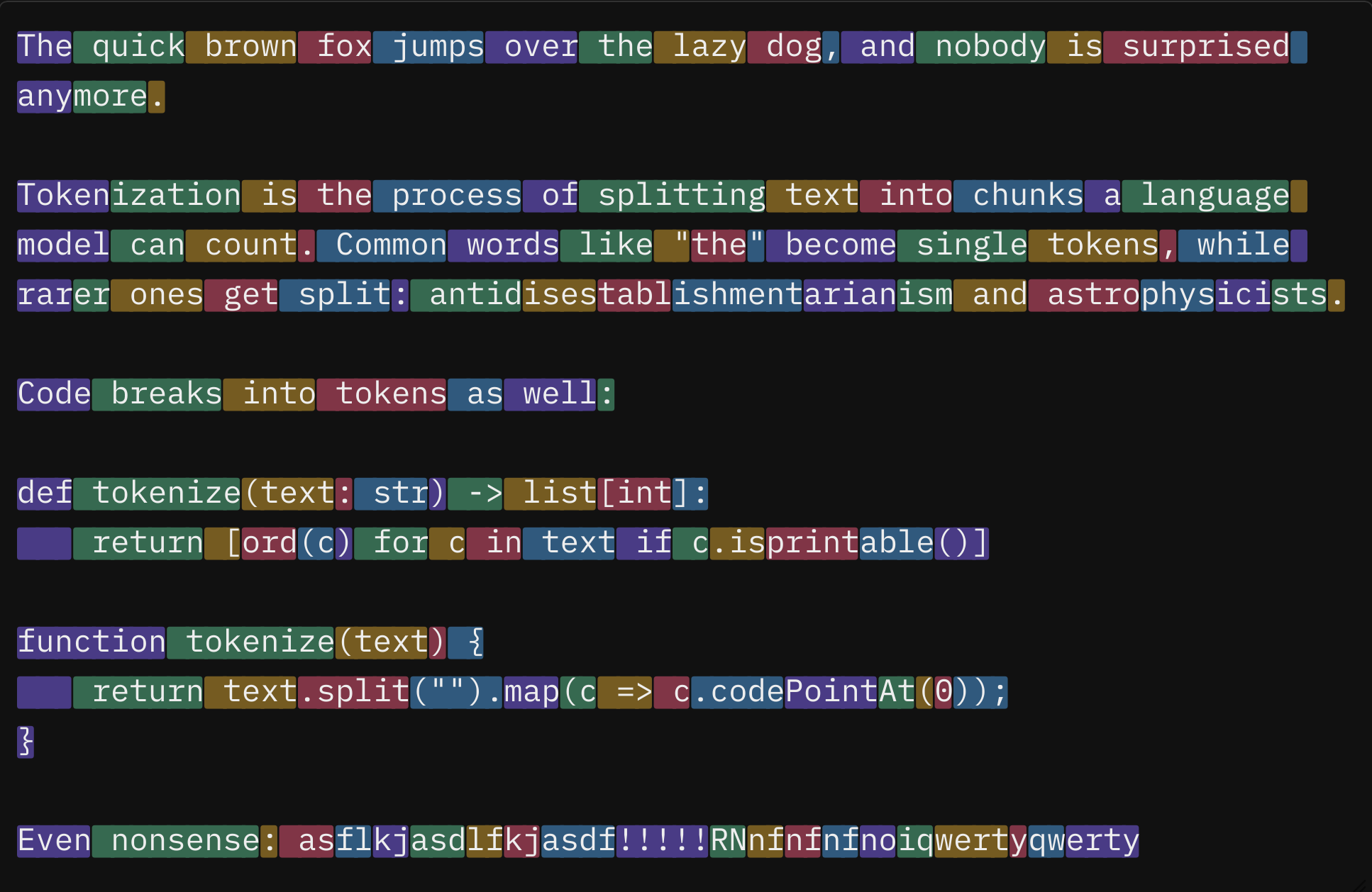
Here's the same sentence visualized in all of these different tokenizers.
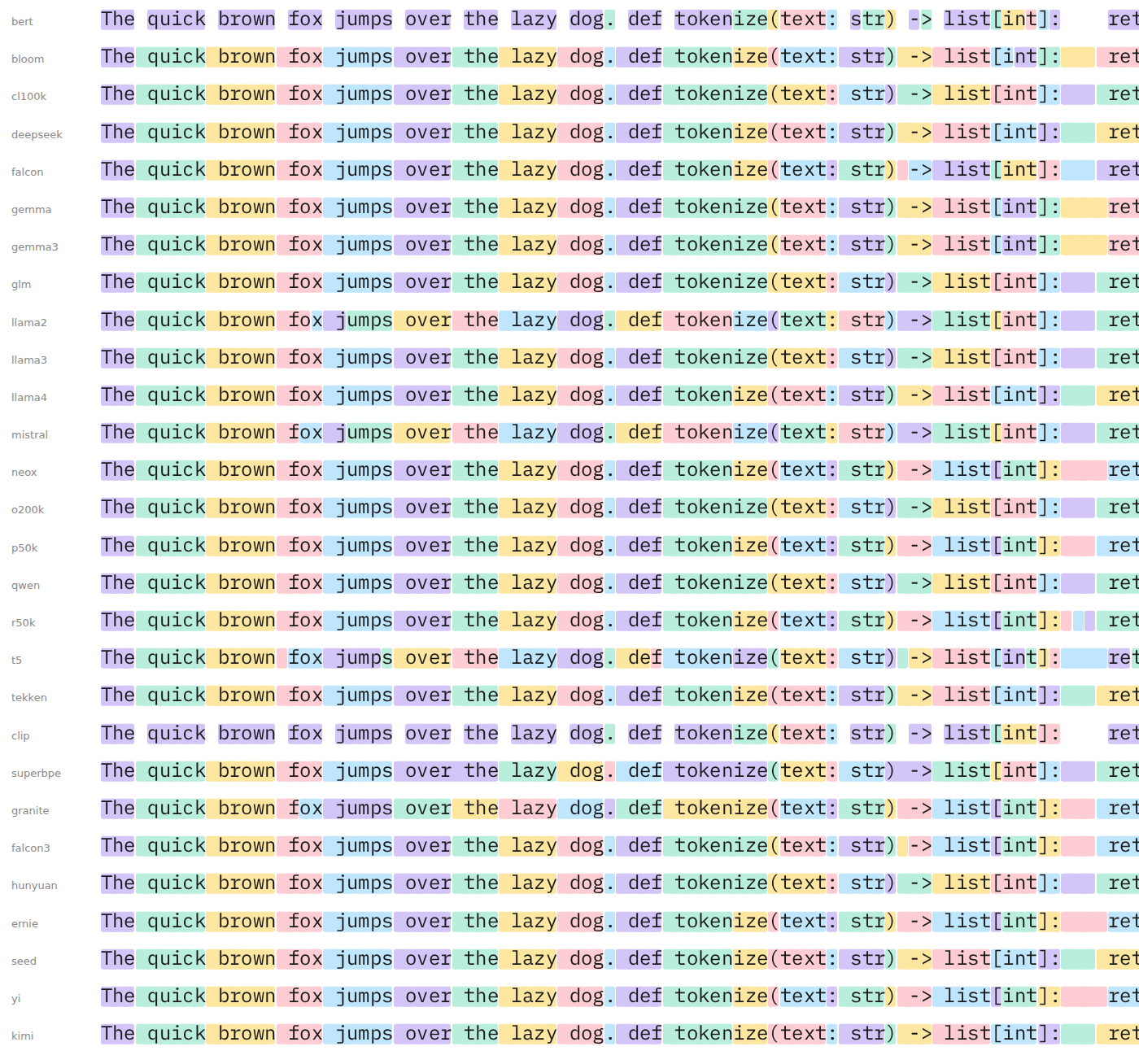
It's subtle, but you can spot some fun differences. Llama 2 splits "fox" and "tokenize" where OpenAI (among others) doesn't. BERT doesn't tokenize whitespace at all (it will never be good at Python, alas). And while we're on whitespace and Python: cl100k takes the four-space indent before return and makes one token of the first three spaces, then folds the fourth into " return", while Gemma keeps all four spaces as a single token.
Note on vendors and models: Anthropic's tokenizer isn't public, as far as I can tell, so there's no Claude face. Neither is Gemini's, though I wouldn't be shocked if it's some evolution of Gemma? OpenAI publishes its encodings through tiktoken, and its model table maps everything up to GPT-5 onto o200k_base, so the o200k face covers those. I'm not sure about the newest models like Astra (GPT-6).
The weird thing fonts can do: substitution
This entire project was an exercise in seeing how far I could push OpenType glyph substitutions—something I knew existed and understood conceptually, but had never played with.
Microsoft's OpenType spec pages explain this elegantly, in my opinion.
In a nutshell, the Glyph Substitution table (GSUB) is the part of an OpenType font that holds rules for replacing one or more glyphs (the drawn shapes, as opposed to the characters underneath them) with other glyphs. The spec numbers eight lookup types; seven of them substitute something, and the eighth is a wrapper you'll meet in the list. The examples below are in Adobe's .fea syntax, which is how most type designers write them.
- Single substitution (type 1): a straight one-for-one swap. The slashed zero in coding fonts is this:
sub zero by zero.slash;. Small caps are the same trick, just 26 times over. - Multiple substitution (type 2): one glyph becomes several. The usual job is taking a ligature or precomposed glyph apart so other rules can see its pieces:
sub f_i by f i;. - Alternate substitution (type 3): one glyph has several interchangeable forms, and the app or the user picks. The canonical example is a font with a drawer full of ampersands:
sub ampersand from [ampersand.1 ampersand.2 ampersand.3];. - Ligature substitution (type 4): several glyphs become one, while the underlying characters stay put, so you can still select and search them:
sub f i by f_i;. Fira Code's!==arrows are this. This is the thing I half-remembered about fonts and went to look up before any of this started, i.e. "how do ligatures actually work?", and here we are, one weird font and a blog post later. - Contextual substitution (type 5): match a sequence of glyphs and run a lookup on any of them:
sub [a e o]' r' lookup connect;. Every glyph in the match is fair game, but there's nothing to look at outside the match. - Chained contextual substitution (type 6): the one powering Tokenizer Mono. Like type 5, but now the rule can also require glyphs before and after the match without touching them, the regular-expression equivalent of lookbehind and lookahead:
sub @letter f' i' r' e' lookup toRed;only fires when a letter precedes "fire". That's how the font tells " hello" from " hellos". - Extension (type 7): not a substitution at all. It's a wrapper that lets a lookup point past the 16-bit offset limit, so a font with huge tables can keep using one of the other types inside it. Tokenizer Mono is that font: the cl100k face wraps 194 of its chained-contextual subtables this way.
- Reverse chaining substitution (type 8): a chained single substitution that runs backwards, from the last glyph in the run to the first, so a glyph can depend on what comes after it has already been decided. It exists for Arabic Nastaliq, where a letter's shape depends on the letters to its left:
rsub e' space by e.final;.
Rules are written in Adobe's feature-file language, .fea. The warm-up font in the repo turns the word "fire" red, and only the whole word, in eight lines:
@letter = [a-z A-Z];

lookup toRed {
  sub f by f.red;  sub i by i.red;  sub r by r.red;  sub e by e.red;
} toRed;

feature calt {
  ignore sub @letter f' i' r' e';        # not "misfire"
  ignore sub f' i' r' e' @letter;        # not "fired"
  sub f' lookup toRed  i' lookup toRed  r' lookup toRed  e' lookup toRed;
} calt;
The tokenizer font is that idea pushed to a silly extreme. One rule per vocabulary token, longest first, keyed on the first glyph. When the shaper matches one it rewrites the letters to start / middle / end variants and skips past the match. That skip is what makes it greedy longest-match. In .fea terms, the rule for " hello" would be:
sub space' lookup toStart h' lookup toMid e' lookup toMid l' lookup toMid l' lookup toMid o' lookup toEnd;
(At this scale the .fea compiler can't cope, so the rules are built directly as table data with fontTools. Same thing, no text form.)
A 22-rule state machine then paints the colors (yes, fonts can have colors; that's the next section!), looking one glyph to the left:
# continuation inherits its neighbor's color (k = 0..4)
sub [@S0 @M0] @M' lookup toM0;
sub [@S0 @M0] @E' lookup toE0;
# a new token takes the next color after a token end
sub [@E0 @X0] @S' lookup toS1;
sub [@E0 @X0] @X' lookup toX1;
# ...same four lines for colors 1 to 4, wrapping 4 -> 0...
# first token in the run
sub @S' lookup toS0;
sub @X' lookup toX0;
Colors in fonts
A few years ago I discovered Google's Noto Color Emoji font and learned you can put colors in fonts. What a neat trick! For this endeavor, while I figured substitution rules might be able to mark where the tokens start and stop, color would make it even snazzier and start to look and feel like the tools I shared toward the top.
Color in OpenType involves two tables working together. COLR says "this glyph is these layers, drawn in this order," and CPAL holds the palettes those layers pick their colors from.
COLR comes in two versions. Version 0 is flat fills, one palette color per layer, and is all I needed for Tokenizer Mono. Version 1 adds gradients, transforms and compositing, which is what Noto Color Emoji's web build uses. Chrome's COLRv1 announcement is a good explainer if you want to go further. Twemoji and Microsoft's Segoe UI Emoji ship COLR builds too.
In Tokenizer Mono every colored letter is two layers: a rounded box filled from palette slot k, and then the original letter on top in "whatever the text color is" (palette index 0xFFFF, a special value meaning "use the current foreground"). With fontTools the whole thing looks like this:
from fontTools.colorLib.builder import buildCOLR, buildCPAL font["CPAL"] = buildCPAL([ [(0.83, 0.77, 0.98, 1), (0.73, 0.93, 0.86, 1), ...], # palette 0, light backgrounds [(0.30, 0.23, 0.54, 1), (0.12, 0.42, 0.31, 1), ...], # palette 1, dark backgrounds ]) font["COLR"] = buildCOLR({ "a.s0": [("box.start", 0), ("a", 0xFFFF)], # box in color 0, then the letter "a.m0": [("box.mid", 0), ("a", 0xFFFF)], # ... 1,001 characters x 4 shapes x 5 colors })
A CPAL table can hold more than one palette. Each index in the list in the example above maps to a layer you can refer to by slot number (i.e. index). So the same box glyph that fills from slot 0 can be pale lavender in one palette and deep purple in another, with nothing else in the font changing. Tokenizer Mono ships two: pastels for light backgrounds and darker, more saturated versions for dark backgrounds. The page on this demo picks between them with the CSS font-palette property depending on if you have dark mode enabled:
@font-palette-values --tok-dark { font-family: "Tokenizer Mono cl100k"; base-palette: 1; } @media (prefers-color-scheme: dark) { textarea { font-palette: --tok-dark; } }
It fails pretty elegantly too. Anywhere COLR isn't supported (which isn't that many places these days; it's widely supported), like most terminals and a lot of native text fields, the boxes simply don't draw and you're left with plain, colorless IBM Plex Mono.
The fiddly bits
Greedy longest-match is not BPE. Remember that a BPE tokenizer splits text by replaying its merges in the order they were learned. The font can't do that. A substitution rule matches a fixed run of glyphs, so the best it can do is take the longest token that fits and move on. Usually that lands in the same place, which is why this font felt fun-enough to share. Sometimes it doesn't.
Take "antidisestablishmentarianism" in cl100k. In the middle of a sentence the word arrives with a leading space, and the font grabs " antid" because it's the longest token that fits there. BPE's merges for " ant" and "idis" rank higher, so the real split is ant|idis|establish|ment|arian|ism and the font's is antid|ises|tabl|ishment|arian|ism. At the start of a line there's no leading space, " antid" can't match, and the font gives a third answer: anti|dis|establish|ment|arian|ism, which looks the most sensible of the lot. (You'll see that one in the demo whenever the word is long enough to wrap onto its own line; see Known gaps.) BPE isn't trying to match how a person would break the word. It only reflects which character pairs were common in its training data, and "ant" was more common than "anti".
The fix was to hard-code answers. The build script uses the 60,000 most common English words from wordfreq and runs them through the real tokenizer and adds a whole-word rule wherever greedy would have gotten it wrong. It's goofy, but a whole-word rule is longer than any token inside it, so it works. Nothing is emitted where greedy was already right, so common words cost nothing. A second pass adds rules for any longer word a shorter rule would otherwise shadow, so " byte" can't fire inside " bytes". In other words, the word rules are a hard-coded answer key
Couldn't you keep going and add every word the greedy matcher gets wrong until it's perfect? In theory, yes! A big enough list would make the font exact on every word in it and it would work.
A few things make this impractical:
The first is cost. The cl100k face went from 4.4 MB to 10.9 MB as a TTF when the 60,000-word list added about 92,000 rules (I started with 10,000 words), so roughly 70 bytes per rule, or about 7 bytes in WOFF2. Each word gets up to four forms (leading space, capitalized, line-initial, all caps), and about half of those turn into rules. A million-word list would mean something like a million and a half rules, so on the order of 100 MB as TTF and 10 MB as WOFF2 per face. I am slightly tempted, and I won't rule out turning this into a 100 MB+ font someday, but a demo is better for now.
A more interesting challenge is performance. I bet nobody thinks about performance variance between fonts! Rules are grouped by their first glyph and tried longest-first, so the work the shaper does at each character grows with the number of rules that start with that letter. Today that's about 50 microseconds per character. Fifteen times the rules wouldn't be 15x times slower, since HarfBuzz indexes the rules rather than scanning them, but typing would start to feel it.
The third is that the words run out before the misses do. wordfreq's English list goes a few hundred thousand entries deep before it turns into noise, and the long tail is names, misspellings and concatenations, which the tokenizer treats like code anyway. Past a certain point you're spending megabytes on rules that fire almost never, and the remainder, identifiers, URLs and other languages, is the same size no matter how long the list is. Greedy plus a frequency-ranked cheat-sheet gets you to 98% coverage on this 60,000-word list, the last 2% is rare words (antidisestablishmentarianism didn't even make the list) and code, and no amount of hard-coding reaches 100% because the input isn't a closed set.
The real fix would be a font that replays merges instead of matching longest-first, which is what the SuperBPE pass does in miniature. A full replay needs one lookup per merge rank, applied in order, and OpenType caps a font at 65,535 lookups. cl100k has about 100,000 merges.
Every tokenizer treats a run of spaces differently. tiktoken keeps the last space for the next word. Gemma keeps the whole run and gives the next word no space. T5 collapses the run to one token. BERT doesn't tokenize whitespace at all! Rather than hard-code this, the build script probes each tokenizer with a real sample and picks the rule shape from the answer.
The vocabulary files lie a little. Gemma stores its whitespace tokens as "added tokens" in a separate list from the main vocabulary. Byte-level tokenizers report empty offsets for whitespace-only tokens. Both bit me, and both showed up the same way: a face scoring 40% or 70% for no visible reason.
SuperBPE broke greedy matching outright. Its tokens cross word boundaries, so the vocabulary has entries like ", h", and "one, half" became ", h" + "alf". " fan of" won over " of the" where real BPE does the opposite. The fix was to do what BPE does: shape the single words first, then re-shape the superwords in rank order as merges of tokens that already exist, matching the exact shape pattern of their parts. One rule per way of building a superword from smaller ones, so "By the way" can form on top of " the way". That took it from 86% to 93% boundary agreement, and the hand-picked sentences from the SuperBPE playground in my testing now match.
Testing by eye against a playground is slow. tools/compare.py superbpe "any sentence" prints both splits side by side, and the corpus check lists the font tokens that most often disagree with the real tokenizer.
How is accuracy measured?
When I claim "98% accuracy" for some of these, what does that even mean?
The corpus is about 200 lines of mixed text that live in the repo as fonts/tokenizer/corpus-large.txt: a few paragraphs of prose, the text of the SIL Open Font License, 120 lines of Python from the standard library, some JavaScript and SQL, and a few lines with curly quotes, accented words and currency symbols. Nothing in it was used to build the font. Our word rules come from a frequency list, not from this corpus.
The method is to shape each line with HarfBuzz, the same engine Chrome and Firefox use, and read back which glyphs came out as "start of token" variants. That gives the font's set of token boundaries as character positions. Then run the real tokenizer (tiktoken or the Hugging Face tokenizers library) on the same line and take its boundaries and compare the two sets.
Precision is the share of boundaries the font drew that the real tokenizer agrees with; a face that over-splits has low precision. Recall is the share of the real boundaries the font drew; a face that under-splits has low recall. Most faces are within a point of each other on the two, which means the errors are "different split" rather than "too many" or "too few".
Why boundaries and not token IDs? The font doesn't know IDs. It only draws where tokens start and stop, so that's the only thing it can be right or wrong about. I'm also completely new to all of this and am curious if there are other/better techniques with OpenType for this weird problem I've created (though I kind of like what a brute-force solution this ended up being).
A few caveats: Line breaks are hard boundaries for both sides, since each line is tokenized alone. The corpus is English and code, so a multilingual tokenizer like BLOOM is being judged on the part of its vocabulary it uses least. A different corpus would move the numbers by a point or two. The measurement script is tools/tokcheck.py, and CI prints the table for every face on every push.
So the reader can see what the missing 2% looks like, here are two misses. cl100k splits " antidisestablishmentarianism" as ant|idis|establish|ment|arian|ism; the font draws antid|ises|tabl|ishment|arian|ism. Same word, same letters, different seams. In code it's identifiers: xMinYMax is x|Min|Y|Max to cl100k and x|Min|YM|ax to the font.
Known gaps
A few things the font can't do, and one thing browsers do to it.
- Browsers re-tokenize at soft wraps. The font's rules can only see the glyphs on the line as the browser laid it out, and in Chrome, Firefox and Safari alike the line is broken before the font gets its say. (I'd assumed Chrome shaped the whole paragraph and then wrapped it. It doesn't, at least not in a way the font can see: a narrow paragraph and a textarea both re-shape at the break.) So a word pushed to the start of a line loses its leading space, which makes it a different token, which is why "antidisestablishmentarianism" splits one way mid-sentence and another way after a wrap. A SuperBPE token that spans several words, like " By the way", is cut into its single-word pieces if the line breaks inside it. Resize the window and the colors shift as words move across the wrap. Nothing in the font can fix this; it's a layout decision made before shaping. If it bothers you, give the text a wide container, use
white-space: nowrapand scroll sideways, or insert hard line breaks where you want them. - Trailing spaces at the end of a line come out as single tokens. OpenType has no "end of text" lookahead, so the font can't tell a trailing space from one that's about to start a word.
- T5 is Unigram, which picks splits by likelihood rather than length. No longest-match scheme reproduces that, so T5 is the least accurate face by design.
- Only characters the font knows get highlighted: everything Plex Mono has a glyph for, which is 1,001 characters.
- Terminals and most native editors won't show the colors. It degrades to plain monospace, which is the graceful failure described earlier.
By the numbers
Boundary agreement with the real tokenizer on the corpus above, from the CI run that built the fonts in the demo (November 3, 2026), sorted by precision.
| face | precision | recall | tokens font / real | shaping | TTF |
|---|---|---|---|---|---|
| bert | 99.5% | 99.3% | 3341 / 3348 | 4 µs/char | 5.0 MB |
| r50k | 98.9% | 98.9% | 3758 / 3755 | 60 µs/char | 8.6 MB |
| gemma | 98.7% | 98.6% | 2963 / 2965 | 46 µs/char | 14.5 MB |
| yi | 98.6% | 98.7% | 3209 / 3208 | 44 µs/char | 8.6 MB |
| p50k | 98.5% | 98.6% | 3073 / 3070 | 42 µs/char | 8.6 MB |
| gemma3 | 98.5% | 98.5% | 2975 / 2976 | 45 µs/char | 13.8 MB |
| neox | 98.4% | 98.2% | 3004 / 3011 | 43 µs/char | 8.8 MB |
| granite | 98.3% | 98.2% | 3108 / 3109 | 54 µs/char | 9.7 MB |
| ernie | 98.0% | 98.1% | 3050 / 3047 | 48 µs/char | 9.8 MB |
| qwen | 98.0% | 97.9% | 2861 / 2864 | 46 µs/char | 11.1 MB |
| cl100k | 98.0% | 97.9% | 2823 / 2826 | 45 µs/char | 10.9 MB |
| hunyuan | 98.0% | 96.6% | 2824 / 2865 | 45 µs/char | 10.8 MB |
| llama3 | 97.9% | 97.8% | 2825 / 2826 | 48 µs/char | 11.3 MB |
| mistral | 97.8% | 98.4% | 3218 / 3199 | 50 µs/char | 8.6 MB |
| o200k | 97.8% | 97.9% | 2802 / 2800 | 52 µs/char | 13.1 MB |
| glm | 97.8% | 96.9% | 2802 / 2829 | 48 µs/char | 11.7 MB |
| llama2 | 97.7% | 97.8% | 3266 / 3265 | 51 µs/char | 8.8 MB |
| kimi | 97.7% | 97.6% | 2810 / 2811 | 45 µs/char | 10.3 MB |
| falcon3 | 97.5% | 98.6% | 3112 / 3075 | 41 µs/char | 11.4 MB |
| deepseek | 97.5% | 97.6% | 2924 / 2921 | 46 µs/char | 9.9 MB |
| falcon | 97.3% | 98.3% | 3225 / 3192 | 43 µs/char | 9.1 MB |
| llama4 | 97.3% | 97.4% | 2815 / 2813 | 55 µs/char | 13.6 MB |
| seed | 97.2% | 97.5% | 2925 / 2916 | 47 µs/char | 10.5 MB |
| tekken | 97.1% | 97.2% | 2977 / 2975 | 51 µs/char | 11.2 MB |
| clip | 96.7% | 96.9% | 2984 / 2978 | 5 µs/char | 9.0 MB |
| bloom | 94.5% | 95.0% | 2893 / 2877 | 58 µs/char | 12.9 MB |
| superbpe | 93.0% | 94.5% | 2384 / 2346 | 53 µs/char | 15.4 MB |
| t5 | 85.7% | 94.1% | 3605 / 3280 | 35 µs/char | 7.1 MB |
Most faces land between 97% and 99%. BERT tops the table because WordPiece really is greedy longest-match under the hood, so it needs no word rules at all! r50k (GPT-2) is next; its small vocabulary leaves fewer ways to be wrong. The three at the bottom are explained by their algorithms: BLOOM is multilingual and its English vocabulary collides with tokens from other languages, SuperBPE's tokens cross word boundaries, and T5 is Unigram.
The fonts run from 5 to 15 MB as TTF and roughly a tenth of that as WOFF2. SuperBPE is the biggest at 15.4 MB, with its superword rules stacked on a 200k vocabulary, then Gemma 2 at 14.5 MB. BERT is the smallest at 5.0 MB; its 29k-token vocabulary is a fraction of the others.
Shaping costs 40 to 60 microseconds per character for the BPE faces on the CI runner, and a few microseconds for BERT and CLIP, which have far fewer rules. A 10,000-character document re-shapes in well under a second, and browsers only re-shape the paragraph being edited.
Hilariously, at 40 to 60 microseconds per character, I started wondering whether this is actually any faster than sending the text to a service that tokenizes it, returns the pieces, and having the client reassemble and highlight them. All that work only to arrive at something that might be less accurate and slower.
As that thought landed I ran a quick check, on my laptop, same 12,265-character corpus for both, line by line:
| per character | 500-char paragraph | 10,000-char document | |
|---|---|---|---|
| the font, shaped by HarfBuzz | 34 µs | 17 ms | 343 ms |
| tiktoken, running locally | 0.11 µs | 0.06 ms | 1.1 ms |
So: about 300 times slower than doing it properly. I'm so proud.
Painting a span per token on the client adds a few milliseconds to the tokenizer's side, which still leaves the font two orders of magnitude behind. Against a network round trip of 30 to 100 ms it's closer to a tie: the font wins for a paragraph and loses for a document.
The one thing in the font's favor is that browsers only re-shape the paragraph you're typing in, so what you actually pay per keystroke is the 17 ms row, and nobody can probably feel that.
No regrets.
A half-baked idea to end on
Everything in Tokenizer Mono swaps glyphs for other glyphs of the same text. But a substitution rule doesn't have to. We can match a whole phrase, collapse it into one glyph, and expand that glyph into something else entirely. Good becomes evil. Up becomes down. Yes is no.
My half-baked idea after landing this was "To what degree could we be replacing glyphs with the would-be response tokens to these tokens from an LLM?" A model in a font (kinda).
So, in principle: a font where typing "What is the capital of Oregon?" could render as "Salem is the capital of Oregon." It would be deterministic, but the rule fires when the question mark lands, the answer appears in place of the question, and the document underneath still says what you typed. Select it, copy/paste it and you get the question back.
It would basically be a lookup table though, not a model. The font could only answer questions someone enumerated at build time, exactly as spelled. ELIZA packed into a font maybe. I'm putting a pin in it as the next silly font project.
If you want the real thing though, it exists! And it's wonderful. Pure OpenType substitution is a finite-state machine, which is enough for Fontemon (a playable Pokémon-style game that lives entirely inside a font). For an actual language model you need more than a state machine, and HarfBuzz has a Wasm shaper that lets a font carry arbitrary code (which is kind of insane to me): llama.ttf uses it to bundle a small Llama model and its inference engine inside a font file, so typing a prompt generates text. No browser enables that Wasm shaper, thank goodness, but the ceiling for "a font that does things" is a lot higher than you'd think.
Credits: IBM Plex (OFL), fontTools, HarfBuzz, tiktoken, Hugging Face tokenizers, wordfreq.
Sources
Every "used by" claim in the table above was checked against the vendors' own tokenizer files, not model cards or press. For public repos the tokenizer.json vocabulary and merge list were downloaded and compared directly. For gated repos (Meta, Google, Mistral, BigCode) the comparison uses the file hashes Hugging Face publishes in the repo metadata, or a public repo that ships the byte-identical file.
If you enjoyed reading this consider sponsoring my work on GitHub or subscribing to my newsletter.
Share this post: Hacker News • Reddit • LinkedIn • Mastodon.
Published on Wednesday, November 4th 2026. Read this post as plain-text.
Hamburg, Germany
Working Notes: a commonplace notebook for recording & exploring ideas.
Home. Site Map. Subscribe. More at expLog.
— Kunal
This particular note is around exploring cognitive surrender: uncritically accepting whatever agents output without actually thinking, exploring or considering alternatives. Working this way is extremely fast, not particularly taxing, and unsurprisingly seductive.
And yet I find myself repeatedly questioning if this is actually a good way to apply agents: often enough I find myself making suboptimal decisions, accruing technical debt and reducing my familiarity with the system I’m working on instead of improving it.
As we collectively rethink how we work I’ve been finding it useful to read and share other people’s workflows, and consciously write about and examine my own. This particular post focuses on finding the right balance of trust while working with agents.

Cognitive surrender is seductive
One of the virtues of being a great programmer is to be lazy. After more than a decade of training myself to look for the shortest and simplest path it’s rather attractive to be able to simply hand over the problem. If I can spin up a software factory, why wouldn’t I?
There’s also a lot of peer pressure (or game theory) at work: if any of my colleagues have seemingly surrendered, then I’m only going to look worse if I spend too much time trying to do silly things like understanding what I’m working on. And, of course, while everyone else is a slop-cannon generating code faster than they can read it I can build a meticulously designed software factory manufacturing perfect designs. The sheer volume of work also appears remarkably productive – we’ve all talked about just how many more PRs we ship every day.
This tends to get compounded by the agents’ expressed confidence & conviction. Perhaps an inadvertent consequence of RLHF, but models tend to be astonishingly confident in what they recommend (and perhaps even more blasé while admitting they made a mistake). This makes it too easy to take their answers at face value, with whatever social programming I seem to have evolved with.
OSS projects – particularly those facing time pressure – seem to accrue tremendous complexity quickly, to the point that it feels like the only way to interact with a project in any sane time frame is by heavily relying on agents to navigate and modify and test the code. This is also a self-reinforcing feedback loop: broken windows multiply rapidly with agents on the loose. [1]
Technical debt and incidental complexity have a fairly attenuated feedback loop: complexity introduced by slop doesn’t bite immediately; it’s far more subtle and compounds over time when I’m not paying attention.
Beyond all of that, I have to mention the hype cycle. We all should be skipping Netflix to watch talks by Anthropic engineers on making loops (or the agentic workflow du jour). [2]
Why not surrender?
It’s not entirely obvious that it’s a bad idea to surrender: if it’s easier and better, then why not take that path? So far, my personal answer is that I need to take the easier path consciously and intentionally, with enough effort to mitigate downsides.
Part of what makes me deeply uncomfortable is suffering from a form of Gell-Mann amnesia while working with agents. When I have expertise and the overall design direction I can generally simplify the output significantly, controlling for complexity. When I don’t they seem to be the smartest engineers in existence – far beyond the more squishy, organic variety – and all I can do is follow in awe. And then the agent gets stuck creating a directory and I have to reset all my assumptions.
For the current state of the art (October 2026) I generally find maximal use of agents leads to a significant explosion in complexity: something that mostly works, with extremely surprising edge cases and bugs. These are generally the projects with hundreds of thousands of lines of code shipped rapidly, breaking the scale supported by most software development tools, so you also need to revisit those – and this compounds rapidly.
I have a strong aversion to incidental complexity, and generally refuse to build, maintain or extend it: it’s fine for a proof-of-concept, but it must end there. For systems that need to keep working, steering the design aggressively towards simplicity and modularity is what lets me build something I can actually operate (with and without agents).
As models continue to improve rapidly, I expect the previous argument to go away as the models learn and can express a broader sense of engineering taste, good design and quality. The other reason – which I unfortunately expect to persist – is that my personal understanding and mechanical sympathy for systems I maintain erode extremely rapidly, or never get a chance to develop.
In the early days when I would build things by hand I’d be able to quickly diagnose any bug or misbehavior based on my familiarity with building and maintaining the code: the more I rely on agents, the more my only option is to spin up one more session and hope; and the automated fix then further reduces my understanding in a self-reinforcing loop. Without context, I no longer have much meaningful judgement and can’t engage – or handle it in context.
The Ironies of Automation (1983) is referred to often in articles similar to this one. I’d recommend directly reading the paper if you haven’t: it’s fully relevant to the decisions we have to make today. The paper warns that it becomes even harder to deal with tasks an agent fails at because we never manage to get any practice with the easier tasks; nor do we get a chance to internalize what a system feels like under standard operating circumstances.

At the end of the day, I’m responsible and accountable for what I build, not the agents. Surrendering agency and not thinking basically makes me accountable without any meaningful ownership. There’s also the small matter of pride in the quality of my work.[3]
Solutions
The sombre opening shouldn’t lead you to believe that I’m not excited about the sheer potential unlocked by AI, and the opportunities to build things that I would never have been able to without it. It’s more about resetting expectations, explicitly working through the tradeoffs involved and choosing which ones are acceptable. And finding ways to maintain the quality and craftsmanship I care about.
There are still tradeoffs
The first step for me has been to internalize that I can’t truly have my cake and eat it: I can go terribly, inhumanly fast at building things but I need to accept that there’s no way to retain the mechanical sympathy, depth and confidence I used to have without putting in the effort. Time that used to be only counted as building a system also involved comprehension; agents can drive the time to build to zero but the next bottleneck – comprehension – hasn’t moved much so far.
The hype cycle occasionally can make it hard to communicate this explicitly: a lot of the communication around agentic loops tends to assume that there are no downsides whatsoever.
Choose your vibe limit & triage
Several months ago I defined my vibe limit as the complexity of the change I can make with sufficient confidence using agents. I like the risk/complexity curve enough to post it again:

The next step is figuring out where I land: there are several projects where good enough is fine, or the problem is sufficiently sandboxed that I’m happy to live with whatever the agents generated. On the other hand, if the system is important, fragile, can’t be sanity checked easily or isn’t particularly well isolated I need to directly spend my time.
Aggressive prioritization, triage, and constantly recalibrating myself become really important in this ecosystem: I should explicitly choose where to surrender agency and where to spend my time (not unlike leading a team, except the pace is much faster). Constantly reviewing my predictions and the outcomes helps a lot in recalibrating, particularly with new model drops.
Watch out for automation bias
I also find myself needing to be much more mindful while working. A warning sign I watch out for these days is if I find myself repeatedly tapping “yes, continue” in a session. At that point either I should figure out what it would take to completely delegate the problem to Claude instead of trying to micro-manage the agent – or realize that I stopped thinking and I need to check the decisions being made.
Completely delegating the problem generally means building a better sandbox or feedback loop, or figuring out ways to be able to sanity check much more easily before shipping to production. Alternatively, if I need to engage much more deeply I’ll use some of the other tactics described below.
Force yourself into the loop
The premise of augmenting myself by working in the loop with powerful thinking machines was a large part of my decision to join my current company. This generally comes down to directions you can give the model to reduce the size of the steps it takes, or explicitly choosing to drive instead of passively observing.
For projects I deeply care about, choosing to drive instead of letting the model drive is one way to intervene in every single decision. It’s much slower to type things out, but it does force me to engage with every decision and gives me an opportunity to override it. In fact, for this post I’m using a Codex session to edit: help me tighten the post, point out the small typos, punctuation errors, or half-finished sentences that tend to embarrass me after I explicitly share a post publicly – but I make all changes by hand.
In the AGENTS.md for the notebook:
Never edit files directly, always wait for the author to request or confirm changes, or let him make the edits directly.
This is reminiscent of how I used to work with Stack Overflow: never copy-paste code; instead write it out explicitly while cross-checking with documentation. Either I’d learn and internalize something new or I’d realize the Stack Overflow answer was suboptimal or outdated.
Force comprehensibility
We don’t need to limit ourselves to existing interfaces anymore: with agents it’s also possible to have them build a tremendous amount of scaffolding to support comprehension and make changes in ways that are digestible.
Often enough for larger, complex stacks I have the agents build me a custom view for the Pull Request with 4 columns: the standard 2 for the diff, a 3rd column with running commentary from the agent on why it made a particular change and finally the 4th column as a place for me to add comments and directions.
Getting the agents to make stacks of changes with the explicit direction to “Make the change easy, then make the easy change” works really well. I used to spend a lot of time trying to make my diffs easily reviewable to respect the reviewers’ time – now I can ask the agents to do the same for me.
It’s also very valuable to dive into actual execution with a debugger (or have an agent manipulate the debugger on your behalf) till you get a deep sense of how things are flowing through the program, with the confidence that this is the real execution path.
Another example is to make harnesses explain what they’re doing: I’ve built several variations of command-line helpers that transparently fit into my shell sessions (x being the last public version). In my most recent iteration, I explicitly ask the model to explain any obscure flags and commands used so that I can learn as I go.
When you do decide to delegate
Sometimes, it does make sense to hand over the problem to an agent: it could be too big, not valuable enough, time could be too short, or you just want to get a first prototype out to explore a problem end-to-end.
This one is probably an essay by itself: adapting old-school best practices when you have infinitely fast stochastic intelligence on top. The idea here is to reduce the risk in making changes, flattening the vibe-limit curve and making it possible to make bigger changes safely.
Beyond giving the agent some means to verify itself against the goal you’re aiming for, I find it very useful to:
- Observability: Invest heavily in observability, both black-box and white-box, and make sure to keep a direct handle on the metrics instead of solely relying on the agents’ view. As a habit I prefer to triangulate onto a behavior with multiple sources of metrics, and that becomes even more important with systems rapidly becoming opaque.
- Non-functional requirements: Don’t forget to observe resource utilization and other non-functional requirements: these can be canaries for unexpected behavior.
- Deterministic validation: Build mechanical straitjackets for the model: have held-out pieces of code or deterministic tools for validation and observations as a hold-out against the model misunderstanding or glitching.
- Shadow Traffic: Make it possible and cheap to run a deployed candidate against shadow traffic with no side effects: keep it as similar to production as possible, and this can be the final gate to prevent surprises.
- Style guides: Give the model a style guide based on your existing code and work. I’ve found Claude’s output far more to my taste after having the models generate a style guide based on all the code and blog posts I’ve written in the past.
- Fast deploys: An often maligned motto at Facebook used to be Move Fast & Break Things: that, too, is an intentional tradeoff to make. If you can’t be sure of quality, make it very easy to deploy code as well – so changes can be shipped and reverted extremely rapidly.
- Rethink what’s possible: It’s surprisingly easy to write and rewrite systems from scratch rapidly as you learn. Build to throw, evaluate, and repeat to get something knocked into great shape – I’ve built projects in multiple iterations, giving the agent the previous iteration and its limitations as initial context and constantly finding myself able to deeply increase the quality. This doesn’t work as well when you’re punishing your code reviewers though, so make sure to align with your team, or simply don’t get the first several iterations reviewed.
Good design is a force multiplier
In Notes on the Synthesis of Form Christopher Alexander has a wonderful example demonstrating the value of decomposition – or building a lightly coupled, cohesive system to be able to succeed quickly.
No complex adaptive system will succeed in adapting in a reasonable amount of time unless the adaptation can proceed subsystem by subsystem, each subsystem relatively independent of the others.

Whether agents or humans are doing the work, a good design makes the system much easier to understand, iterate on, validate and extend. As you learn the limitations of the design, you also now have the ability to redo it much more rapidly than ever before. Regardless of how much depth you decide to maintain in your projects, I’d make sure the broader structure continues to make sense.
Additional reading
There are several interesting articles, talks and books that are relevant:
- Addy Osmani with several additional techniques
- Guy Levi recommending leaning into critical thinking
- Cory Doctorow talking about handling being forced to use AI
- Stuart Halloway emphasizing that AI is automation, and the importance of friction to build metis.
- Elizabeth, SigNoz on skills atrophying.
- Ricard Solé et al. on LLMs as a cognitive virus, modeling the interaction and consequences of cognitive offloading.
I’m curious if you have any other recommendations around effectively leveraging agents without losing context – I’d love to hear about additional experiments to try or workflows to adopt! Particularly if you’ve successfully recovered projects that collapsed into slop. Discuss on Hacker News.
I have constantly been expecting more software to fail under the weight of its own complexity. One of my hot takes is that this hasn’t happened at the scale and magnitude I expect yet because agents became smarter fast enough to keep up with the debt introduced by the previous generation. ↩︎
You’ll pry my weekly indulgence in The Great British Baking Show from my cold, dead hands. ↩︎
You could argue that this is a very “Individual Contributor” approach to building things, and that managers deal with this all the time. I’ll quote Andrew Grove on management: “delegation without follow-through is abdication” – you still need to engage to get the outcome you need. ↩︎
Hamburg, Germany

Hamburg, Germany
Next Page of Stories