4038 stories
·
4 followers

Rebuilding the global town square from scratch (x.com)

1 Share

By Yagiz Nizipli, Principal Engineer

Open a profile on <a href="http://X.com" rel="nofollow">X.com</a> over a slow connection. On the old web app, you'd stare at the X logo for more than 22 seconds before the first post appeared. On the new one, it shows up in 2.7.

That new web app replaces the three servers we used to run for people, search crawlers, and link previews with one. It already serves logged-out <a href="http://X.com" rel="nofollow">X.com</a> and the pages search engines crawl. Signed-in <a href="http://X.com" rel="nofollow">X.com</a> is next. We tested it with employees and testers on <a href="http://lite.x.com" rel="nofollow">lite.x.com</a>, and now we're moving signed-in people over slowly, one country at a time.

<a href="http://X.com" rel="nofollow">X.com</a> is the sixth most visited website in the world, according to Similarweb. Five engineers, working with AI coding agents, built the first version of its new web app in under six months. The team has grown as signed-in pages move over, and more than 20 people have committed to the app since the end of September.

This post covers why we rebuilt <a href="http://X.com" rel="nofollow">X.com</a>, how we're rolling it out country by country, and how the old and new apps compare today. It also covers the performance work we've done since logged-out traffic moved over.

A brief backstory

<a href="http://x.com" rel="nofollow">x.com</a> has been rebuilt before. In 2017 we launched Twitter Lite (capitalized terms used in this section defined therein), a Progressive Web App at <a href="http://mobile.twitter.com" rel="nofollow">mobile.twitter.com</a> built for people on slow connections. It was a client-side React application with a small Node.js server that rendered an HTML application shell. Once the shell loaded, the browser fetched data directly from our APIs. Keep that detail in mind, because it's at the root of the slow-connection problem we'll get to later. In 2019, the same codebase became the new Twitter.com on desktop, built around "one codebase - one website" for every device.

That app, which we call rweb (short for responsive web), has served <a href="http://x.com" rel="nofollow">x.com</a> for most of the last decade. Over the years, we added more servers alongside it, each with its own purpose:

  • rweb rendered the app in the browser for both logged-in and logged-out users.
  • rweb SSR rendered the same app on the server for search crawlers, with its own rules for cleaning up URLs.
  • Jetfuel SSR was a separate server-rendered site for logged-out pages that search engines index, including events, Spaces, Communities, Trends, search, and news articles.

Each server did its job well. The trouble was that there were three of them: a single page on <a href="http://x.com" rel="nofollow">x.com</a> could be built in three different ways.

Three servers became one

Which server answers each kind of visitor, before the rewrite and today.

The problem

One URL on <a href="http://x.com" rel="nofollow">x.com</a> has three very different audiences. Take x.com/elonmusk.

A person on a phone or a laptop wants to see the profile and the latest posts as quickly as possible, then scroll and maybe sign up.

A search crawler such as Googlebot or Bingbot wants complete HTML: the posts, structured data that describes them, links to every language version of the page, and the right status code when an account doesn't exist.

A link-preview bot, like the ones behind iMessage, Slack, or Discord, wants the page's title, description, and image. Everything else on the page is wasted work for it.

Serving all three is hard because of how x.com's data is shaped: it's a graph. A post has an author, the author has a profile, and the post may quote another post with its own author and media. The browser discovers most of that graph only after it has downloaded and ran the code that asks for it. Remember the application shell from Twitter Lite? This is where it hurts. On rweb, a logged-out visitor's browser downloaded the shell, then the JavaScript, then ran it, then requested data from our GraphQL API, and only then rendered the profile. On a fast connection, you barely notice that chain. On a slow one, every step is another round trip, and the visitor spends all of that time staring at a splash screen.

Work before the first post appears

Steps in order, not to scale.

rweb SSR and Jetfuel SSR solved the crawler half of this problem by rendering HTML on the server. The catch was that they solved it separately, from each other and from the app people used. A fix to a page's meta description, structured data, or 404 behavior could need to land in three codebases.

Some problems don't show up in a design doc. You only find them after years of running the system.

Three servers drift. Every SEO fix could land in one server and miss the others. Keeping them aligned was a constant, mostly invisible tax.

Logged-out visitors got the slowest path. Crawlers got finished HTML from rweb SSR or Jetfuel SSR. People who weren't logged in got rweb's application shell and had to wait for JavaScript to render the page. The bots got the better deal.

The stack aged unevenly. rweb combined a normalized Redux store with Relay, styled components through React Native for Web, type-checked with Flow, and shipped separate modern and legacy bundles. Each choice made sense when it was made. Together they made everyday changes slower than they needed to be. We call the result death by a thousand cuts: each problem was small on its own, and together they made the app hard to maintain and hard to keep fast.

The decision

At this point, we had three options.

The first was to keep improving rweb in place. We'd done a lot of that over the years, and it kept the site healthy. But it also kept all three servers, and giving logged-out visitors server-rendered HTML would have meant building a fourth rendering path. A fourth.

The second was to go a step further and replace rweb's toolchain while keeping its architecture: Webpack and Babel with Vite, Flow with TypeScript, and our Express server with Fastify. Each of those changes touches nearly every file in the codebase, and at the end of it, the architecture that caused the problems would still be there.

The third was to build a new application that serves every audience from one server, move traffic to it gradually while rweb keeps serving everyone else, and fold both SSR servers into it along the way. That's the one we chose.

In 2019 we wrote that "big migrations like this are risky and difficult to pitch." That's still true. What made this one possible is that it happens gradually: logged-out visitors first, then signed-in people one country at a time, and the old servers keep running until everyone has moved.

There are two fair objections to a rewrite like this.

"Never rewrite from scratch." Joel Spolsky's advice is well earned: big rewrites tend to stall while the old product keeps moving. We kept rweb shipping the whole time, moved traffic over gradually, and tested the new app against the old servers as specifications. With agents doing much of the implementation, the rewrite took months, which left the old product little time to pull ahead.

"Why not just upgrade Webpack?" Faster builds would help the people building <a href="http://x.com" rel="nofollow">x.com</a>. They wouldn't give the visitor on a slow connection server-rendered HTML, and they wouldn't turn three servers into one. Those were the problems worth a new app.

What we kept

Rewrites have a way of making the old code sound worse than it was. A lot of what worked in the old stack made it into the new app.

rweb got the product model right. One responsive codebase that adapts to screen size, input method, and network conditions is still how we build for the web. rweb also moved <a href="http://x.com" rel="nofollow">x.com</a> to GraphQL and Relay, which the new app builds on directly.

rweb SSR knew how <a href="http://x.com" rel="nofollow">x.com</a> URLs break in the wild. Over the years, rweb SSR collected rules for URLs that arrive mangled: search queries with trailing punctuation, language parameters glued onto queries, and intent links that chat apps wrap in extra characters.

Jetfuel SSR took search seriously. Jetful SSR pages carried detailed structured data, linked every language version of each page, and returned real 404s for content that doesn't exist.

A rewrite is a chance to throw things away, and it's tempting to throw away too much. We kept:

  • The same URLs, including the redirects and aliases that people and crawlers already depend on.
  • rweb SSR's URL cleanup rules, ported to the new server.
  • Jetfuel SSR's structured data, language alternates, and 404 pages, rebuilt as shared components.
  • Jetfuel's link-preview card images, redrawn pixel for pixel by a new Rust service.
  • One responsive codebase for every device.

The new stack

The new app is built on Vite, React, Fastify, Platformatic Watt, Relay with GraphQL, and XDS, our new component library. A server package of our own ties them together.

  • Vite builds the client and server bundles with Rolldown and powers local development. Logged-out and signed-in visitors get separate client entry points, so logged-out pages only download logged-out code.
  • React renders on the server and in the browser, with streaming server rendering and Suspense.
  • Fastify handles every request, from middleware to the final HTML stream. Our @x-clients/server package assembles it from configuration: security headers, cookies, metrics, streaming rendering, and graceful shutdown.
  • Platformatic Watt runs the server on Node.js v26 as several worker threads in one process. It replaces any worker whose event loop or memory stays over its limit, so one stuck render only affects that worker's requests.
  • Relay and GraphQL fetch and cache data, with each component declaring the data it needs.
  • XDS, our new component library, gives the app more than 40 components, from buttons and menus to dialogs, tooltips, and toasts, built on Base UI and Tailwind CSS. Five other X web apps use it too, and the features we share with rweb bring its styles there.
  • TypeScript and Tailwind CSS cover types and styling. Type checks run on tsrs, a Rust port of the TypeScript compiler.

One server for every audience

The new server decides how to render each request based on who's asking.

People get streaming HTML. The server sends the page shell as soon as it's ready and streams in each part of the page as its data arrives. Each GraphQL response the server received travels in the page once, so the browser can reuse it without asking the API again.

Verified search crawlers get complete documents. For search engines, the server waits until every part of the page has been rendered and sends the whole document at once, with structured data and every Suspense boundary resolved in place. We make that call based on our edge's verification of the crawler's IP address. Why not check the User-Agent header, which is the common approach? Two reasons. First, it would buffer performance tools like Lighthouse along with real crawlers. Second, it would let anyone request the more expensive path by changing a header. With verified IP addresses, our Lighthouse runs measure the same streamed page people get.

Crawler documents never hydrate, so they carry no client bundle, no router state, and no placeholders that only our JavaScript would replace. Size matters here more than you'd think. Googlebot reads only the first 2 MB of a response, and the HTML of a long thread can run past that. We'll get to how we brought those documents back under the limit in the performance section.

Link-preview bots get only what they read. These are the bots that unfurl links, such as Slack, iMessage, Discord, WhatsApp, Signal, Facebook, LinkedIn, Telegram, and Snapchat, to name several. For them, the server runs the route's data loading and head tags and skips rendering the page body, and the loaders skip the timeline and conversation requests that only the body needs. The response carries the title, description, and card image that the bot reads. Any other crawler that our edge hasn't verified gets exactly what a logged-out visitor gets. That includes a request that claims to be a search engine but comes from an unverified IP address.

Card images come from a Rust service. The image in a post's link preview is a PNG drawn on demand. Jetfuel used to draw those cards with a JavaScript service. It could only use more cores by running more instances, which share no memory, and during incidents it had taken about two minutes to respond. So we rewrote it in Rust. The new service lives in the same monorepo as the new app and answers the same routes: posts, media previews, subscriptions, cashtag charts and Money. A record-and-replay test harness checks every card against committed baselines, and a second harness compares the new cards with the old service's, pixel for pixel.

Data and navigation

Every route declares its data up front. When a request comes in, route loaders start the GraphQL requests the page needs while the server is still rendering. The page carries each GraphQL response the server received, once, as JSON text. The browser starts with an empty Relay store and replays those responses into it, so a component that asks for data the server already fetched gets the server's response without a network request. The browser holds responses that nothing has read yet for 30 seconds after the stream ends, so a tab or dialog opened soon after still finds them.

Client-side navigation works the same way. Links preload a route's code and data when someone shows intent to visit it, by hovering over or focusing the link. Posts in a timeline aren't plain links, so a post preloads when the mouse moves onto it and rests there for 100 milliseconds, or presses it. A post that scrolls under a still pointer doesn't preload. Since September, 21 more routes start their main query from the route loader, so a hover preload fetches their data along with their code.

rweb still has one advantage we're catching up on. It kept so much data in a client-side cache that moving between screens often felt instant. Intent-based preloading is how we're closing that gap.

How a small team built it

So how did fewer than five engineers build the first version in under six months? The short answer is AI coding agents.

The engineers set the architecture, decided what to build, and reviewed every change. Agents did much of the implementation: porting behavior from the old servers, converting pages, writing tests, and fixing what CI and reviewers flagged. That only works if you can trust what the agents produce. Three things got us there.

Shared instructions. One file at the root of the repository, AGENTS.md, tells every agent how we write code: named exports, no barrel files, validation of external data at trust boundaries, which tests are worth writing, and that nothing gets committed until lint, typecheck, and the relevant tests pass. Every agent, and every new engineer, starts from the same rules.

Skills in the repository. Recurring workflows live next to the code as skills that agents follow step by step, more than 25 of them: writing commits, opening and stacking pull requests, reviewing code, shepherding a pull request through CI, changing dependencies, adding translations, and working with Relay and our router. When a workflow changes, we update its skill once, and every agent picks it up.

Guardrails on every commit. We turned our conventions into lint rules. Custom oxlint plugins check Relay usage, Tailwind classes, tests, and translations. And yes, we have an "anti-slop" plugin. It rejects patterns agents tend to produce, such as chained type assertions, parameters typed as unknown, and conditional spreads of empty objects. A pre-commit hook formats, lints, and type-checks every change before it lands, and a pre-push hook lints the packages that import it.

The migration itself suited agents well, because rweb SSR and Jetfuel SSR were working specifications. An agent could read how an old server handled a URL or a page type, port the behavior, and write a test that pins it down, and a reviewer could check the result against the original.

For the engineers, the job shifted. We spent less time writing code and more time deciding what the system should do, then checking in a real browser that it actually does.

Moving the traffic

Search crawlers first

Moving crawler traffic is the riskiest part of any web migration, because search engines notice everything: a missing structured-data field, a changed canonical URL, a 404 that used to be a redirect.

We treated both SSR servers as specifications. For each page type, we compared what Jetfuel SSR or rweb SSR returned with what the new app returned, and closed the gaps one by one: structured-data annotations, meta descriptions, language alternates, 404 pages, redirects, and URL cleanup. Many of those behaviors now live in shared components, next to tests that name the server they came from.

A small parity script made that comparison repeatable. It requests the same path from two servers as a verified Googlebot and compares what search engines read: the status code and redirect, title, description, canonical URL, robots tags, Open Graph and X card tags, the number of language alternates, and the types of structured data.

Crawler traffic moved to the new app gradually:

  • August 1, 2026: we retired Jetfuel SSR.
  • Early September: the new app served all the crawler traffic that rweb SSR used to handle, and we shut down rweb SSR. Removing its deploy and build deleted almost 36,000 lines from rweb.
  • Mid-September: Jetfuel's server-rendering and image services were deleted from its repository too.

Then people, one country at a time

We're moving signed-in <a href="http://x.com" rel="nofollow">x.com</a> one country at a time. For every request, our edge decides which server answers, based on the path and on who's asking, so we can move a group of people to the new app and move them back if something goes wrong.

The paths come from the app itself. A configuration file next to the app (ngroutes) discovers the routes in the app's file-based route tree and publishes them to the edge on every deploy. A path the new app doesn't have goes to rweb.

A feature switch decides who gets the new app, so we can change who's in without deploying the app, and anyone we take out goes straight back to rweb.

Logged-out pages went first. While they were in progress, the new app was also available at <a href="http://lite.x.com" rel="nofollow">lite.x.com</a>, which let us compare it with <a href="http://x.com" rel="nofollow">x.com</a> side by side. Today, the new app serves logged-out <a href="http://x.com" rel="nofollow">x.com</a>, and signed-in <a href="http://x.com" rel="nofollow">x.com</a> is rolling out. Signed-in pages are rebuilt and tested on <a href="http://lite.x.com" rel="nofollow">lite.x.com</a> first, where employees and testers use the signed-in app. Recent examples are the NFL, MLB, and college football hubs. In the first country, signed-in people are split into an experiment: some get the new app, and the rest stay on rweb, so we can compare the two apps on real traffic.

Some features are built once and shared across the migration. X Chat is the clearest example: both rweb and the new app load X Chat at runtime from <a href="http://chat.x.com" rel="nofollow">chat.x.com</a> through Module Federation, so both sides run the chat that <a href="http://chat.x.com" rel="nofollow">chat.x.com</a> ships. The new app loads X Calls and Money the same way. It also lends Money the page's own copy of React and other shared libraries, which cut the code downloaded for the first Money page from 590 KB to 509 KB gzipped. A shared features package still carries code that both apps import, such as analytics and Grok Imagine.

Results

The easiest way to see the difference is to watch both apps load side by side.

We recorded this on November 3, 2026, signed in to the same account on both sides: rweb on <a href="http://x.com" rel="nofollow">x.com</a> and the new app on <a href="http://lite.x.com" rel="nofollow">lite.x.com</a>. The network was throttled to Lighthouse's default Slow 4G profile, a 150 ms round trip, 1.6 Mbps down, and 750 Kbps up, with no CPU slowdown, an empty cache, and service workers turned off. We recorded each app three times on its own and used each app's median run. The timers under each side come from the browser's own timing APIs.

  • New app: the page appears at 2.4 seconds, and the first post at 2.7.
  • rweb: the splash screen appears at 1.0 seconds and stays up until the first post appears at 23.9 seconds.

That's more than 22 seconds of splash screen. This is a lab recording, so treat it as an illustration of the gap; real devices and networks will vary. But the shape of the difference comes straight from the architecture: the new app sends content in the first response, and rweb has to download and run its JavaScript before it can even ask for any.

The other results are structural. x.com's logged-out web runs on one server where there used to be three. The crawler traffic that rweb SSR and Jetfuel SSR used to handle is served by the new app. An SEO fix now lands once. As traffic moved, we halved rweb's logged-out fleet from 1,400 to 700 instances per data center, and halved rweb SSR's fleet from 2,400 to 1,200 before shutting it down.

Making it fast

That 2.7 seconds didn't come for free. The June recording in Figure 2 shows where the new app started: already about six times faster than rweb on a slow connection, with plenty left to fix. Since then, performance has been a big part of the work: more than 80 commits labeled perf have touched the app since September 1. Here are the changes that mattered most, on the server and in the browser. Every number below comes from the pull request that made the change, except the stylesheet change, which we measured again for this post. Each one says where it was measured: on production builds in a lab, on a development server, or on the production fleet before the change.

On the server

More rendering workers. Logged-out rendering was limited by the workers' event loops. In October, measured on the production fleet, each worker's event loop was busy about 67% of the time at the median and 84% at p95. At peak, its longest stall was about 1.9 seconds at the median and 3.7 seconds at p95. Here's the sneaky part: a stalled event loop can fire a timer before it handles a response that has already arrived. So a 1-second timeout on one upstream request fired on 1–9% of logged-out renders, even though the service behind it answered in about 25 ms. Each worker renders on one thread, so we spread the same traffic across more workers, which cuts each event loop's share of it.

No waiting on a guest token. A logged-out render needs a guest token and the visitor's feature flags. The server used to request the feature flags only after the guest-token request returned, even though the feature-switch request doesn't use the token. Now both requests start together. That removes a serial round trip from logged-out renders, and a slow or rate-limited guest-token request no longer delays the feature flags.

GraphQL responses in the page, instead of store records. The server used to serialize its Relay store into the page, then stream every update to it. Those normalized records were four to five times the size of the GraphQL responses they came from. Now the page carries each response once, as JSON text, and the browser parses it with JSON.parse when it replays the response into its own store.

Crawler documents under Google's 2 MB limit. Remember Googlebot's 2 MB limit? The HTML of a long thread ran to 2.2–3.5 MB, so Google lost the replies past the cut, and our structured data pointed at posts it never saw. Three changes brought those documents down. Each was measured on local renders, with the request marked as a verified crawler.

  • Every post used to inline the full drawing of seven action icons, about 2 KB, plus 775 bytes for a verified badge. A build-time plugin now puts each icon once in a hidden sprite at the top of the page, and posts reference it. This saved 165 KB on @elonmusk's profile (14.2%) and 340 KB on a long thread (13.6%).
  • Each photo's structured data repeated the post's text twice and the photo's URL three times. It now keeps one URL, the one Google reads for images, and describes the photo only with its own alt text. That saved 450 KB (13.0%) on a photo-heavy thread.
  • Crawler documents no longer carry output that only matters once our JavaScript runs: timestamp scripts, router state, skeleton posts, and sign-in buttons. That saved another 54 KB on a 137-post thread.

In the browser

Hydrating the shell right away. The entry script used to be a deferred module, which the browser runs only after it has parsed the whole document. A streamed document is fully parsed only when its last Suspense boundary arrives, so hydration waited for the slowest part of the page. The entry is now an async module. It runs as soon as it loads, React hydrates the shell, and each boundary hydrates when its HTML lands. In a test with a 5-second server-side delay on the conversation query, React attached to the page at 589 ms, long before the document finished parsing at 6,017 ms.

Fewer files at startup. A page can't hydrate until every file in its entry's static import graph has arrived. With Rolldown's default chunking, that was 754 files for the signed-in entry and 582 for the logged-out one, and most signed-in startup files held a single module. Chrome runs at most about 100 requests at once on one HTTP/2 connection, and our asset CDN allows 100 concurrent streams. So those files took about eight round trips, even when the browser requested them all at once. A build plugin now packs the modules that every entry loads at startup into three chunks: dependencies, our own code, and the code that names lazily loaded chunks, whose file names change on almost every deploy. The signed-in entry went from 754 startup files to 182, and the logged-out entry from 582 to just 10. Every page still loads exactly the modules it loaded before. In a lab test that delayed every JavaScript response by 275 ms, about the p90 round trip for <a href="http://x.com" rel="nofollow">x.com</a> users, the signed-in home timeline appeared at 4.95 seconds instead of 6.63.

The stylesheet first. On a slow connection, every download in flight shares bandwidth with the render-blocking stylesheet. The page's JavaScript used to start downloading at the same time, so first paint waited for code the page didn't need yet. A small inline script now adds the entry script, and the preloads for the chunks the server rendered, once the stylesheet has loaded. In lab runs on a slow profile (4× CPU slowdown, 150 ms round trip, 1.6 Mbps), first contentful paint for a logged-out profile went from 3,064 ms to 1,984 ms. For a logged-out post it went from 7,216 ms to 1,804 ms. There's a cost: scripts start later, and on two of the five slow pages, hydration finished slightly later, by 0.3% and 0.6%.

First contentful paint on a slow profile

Lab medians before and after JavaScript started waiting for the stylesheet. Lower is better.

Fewer bytes. Several changes cut what pages download:

  • English pages now render each message from its key, because our English catalogs map every key to itself. Logged-out English pages no longer wait for five catalog files, 49.5 KB gzipped, before they hydrate.
  • A small message parser that reads only what our catalogs use replaced the full ICU message parser in the browser. That cut about 8 KB gzipped from each entry's startup code.
  • The Sentry build plugin used to add the release ID to every chunk, even though nothing read it there. On the logged-out @elonmusk profile, that was 211 chunks and 12.4 KB gzipped.
  • Post photos, video posters, and card images are now requested as WebP. Our image CDN already served those URLs as WebP at roughly half the size of JPEG.

How we measure. Lighthouse CI runs on pull requests that can affect the app, against @jack's profile and his first post, with desktop and mobile settings. The pull requests behind the changes above measured them on production builds, often behind an HTTP/2 proxy that adds latency, and reported regressions next to gains. For this post, we measured the stylesheet change again the same way: 11 interleaved pairs of runs per page, marking a change only when its 95% bootstrap interval excluded zero. In the field, the app reports Core Web Vitals (LCP, INP, and CLS), plus FCP and TTFB, to perftown, our client performance pipeline, under the same product namespace as rweb.

How the two apps compare today

For this post, we also benchmarked both apps on November 3, 2026. Signed in, we could compare them directly, because rweb still serves most of signed-in <a href="http://x.com" rel="nofollow">x.com</a> and <a href="http://lite.x.com" rel="nofollow">lite.x.com</a> serves the signed-in version of the new app. Logged out, <a href="http://x.com" rel="nofollow">x.com</a> already runs the new app, so there we measured it on its own.

Every load started a fresh headless Chromium with an empty cache and service workers turned off, so neither app got help from a warm cache or a service worker. We loaded each page seven times per app and setting, alternating between the apps. There were two settings: unthrottled, and a slow profile with 150 ms of added latency, 1.6 Mbps down, 750 Kbps up, and the CPU slowed down four times. Our main metric is time to first post, the moment the first post is on screen. First contentful paint alone would flatter rweb, because its first paint is the splash screen.

Time to first post, signed in

Median time until the first post is on screen. Lower is better.

Signed in, profiles and posts show up 8 to 13 times sooner on a slow connection. On the slow profile, rweb showed its first post after about 22 to 25 seconds on every page we tried. The new app showed the @SpaceX post in 1.7 seconds and the @SpaceX profile in 3.0 seconds, 12.8 and 8.2 times faster. Unthrottled, the new app was 3.2 times faster on the post and 2.3 times faster on the profile.

Home gains the least. The new app renders the signed-in Home timeline only in the browser, so Home waits for JavaScript in both apps. On the slow profile the new app showed Home's first post at 14.1 seconds against rweb's 24.6, 1.7 times faster. Unthrottled it was 1.2 times faster, at 1.8 seconds against 2.2. Home is where the new app has the most left to gain.

The server does more work before it answers. Signed in, the new app's first byte arrived at a median of 430 to 560 ms on the profile and the post, against under 300 ms for rweb, because the server fetches the data and renders the page before it responds. rweb answers sooner with an empty shell and then asks for everything from the browser.

JavaScript downloaded before the first post

Compressed bytes of script that finished downloading before the first post appeared.

Most pages show a post before any JavaScript arrives. On the slow profile, rweb downloaded 3.0 to 3.6 MB of compressed JavaScript before its first post on every page. The new app downloaded none before showing a profile or a post, because the post is already in the HTML. On Home it downloaded 1.9 MB first. Over a whole page load, the new app downloaded 1.3 to 2.3 MB of compressed JavaScript per signed-in page, against 4.1 to 4.8 MB for rweb.

Time to first post, logged out

The new app on <a href="http://x.com" rel="nofollow">x.com</a>. Median time until the first post is on screen.

Logged out, <a href="http://x.com" rel="nofollow">x.com</a> shows a post in about 2 seconds on the slow profile. On the slow profile, the logged-out new app showed the first post in 1.7 seconds on an @SpaceX post and in 2.2 seconds on the @SpaceX profile. Unthrottled, it took 442 and 792 ms. With the June recording's network throttling and no CPU slowdown, the @SpaceX profile showed its first post at a median of 2.1 seconds. In the June recording (Figure 2), a logged-out profile showed its first post at about 3 seconds on the new app and about 18 on rweb. A screen recording and the browser's timing APIs don't mark exactly the same moment, so treat that comparison as rough.

These are lab numbers from one laptop, and real devices and networks will vary. Signed in, we used the same account on both apps.

What we learned

Looking back, three lessons stand out.

The old servers were the best specification we had. Much of what rweb SSR and Jetfuel SSR had collected over the years became tests in the new app, and a parity script checked the result against the originals. That's also what made the work such a good fit for agents.

Moving gradually is what made a rewrite safe. Crawlers and logged-out pages went first, and signed-in people are moving one country at a time while rweb serves everyone else. Any group we move can go straight back.

Lab numbers need field numbers next to them. Most numbers in this post come from a lab. The app also reports Core Web Vitals from real visits, because real devices and networks will always vary.

What's next?

Signed-in <a href="http://x.com" rel="nofollow">x.com</a> is rolling out now, one country at a time, through the same edge routes and feature switch that serve logged-out pages. When the rollout completes, rweb retires, after serving <a href="http://x.com" rel="nofollow">x.com</a> for most of the last decade. It's been a year of rebuilding at X: in July, we also rebuilt the Android app from the ground up.

Twitter Lite set out in 2017 to be the best way to use Twitter on a slow, unreliable, or expensive connection. Nine years later, that's still the goal. The new <a href="http://x.com" rel="nofollow">x.com</a> carries it to all three audiences: people, search engines, and link previews.

Thank you

This wouldn't have been possible without these people: Alex Abraham, Jonas Badalic, Robert Balicki, Louis Barthonet, Vinayak Bector, Tom Blacknell, Lachlan Geoffrey Bradford, Nicolas Duc-Dodon, Benjamin Erichsen, Klara Jemelik, Ray Li, Yagiz Nizipli, Saurin Patel, Darshan Raju, Jainam Chirag Shah, Mridul Singhai, Hugo Striedinger, Benji Taylor, and Zachary Warunek. Thank you.


Read the whole story
emrox
11 hours ago
reply
Hamburg, Germany
Share this story
Delete

Indie game development with AI

1 Share

I recently built two full games with AI:

I did not write a line of code. I did not read one either.

My "game editor" was a chat, a link to playtest the game, and a web page with previews of 3D models. My "work" was sending text and screenshots. Nothing else.

And still, making those games has been hard and intense. Like never before. For weeks.

AI made writing a game faster and easier. It did not make it easy.

  • All 22 days
  • Spirit Call · 754 commits
  • Inkline Town · 148 commits

150

100

50

0

Commits per day across both games, all branches, merges and automatic checkpoints excluded.

I really enjoy game development. Like, a lot. But game dev is intense, time-consuming, and often has a bad financial return. So much so that I wrote a full essay about my frustration.

But AI changed everything!

A project that used to take months is now a weekend of prompting, and I wanted to see if that holds for a complete game, not just a slop demo.

My goal was getting an answer to the question all game devs are asking themselves:

If AI implements everything, what's left for me?

I found the answer: The hard part didn't go away, it moved. Away from implementation, and into the choices only you can make: what game, what style, what is fun, what is broken.

AI frees your time, so you can think about the core of your game. And that's hard, and now it's all you have to do, all the time. No coding break.

  • you playtest
  • you implement
  • agent implements

Great. Well, what does this mean, in practice, for you?

Here are all the steps I will take for my next game, everything that I learned, and how you can steal all of it.

Choosing your game is choosing your bottleneck

The first decision is yours, and it will always be so: "What game do I want to make?"

The answer you choose has the potential to make or break you and your game. Literally.

Any step in your pipeline the AI can't do becomes your full-time job.

  • you playtest
  • you implement
  • agent implements
  • you, by hand: the AI can't

So when you pick a genre and a style, you are also picking where your time will go. Agents go fast, so whatever still needs you becomes the bottleneck. Make sure that step is one worth your time: taste, fun, playtest.

The characters the agent couldn't make

My plan for Spirit Call was a game like Genshin Impact (原神), with a new character every few weeks.

So the question became: can the agent produce high-quality characters, without me stepping in? And, spoiler, the answer was no (after two days of attempts).

Simple stylized models worked well. Detailed anime characters failed every time.

I tried every route I could think of: reference sheets, prebuilt models, a full studio-style pipeline, even copying a character from another game. The results were bad, and worse, never repeatable. And all of this before animation.

  • anime, from references, a 3D model made by the agent

    ✗ anime, from references
  • anime, on a prebuilt mesh, a 3D model made by the agent

    ✗ anime, on a prebuilt mesh
  • Wind Spirit, a 3D model made by the agent

    ✓ Wind Spirit

I could have done the anime characters by hand (maybe). Even with AI support, one decent character would have taken me weeks.

So I changed the style instead of the game: from full anime characters to simple stylized spirits. Not the initial vision, but one I could ship, fast, with AI in every step of the pipeline.

  • your time, by hand
  • with the agent
  1. Ten spirits by handestimate, about three days each30 days
  2. All of Spirit Callfirst commit to last21 days
  3. Ten spirits with the agentabout 20 minutes each3 hours
Spirit Call's ten spirit models by hand (an estimate), against the whole game, first commit to last, and the spirits as the agent made them. Calendar days on one axis.

Even the simple spirits would have cost more by hand than the whole game took: about a month for all ten, against three weeks for all of Spirit Call. With the agent, they took about 20 minutes each:

  1. 2D design from ChatGPT
  2. Low-poly version of the design, again from ChatGPT
  3. Breakdown of every view for 3D modeling, still ChatGPT
  4. 3D modeling with Blender MCP

They were also far easier to animate. Each enemy went through the same steps.

  • Wind Spirit
  • Firebomber

A style the agent can repeat

I learned my lesson with my second game, Inkline Town: an ink style, assets made by an agent, with a repeatable pipeline from day one.

Agents are not yet good at anything that requires taste: character design, detailed 3D models, animation, story. Any of it adds more work for you, personally.

genrecharactersmany modelsanimationtuningleft to you
puzzle
idle
town builderInkline Town
card game
platformer
top-down shooterSpirit Call
fighting
story RPG
anime action
My ranking of genres by how much still lands on you, with the two games where they sit. It's a judgment, not a measurement: your scope and style can change the order.

If you want an agent-first fast loop, your role should only be playtesting and taste. Anything else, and the loop is broken.

Build a system that verifies for you

You should not need to read the code. The agent can handle it all. But you need layers of verification on top to make the output reliable. It starts with structure.

Entity Component System (ECS)

I use an Entity Component System (ECS): every object in the game is an entity, a bag of data (components) like position, velocity or health. Each piece of logic (a system) declares which components it reads and writes, and runs on every entity that has them.

Systems never call each other. That's what makes the architecture composable: the agent can add or rewrite one system without touching the rest, and since every system declares what it touches, the checks have something concrete to verify.

Spawn a Projectile below: it has a position and a velocity, so the same Move system that moves the player moves it too. No new code.

ECS

Components

Systems

  • Move
  • PlayerInput
  • EnemyChase
  • Damage
  • Camera
  • reads
  • writes
  • tag

Pick components

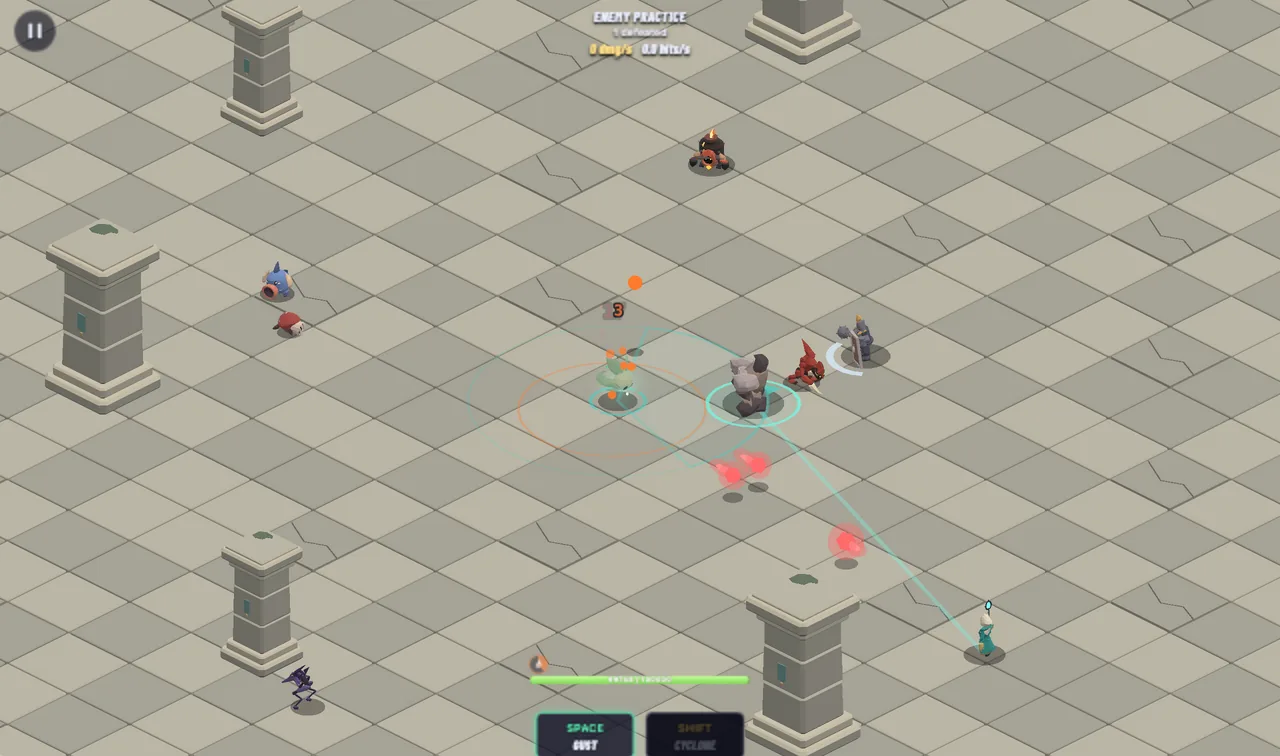
Below is the same rule on a real frame of Spirit Call. The spirit, every enemy and every bolt in flight are entities: pick components, and every entity that has all of them lights up. That is how a system finds what to run on.

Spirit Call's enemy practice on Oct 4: the wind spirit in the middle of a stone arena, surrounded by eight enemies, with three red enemy bolts flying toward it

Pick components to find the entities that have all of them

Spirit Call's enemy practice on Oct 4: one player, eight enemies and three enemy bolts, queried by component.

Automatic checks for agents

On top of that structure, you layer automatic checks. Each one takes a set of bugs off your mind:

  • Types: a wrong call doesn't compile, and the error tells the agent how to fix it. That's usually the first layer of checks
  • Headless tests and simulation: the game runs as numbers and text, no graphics. The agent can play thousands of frames and verify behavior without you
  • Lints: rules that catch the mistakes an agent keeps repeating. When the same thing breaks twice, ask for a lint
  • Every bug becomes a test: once fixed, it can't come back silently in the same form
  • Recorded playtests: the game records what happens while you play. Your session becomes data the agent can read
  • Debug sessions: the agent asks why a value changed and gets an answer, instead of guessing

The checks run between my prompt and my next playtest: the agent sees the failures, fixes them, and I never hear about most of them.

You can get creative with checks, depending on your game. In Spirit Call, I made the agent write a balance model to mathematically prove that clearing each main quest once pays for leveling a character up to the next one, without grinding.

Drag the sliders: cut the quest rewards or make level-ups pricier, and see which quest first needs replays to afford.

  • Gold you have
  • Gold to level a character up to the quest

None of these is mandatory. But the more of them you add (where they make sense for your game), the faster you iterate, and the more of your attention goes to taste instead of code and bugs.

You still need to know what each layer protects you from, even without knowing the implementation details. That's what lets you direct the agent when something keeps going wrong.

I created Ritmo for this exact purpose: a TypeScript ECS runtime I built in parallel with the two games, to collect all the checks in one place.

But the principles work with any engine.

  • Ritmotyped access · schedules · headlesslints · journals · math & input
  • agentcomponents · systems · contentchecked by Ritmo
  • youmechanics · feel · what is fun

Below is a real session: my prompt, the agent's thinking, and how Ritmo helped:

Upgrade inkline-town to Ritmo 0.9.0Opus 5.5 · Oct 18
  1. Upgrade the game inkline-town to Ritmo 0.9.0, adopt the new Ritmo oxlint plugin…

  2. Thinking

    Typecheck passes, so now I'll run the game-specific lint to catch things like .

  3. Ran pnpm lint:game

    warning relation-failure-never-read Town/WalkerOf: … so

    warning relation-failure-never-read Town/FieldOf: … so

    before the upgrade: 0 warnings

  4. Thinking

    If relate fails because the parent gets despawned in the same apply right after the child spawns,

  5. Thinking

    …a Hazards system could despawn a watch tile the same frame a Rescue walker relates to it… I think that reads relation failures…

  6. Created src/sim/orphans.ts, added DropOrphans to the schedule

  7. Ran pnpm lint:game

    0 warnings

  8. Ran pnpm test

    pass 138 · fail 0

  9. Thinking

The agent's session on Oct 18. Thinking, commands and output are verbatim; the lint is new in Ritmo 0.9.0, and the fix shipped as commit c801b02.

The first playable is fast, the game is not

With all of that in place, the first version of your game loop comes quickly. Days, sometimes hours. Then the real work starts.

Everything that comes later, an AI cannot do alone:

  • Is the game fun and balanced to play for longer sessions?
  • Is the style clear and visually appealing?
  • Would a player understand how to play?
  • Are the assets and animations satisfying?
  • Is the story appealing?

Three quarters of Inkline Town's commits came after the first two days, when the game was already playable.

How a game with agents gets made

The start was fast. I found a style reference on X, a short video, and asked the agent to recreate it, animations included: five minutes.

Then I asked the agent to turn it into a town simulation with a few basic buildings: working ten minutes later. The core of the game took about 20 minutes. Defining the buildings and a few mechanics came next. All of that fit in the first two days.

The screenshots from those days show it: a playable town within the first hour, and a real-looking one by the evening.

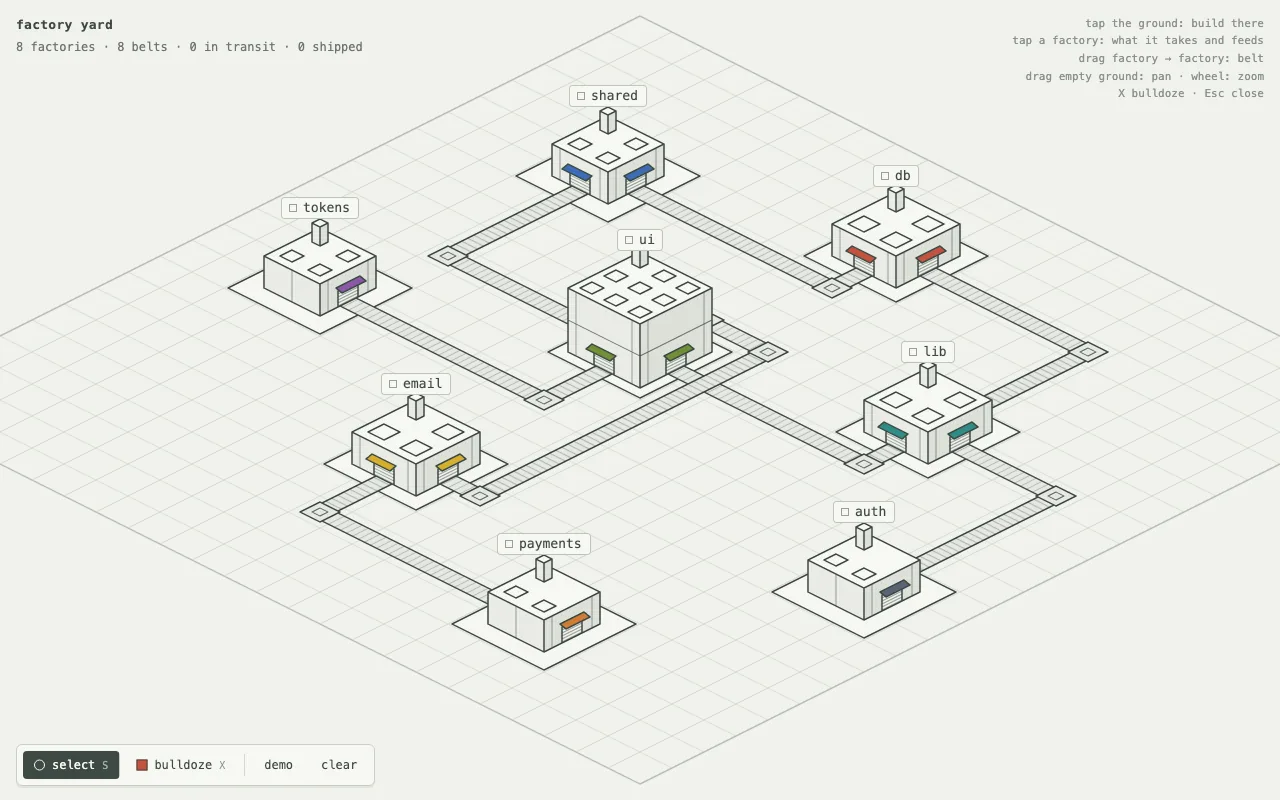
  • Inkline Town's first prototype: eight line-drawn factories on an isometric grid, linked by conveyor beltsOct 12, 12:17 · factory yard
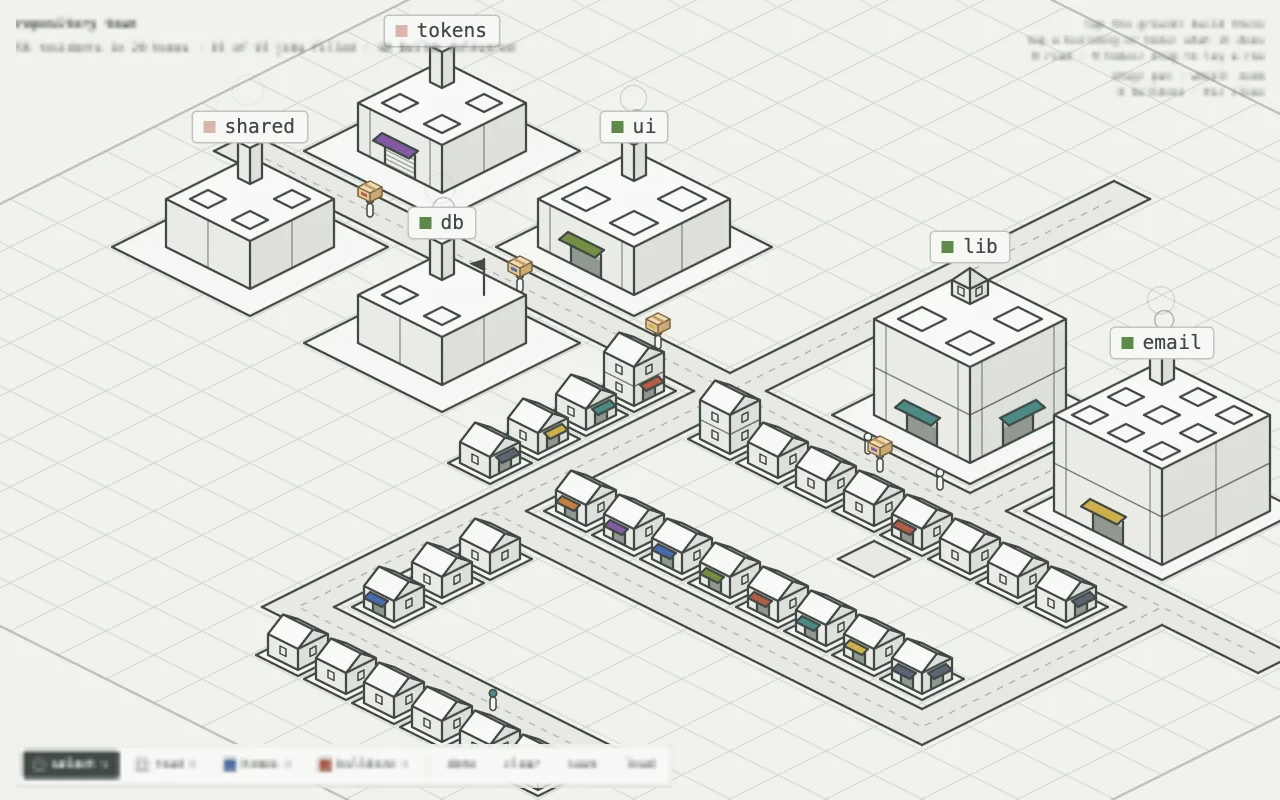
  • The first town simulation an hour later: rows of small houses along roads, carriers with crates, and the same factories as workplacesOct 12, 13:10 · the first town
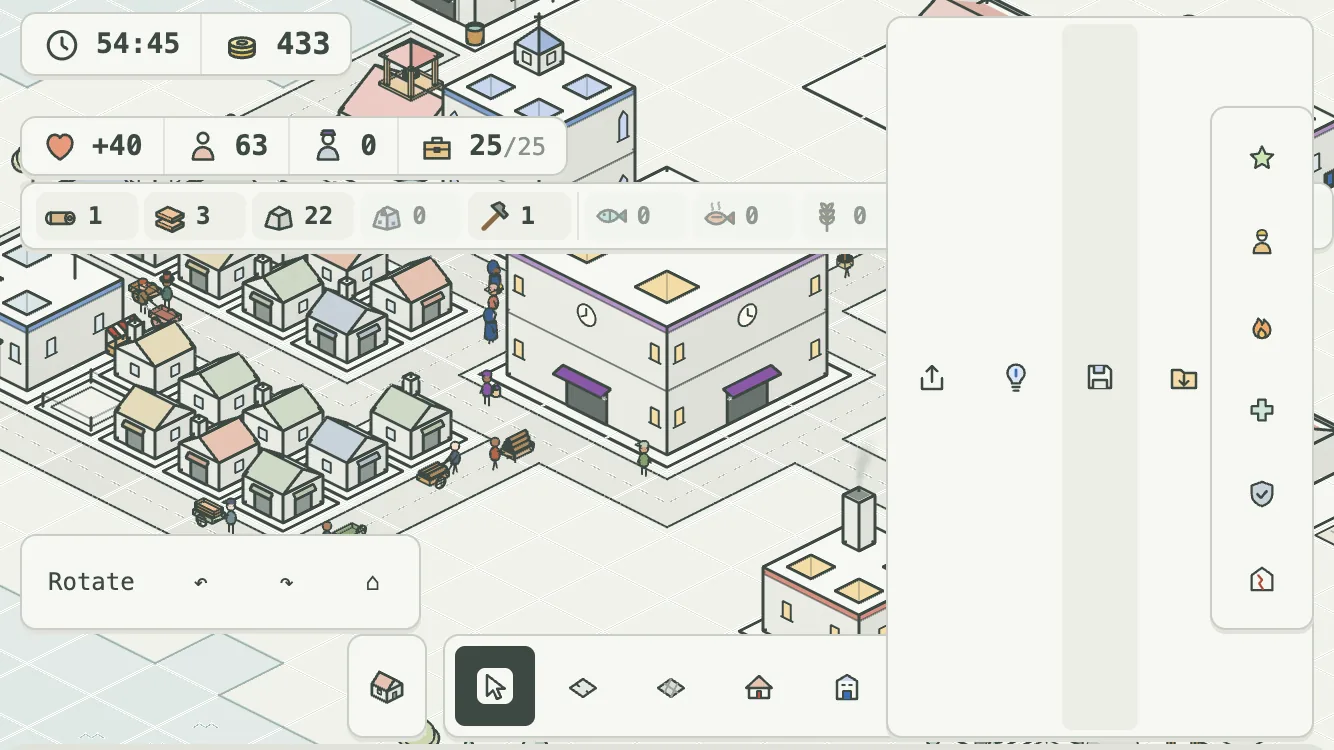
  • Inkline Town at the end of its first day: a dense town of colored houses, windmills and workshops around a town hall, with a resource bar on topOct 12, 20:37 · end of day one
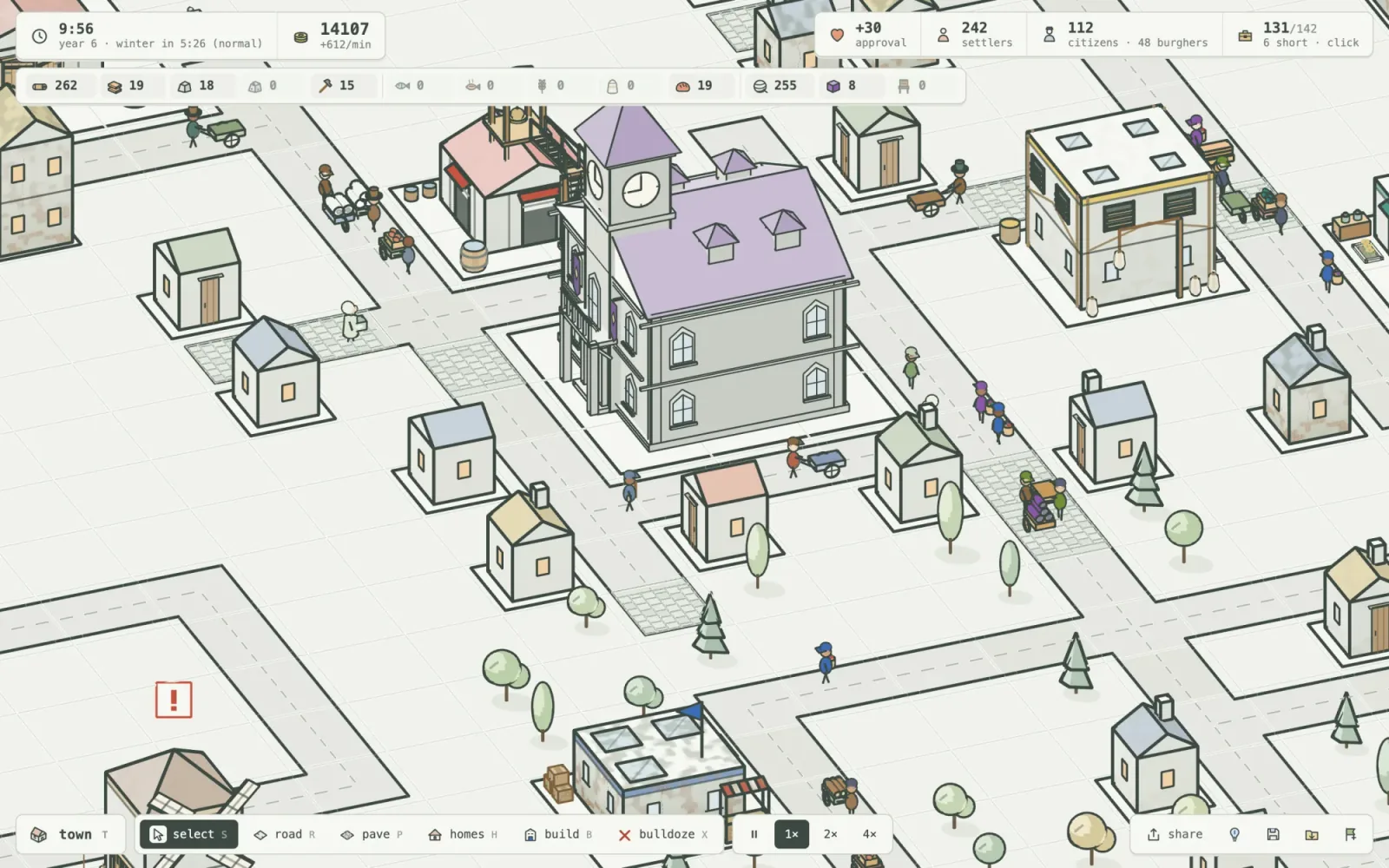
  • Inkline Town on day five: a clock-tower guildhall over paved streets, townhouses and trees, with citizens and burghers in the top barOct 16 · day five
Inkline Town on Oct 12, its first day, and on Oct 16.

Two days for something playable, then six more for content, fun and balance.

Just check Inkline Town's own commits. From day two on, most of them tune something after a play session instead of building something new: nearly two thirds of all game commits.

build something newtune it after playing63% of commits tune
    • 2999905Town simulation: roads, walkers, homes, production chains, taxes and trade
    • e560c3eThe charter: a term in office with land, pressure, and an end
    • 4ba881dA town that looks and works like a real one
    • 31c1b98Balance: higher taxes, lighter admin, one tool for the citizens' chain
    • 90aed9aTell the player why: causal panels, a clickable ticker, and rules that bite
    • 280cf1ePolish the page from a first playthrough: ticker, levers, overlays, icon
    • 5c19d4fStart with only the hall's ring road; every guide step says what closes it
    • 9331149Economy pushes back on sprawl: meals by resident, steeper administration, taxes that empty homes
    • e58424cFish opens the town but does not carry it
    • e7c7f1cRetune the numbers the ledger flagged
    • 8a2266dA market's walker brings home what it did not hand out, without losing it
    • 49f0c71Panels say how a building is, why, and what to do

The agent implements each of those changes in minutes. What takes time is figuring out what to implement: which mechanic is missing, why a system is boring, what a new player doesn't get.

Every round of that loop needs me: play, notice, decide, ask, play again.

Playtest as a player, report as a player

I never touched a number in Inkline Town. To this day, I don't know how they're computed or how they move: I only ever saw the game.

I play for around 45 minutes, as a player. Then I report what I see:

  • a strategy that dominates every other one
  • an exploit that breaks the economy
  • a moment where I didn't know what to do
  • a mechanic the game clearly needs and doesn't have

The problem of the fishery

Inkline Town's clearest case was food.

The town eats fish or bread. A fishery is one building; bread needs three buildings, all running. So I built fisheries, side by side on the same lake, and food stopped being a problem. Everyone was living on fish; bread had no reason to exist.

My bots had been playing the economy since the first day, and none of them noticed this bug.

An agent has no sense of balance: a strategy that makes the rest of the game pointless looks like any other strategy to it.

So I spoke the prompt below to the agent, as any human playtester would.

Prompt to the agent

I tested the game as a user and there are a few holes in the gameplay. Here is my winning strategy, see if you can find the holes in it.

I place about 10 homes, then , lumberjack, and stone.

While production keeps going, I buy some tools and start on bread and cloth.

As soon as I can, I upgrade the homes, and my money just keeps coming. Then it's just a matter of adding more homes, and I'm done.

This works all the time. Is there a hole that lets me exploit this and win every time?

agent, next commits
  1. +1 h 39358fcfdAdd an economy ledger and the rules it must keep, with the open holes as todos
  2. +2 h 18c7a81c31Homes pay to rise a tier, and administration is reckoned by the resident
  3. +2 h 24e58424c2Fish opens the town but does not carry it
  4. +2 h 30e7c7f1c34Retune the numbers the ledger flagged

The agent turns that into a fix, and then proves it, often with an automated economy simulation. And now that my playtests are recorded, it also has the exact numbers of the session I just played.

Checking the economy with math

For the fisheries, the fix started with a model, not a number.

I knew that if one hole like this had slipped through, there were others, and that an economy like this can be checked with math: an agent can write that check as a test.

So I asked for an economy model that weighs every number in the game against the others.

It confirmed the fishery, and showed it wasn't alone: twelve rules of the economy were broken. Finding the issues took most of the time; fixing them was fast and easy.

The problems that broke the economy never came back, because for each one we added the assumption behind it to the model. What still needed my playtests was the kind of choices I wanted the player to face.

Getting from the ledger to the fix took the agent under an hour. My part was the 45-minute match, the report, and knowing to ask for the model.

Inkline Town's economy ledger on Oct 15: the rules the game broke, at each commit from the one that wrote the ledger to the one where every rule held.

How to trust code you never read

Some of the agent's work takes hours. I don't watch it. I don't review it.

When it's done, the checks have already run. Types compile, tests pass, lints are clean, simulations hold. Implementation is verified before it reaches me, against what the checks encode.

you 0:00AI 0:00

round 1 of 3, on repeat

What the checks miss

Passing the checks doesn't mean the game is ready. What reaches me is what they miss: a side panel hiding a button, an unclear tutorial line, a mechanic that works exactly as specified but isn't fun.

Simple but glaring example: an empty side panel covering half the map. I sent the screenshot; half an hour and multiple iterations later, it was fixed.

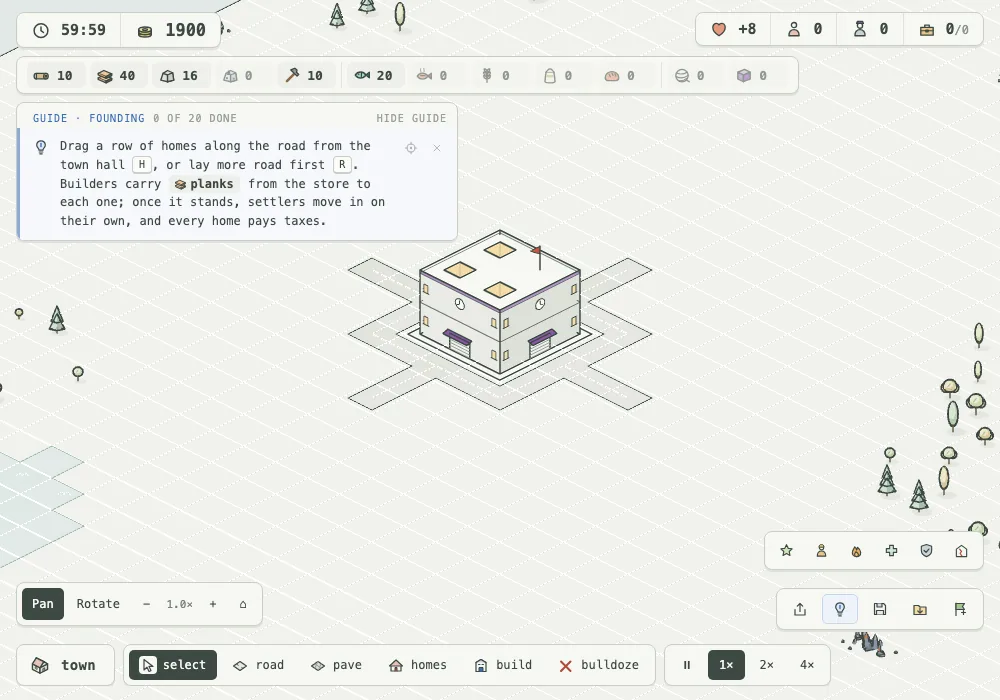
  • Inkline Town on a small screen: an empty side panel covers the right half of the map, with the share, save and load buttons stranded in its middleOct 14, 10:19 · what I saw
  • The same game after the fix: the map is clear, the buttons sit in two small bars at the bottom right, and the founding guide shows its first stepOct 14, 10:52 · after the fix
Inkline Town on a small screen, Oct 14, before and after the fix.

Then I open the game (never the code) and restart it from the very beginning to judge what no check measures: whether it's fun.

Since I never know what the agent changed, every time I open the game I meet it fresh, like a new player: I read the UI for the first time and follow the tutorial step by step.

My reports mention what felt off and why, never how to fix it. My sessions are recorded, so the agent can replay my actions, take its own screenshots, and see the issue.

Bots are not players

You can even create various bot profiles, each with different skills, as a check to balance the game:

  • skilled bot, dodges about 3× as well as a person
  • learning bot, takes many hits
  1. Swordsman46 / 29
  2. Gunner23 / 0
  3. Tidecaller46 / 8
  4. Stormcaller46 / 21
  5. Bastion47 / 34
Spirit Call's balance matrix on Oct 9: clears out of 48 runs (8 quests, 2 seeds, every aspect) for each character, by bot profile.

The bots show which quests can be cleared, and catch it when a change breaks one. They don't tell you how many players would clear them, or whether it's fun.

Know the tools underneath

The checks are only as good as the rules behind them. When one keeps failing, you need to tell whether the agent got it wrong or a rule is missing, and for that you need to know the tools underneath.

My trust came from the stack: my own engine plus Effect, which I know well enough to let the agent run.

If you're not into development or math, expect to hit a wall at some point.

Remember the fisheries: there, the wall was knowing to ask for a math model. Without that, you would be stuck in a much longer loop, fixing each case by hand from playtests.

Your contribution was never the code

If you have been building your game by hand for years, I know you are screaming: "But it stops being my game if I don't write any of it!"

It doesn't. Your contribution was never the code. It was the ideas, the feel, the hundreds of small decisions about what's fun. That is exactly the part AI can't do, and the part that now gets all your time.

If you enjoy writing every line, keep doing it. But if you want to make and sell games, building by hand means years on a game you're not sure will work, while an agent writes a full system in minutes, and the models keep getting better.

My prediction: on average, games made with an AI system will ship faster and sell better.

Not because AI makes better games, but because the time no longer spent on code goes into playtesting, fun, and the bugs only a human catches. If you keep writing code, you simply don't have enough resources for all of it.


If you want to make a game, here is the order:

  1. Pick your game and style with the bottleneck in mind: test early that the AI can produce what you need
  2. Build verification alongside the first playable: start with types, lints and tests for the core rules, whatever your engine. Add headless simulations and math models of your numbers as playtests show what needs protecting. Ritmo has them all built in, but it isn't required
  3. Verify that the core gameplay is fun, early: and expect most of the work to come after it
  4. Playtest as a player, report what's broken, let the agent fix and prove it: repeat. Ask for what the player would notice, never for code
  1. 1pick
  2. 2verify
  3. 3first loop
  4. 4playtest & fix, repeat

It's still hard. It's faster. And, if you ask me, way more fun than before.

Why more fun? Because my time goes to the part I care about. Since code doesn't matter much, the focus is all on gameplay and game feel. I am playing more instead of bothering with code details.

And the final game is still mine, something that no agent alone could make.

What changed

  1. Revised after reader feedback, with shorter sections.

    New: screenshots from development, an interactive Spirit Call frame, a real agent session, and a chart of bots playing the game.

    All of it comes from the games' repositories and the agents' own session logs.

Read the whole story
emrox
2 days ago
reply
Hamburg, Germany
Share this story
Delete

What's new in Node.js 27

1 Share

On October 29, 2026, the Node.js team published v27.0.0-alpha.0.0.0. If you have been using Node.js for a few years, that version string alone probably made you do a double take. Where is the usual October v27.0.0 Current release?

Node.js 27 is the first release to follow the new annual schedule. Under the old schedule, October brought a major release that reached end of life six months later without entering Long Term Support (LTS). October now starts a six-month Alpha phase, ahead of the 27.0.0 Current release in April 2027 and LTS promotion in October 2027.

In this first Alpha, V8 moves from 14.6 to 15.6, adding Iterator.zip(), Iterator.zipKeyed(), Iterator.prototype.join(), Iterator.prototype.includes(), and Math.sumPrecise(). There is a promises API for node:net, along with async-iterable TCP servers. The Virtual File System (node:vfs) is now unflagged, the Permission Model gains --allow-env, and HTTP and memory defaults change too.

We’ll start with the JavaScript and Node.js APIs you can use in everyday code, comparing them with the older approaches. Then we’ll cover runtime changes and what to check before upgrading.

Quick Answer: what’s new in Node.js 27

The main additions in Node.js 27 so far:

  1. New Iterator helpers (zip, zipKeyed, join, includes) pair sequences, join their values into strings, and search them without collecting intermediate arrays.
  2. Math.sumPrecise() sums an iterable of numbers without rounding each intermediate addition.
  3. node:net/promises and async-iterable net.Server let you use async/await to set up TCP servers and sockets.
  4. Virtual File System (node:vfs) is unflagged, making in-memory file systems and --vfs-load available without --experimental-vfs.
  5. Core upgrades across fs, permissions, test runner, and http, including atomic temp files with fs.mkstemp(), --allow-env, Jest-style mock helpers, and a 65-second HTTP keepAliveTimeout.
  6. V8 15.6 and OpenSSL 4.1 update sorting and cryptography, and the default heap limit rises to 4 GB on an 8 GB machine.

For example, we can format a list of products and total their prices:

const items = ['Keyboard', 'Mouse', 'Monitor']

const prices = [129.99, 49.99, 349.95]

const lines = Iterator.zipKeyed({ item: items, price: prices })

.map(({ item, price }) => `${item} ($${price.toFixed(2)})`)

.join(', ')

console.log(`${lines} -> Total: $${Math.sumPrecise(prices)}`)

// Keyboard ($129.99), Mouse ($49.99), Monitor ($349.95) -> Total: $529.93

If you want to experiment locally, check your current Node.js version before running the snippets below.

New Iterator superpower: zip, zipKeyed, join, and includes

This is the part of the release I’m most excited about. I love seeing how far we can push streams, iterators, and generators. Our article on JavaScript async iterators should give you an idea of what I mean.

In What’s new in Node.js 26, we used Iterator.concat() to consume multiple iterables one after another. Node.js 27, through V8 15.6, lets us consume them side by side, pairing values at the same position.

Pairing sequences lazily with Iterator.zip()

Suppose you are checking a weather forecast against the temperatures recorded over the same four days. The predictions come from your model, while the actual values come from observations. To calculate each day’s error, you need to pair the values at the same position. Both sequences must cover the same days in the same order.

In Node.js 26 and earlier, if both sequences were arrays, you would typically use .map() with an index lookup:

// Node.js 26 and earlier

const predicted = [18, 21, 20, 23]

const actual = [19, 20, 22, 21]

const errors = predicted.map((prediction, i) => actual[i] - prediction)

console.log(errors) // [1, -1, 2, -2]

That works well for arrays. But what if observations come from a generator, or your model returns an iterator of predictions? Index lookups won’t work on those inputs, and converting them to arrays means loading both sequences into memory first.

In Node.js 27, Iterator.zip() takes an iterable of iterables and returns a lazy iterator of pairs. We can calculate the errors with the same pipeline whether the inputs are arrays or iterators:

const predicted = [18, 21, 20, 23]

const actual = [19, 20, 22, 21]

const errors = Iterator.zip([predicted, actual])

.map(([prediction, observation]) => observation - prediction)

.toArray()

console.log(errors) // [1, -1, 2, -2]

Each pair contains a prediction and its corresponding observation. A positive error means the day was warmer than predicted; a negative error means it was cooler. The pairing and mapping happen one item at a time. Only the final .toArray() collects the errors into an array so we can print them together.

Another common use is the dot product of two vectors: multiply matching components, then add the products. This operation appears in graphics, machine learning, and numerical computing:

const a = [1, 2, 3]

const b = [4, 5, 6]

const dotProduct = Iterator.zip([a, b], { mode: 'strict' })

.map(([x, y]) => x * y)

.reduce((sum, product) => sum + product, 0)

console.log(dotProduct) // 32 (1 * 4 + 2 * 5 + 3 * 6)

Here we never collect the pairs or products into an intermediate array. We also use mode: 'strict' because a dot product requires vectors of equal length: silently ignoring extra components would hide an input error.

Combining endless iterators: solar generation and household consumption

So far, our inputs have been arrays. But Iterator.zip() also works with iterators that have no end. Imagine a home with two power meters: one measures solar generation, and the other measures household consumption. Each meter gives us its current reading in watts whenever we poll it. Subtracting consumption from generation tells us whether the house has surplus power to export or needs to import power from the grid (assuming there is no battery).

We can wrap each meter in an endless generator. Here we simulate the readings with random values so the example runs without hardware:

function* powerReadings(readWatts) {

while (true) {

yield readWatts()

}

}

// Simulated meters: each call produces a fresh reading in watts.

const solar = powerReadings(() => Math.round(Math.random() * 4000))

const household = powerReadings(() => Math.round(Math.random() * 3000))

const netPower = Iterator.zip([solar, household]).map(

([generation, consumption]) => generation - consumption,

)

for (const watts of netPower.take(5)) {

if (watts > 0) {

console.log(`Exporting ${watts} W`)

} else if (watts < 0) {

console.log(`Importing ${-watts} W`)

} else {

console.log('Generation matches consumption')

}

}

Neither generator reads anything until we request a value from netPower. Each request polls both meters once and calculates the difference. Both input iterators can keep producing readings forever, but .take(5) limits this demo to five pairs. Collecting either input with [...solar] or .toArray() would never finish and would eventually exhaust memory.

These are synchronous, on-demand readings: the two meters are polled sequentially, close together, rather than at exactly the same instant. The loop takes five readings immediately; zip() does not add a polling interval. With real hardware, the callbacks would read the meters instead of generating random numbers.

Turning columns into objects with Iterator.zipKeyed()

Tuple arrays like [prediction, observation] are easy to read for two or three items, but once you have four or five parallel sources, positional destructuring gets easy to mix up.

Iterator.zipKeyed() accepts an object whose values are iterables. Each step yields an object with the same keys, so you can refer to values by name instead of position:

const columns = {

id: [101, 102, 103],

user: ['alice', 'bob', 'charlie'],

role: ['admin', 'editor', 'viewer'],

}

const rows = Iterator.zipKeyed(columns)

for (const row of rows) {

console.log(`${row.user} (#${row.id}) has role: ${row.role}`)

}

// alice (#101) has role: admin

// bob (#102) has role: editor

// charlie (#103) has role: viewer

If an API returns each field as a separate array, like user IDs, names, and roles, Iterator.zipKeyed() lets you process them together as a lazy sequence of row objects. The arrays must describe the same records in the same order.

Finishing pipelines with Iterator.prototype.join() and includes()

In Node.js 26, a common way to format a lazy iterator pipeline as a string was to call .toArray().join(', ') at the end. The final .toArray() allocated an array of strings that .join() consumed and discarded.

V8 15.6 adds two terminal helpers directly onto Iterator.prototype:

  • Iterator.prototype.join(separator): consumes the iterator and joins items into a string directly.
  • Iterator.prototype.includes(value): consumes the iterator until it finds a matching value (using SameValueZero equality, just like Array.prototype.includes()) and short-circuits immediately.

For join(), let’s return to our sensor readings. This time we only need one temperature sensor, and we want to format five readings as a comma-separated string. As before, we simulate the hardware so you can run the example locally:

function* temperatureReadings() {

while (true) {

yield 18 + Math.random() * 6

}

}

const readings = temperatureReadings()

.take(5)

.map((temperature) => `${temperature.toFixed(1)}°C`)

.join(', ')

console.log(readings)

// For example: 21.3°C, 19.8°C, 23.1°C, 20.0°C, 22.4°C

.take(5) makes the endless source finite, .map() formats each reading, and .join() builds the string without collecting an intermediate array. These five readings are taken immediately, with no delay between them. Without .take(5), joining this endless iterator would never finish.

For includes(), imagine checking whether a commit message references a particular issue. String.prototype.matchAll() already returns an iterator, so we can extract the complete references and search them directly:

const message = 'Fixes APP-142. Follow-up work tracked in APP-208.'

const references = message.matchAll(/\bAPP-\d+\b/g).map((match) => match[0])

console.log(references.includes('APP-142')) // true

includes() stops as soon as it finds APP-142, without extracting the later reference. Matching complete references also avoids the false positive you would get from message.includes('APP-14'), which matches part of APP-142. The search consumes the iterator, so create a fresh one for another search.

More accurate sums with Math.sumPrecise()

Beyond iterator helpers, V8 15.6 also brings a useful addition for numerical calculations: Math.sumPrecise(). To see why it matters, let’s look at a familiar floating-point surprise.

// Node.js 26 and earlier - floating-point drift in action

const cartPrices = [129.99, 49.99, 349.95]

const naiveTotal = cartPrices.reduce((sum, price) => sum + price, 0)

console.log(naiveTotal)

// 529.9300000000001 (!)

// Even worse: catastrophic cancellation when large and small numbers mix

const ledger = [1e20, 0.1, -1e20]

console.log(ledger.reduce((sum, n) => sum + n, 0))

// 0 (the 0.1 completely vanished!)

When you sum numbers with .reduce((a, b) => a + b, 0), each addition rounds its intermediate result to the nearest representable 64-bit float. Over dozens or thousands of additions, those tiny rounding errors accumulate. Worse, if you add a small number (0.1) to a huge number (1e20) and later add -1e20, the 0.1 is lost completely during the first addition because a 64-bit float doesn’t have enough mantissa bits to hold both magnitudes at once.

In Node.js 27, V8 15.6 enables Math.sumPrecise() by default. It accepts any iterable of numbers, computes the sum using an internal high-precision accumulator, and rounds only once at the very end:

const cartPrices = [129.99, 49.99, 349.95]

console.log(Math.sumPrecise(cartPrices))

// 529.93

const ledger = [1e20, 0.1, -1e20]

console.log(Math.sumPrecise(ledger))

// 0.1 (no precision lost!)

Math.sumPrecise() accepts any iterable, so it also works with the iterators from the previous section. You can pass the result of .map() directly into Math.sumPrecise() without calling .toArray() first:

const orderLines = [

{ item: 'USB-C Hub', qty: 2, unitPrice: 39.99 },

{ item: 'Mouse', qty: 1, unitPrice: 49.99 },

{ item: 'Monitor', qty: 1, unitPrice: 249.95 },

]

const total = Math.sumPrecise(

orderLines.values().map((line) => line.qty * line.unitPrice),

)

console.log(`Order total: $${total}`) // Order total: $379.92

node:net/promises and async-iterable TCP servers

The core node:net module gets iterator support too.

For years, node:fs, node:dns, node:stream, node:timers, and node:readline have all had .promises sub-modules. Yet node:net remained purely callback- and event-driven. If you wanted to spin up a TCP server on an ephemeral port in a test or connect a client socket using async/await, you had to wrap 'listening', 'connect', and 'error' events by hand.

In Node.js 26 and earlier, setting up a TCP server and client with async/await looked like this:

// Node.js 26 and earlier - manual event-to-promise wiring

import { createServer, createConnection } from 'node:net'

import { once } from 'node:events'

const server = createServer((socket) => {

socket.end('Hello from TCP server\n')

})

server.listen(0, '127.0.0.1')

await once(server, 'listening')

const { port } = server.address()

const client = createConnection({ port, host: '127.0.0.1' })

await once(client, 'connect')

for await (const chunk of client) {

console.log('Received:', chunk.toString().trim())

}

server.close()

Node.js 27 introduces the experimental node:net/promises module with two helpers, listen() and connect(), and makes net.Server itself an async iterable.

Let’s try something fun and build a small TCP chat server. Each connected client can send a line of text, and the server forwards it to every other client, prefixed with the sender’s connection ID:

import { listen } from 'node:net/promises'

import { createInterface } from 'node:readline'

const ac = new AbortController()

const server = await listen({

port: 8124,

host: '127.0.0.1',

signal: ac.signal,

})

server.maxConnections = 10

const clients = new Map()

async function handleConnection(socket) {

const clientId = `${socket.remoteAddress}:${socket.remotePort}`

const lines = createInterface({ input: socket, crlfDelay: Infinity })

clients.set(clientId, socket)

// Close the line iterator even if the connection ends abruptly.

socket.once('close', () => lines.close())

socket.on('error', (error) => {

console.error(`${clientId}:`, error.message)

lines.close()

})

socket.write(`Connected as ${clientId}\n`)

console.log(`${clientId} joined`)

try {

for await (const message of lines) {

for (const [otherId, otherSocket] of clients) {

if (otherId !== clientId && !otherSocket.destroyed) {

otherSocket.write(`${clientId} > ${message}\n`)

}

}

}

} finally {

clients.delete(clientId)

lines.close()

socket.destroy()

console.log(`${clientId} left`)

}

}

process.once('SIGINT', () => {

ac.abort()

for (const socket of clients.values()) socket.destroy()

})

console.log('Chat listening on 127.0.0.1:8124. Press Ctrl+C to stop.')

for await (const socket of server) {

// Each handler stays active for the lifetime of its connection.

void handleConnection(socket).catch((error) => {

console.error('Connection handler failed:', error)

socket.destroy()

})

}

Run the server from the companion repo:

node 03-net-promises/net-promises.js

Then open two or three other terminals and run this command in each (with netcat installed):

Each terminal receives its connection ID, for example Connected as 127.0.0.1:54321. Type a message and press Enter. The other terminals receive a line such as 127.0.0.1:54321 > Hello everyone!. The server does not echo messages back to their sender. Press Ctrl+C in a client terminal to disconnect, or in the server terminal to close the chat and all active connections.

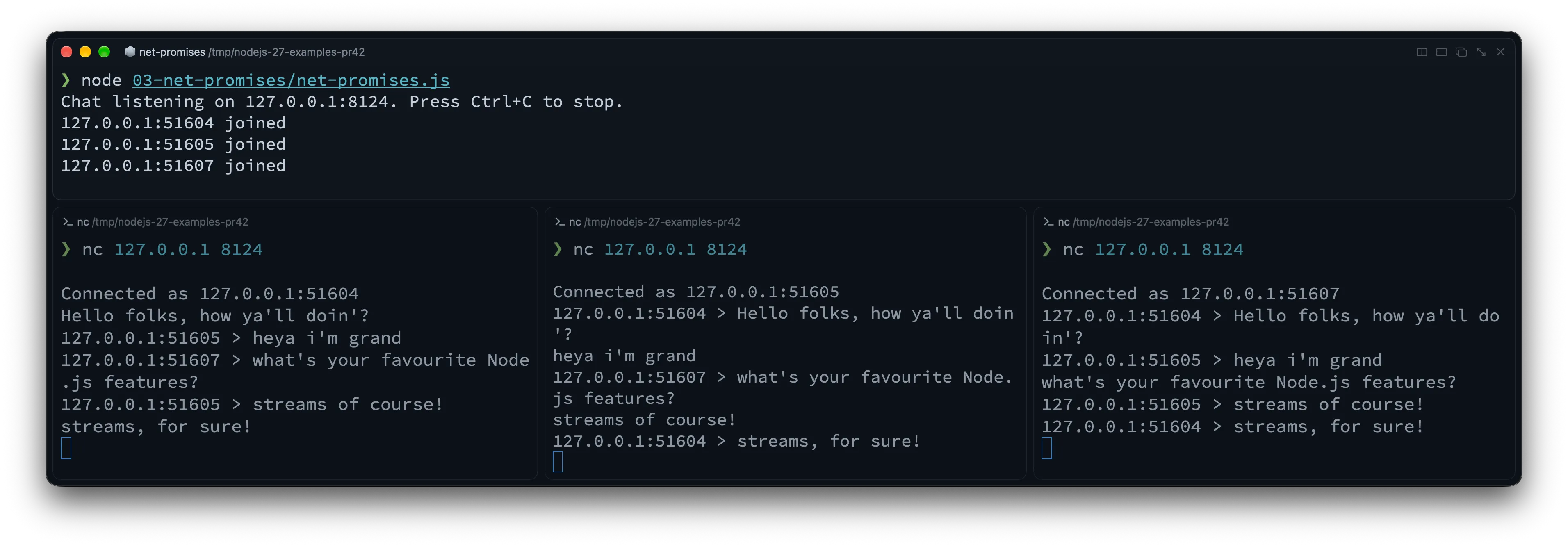
With three netcat clients connected, each terminal receives the other clients’ messages:

A TCP chat server above three netcat clients exchanging messages, with each received message prefixed by the sender's address and port

listen() resolves once the server is listening. The clients map tracks active sockets by their remote address and port, which distinguish connections to this server. These are connection labels, not permanent user identities: reconnecting can give a client a different port.

Inside each handler, readline turns the socket’s byte stream into lines. TCP chunks do not correspond to messages: a line may arrive in several chunks, or one chunk may contain several lines. Each completed line is broadcast to every other active socket. The finally block removes disconnected clients and closes their resources.

The outer connection loop starts each handleConnection(socket) call without awaiting it. That lets it accept the next client while earlier handlers wait for messages. Each handler still awaits its own incoming lines, so clients can remain connected and chat concurrently. The .catch() handles rejected handler promises; socket errors are handled separately, and server.maxConnections = 10 caps open connections for this demo.

Virtual File System (node:vfs) is now unflagged

Testing code that reads configuration files often means mocking node:fs or creating temporary directories and cleaning them up afterward. Bundling assets or templates into an archive poses a related problem: how can your application read them through its usual node:fs calls?

The new node:vfs (Virtual File System) module was originally introduced behind --experimental-vfs, and in Node.js 27 it is unflagged and available out of the box (though still marked Experimental Stability 1 while the API settles).

With node:vfs, you can create an isolated, in-memory file system with vfs.create(), populate it using standard fs-style methods, and mount it so regular node:fs operations (and import / require()) can read from it directly. VirtualFileSystem also supports Explicit Resource Management (using), which unmounts it when execution leaves the block:

import { readFile } from 'node:fs/promises'

import { join } from 'node:path'

import vfs from 'node:vfs'

async function loadAppConfig(configDir) {

const raw = await readFile(join(configDir, 'app.json'), 'utf8')

return JSON.parse(raw)

}

// Create an in-memory VFS that automatically unmounts at the end of the block

{

using memoryFs = vfs.create()

memoryFs.mkdirSync('/etc/myapp', { recursive: true })

memoryFs.writeFileSync(

'/etc/myapp/app.json',

JSON.stringify({ env: 'test', featureFlags: ['vfs'] }),

)

// Mount into Node's reserved virtual namespace (e.g. /dev/null/vfs/1)

const mountPoint = memoryFs.mount()

// Regular node:fs functions can now read from the mounted path!

const config = await loadAppConfig(join(mountPoint, 'etc/myapp'))

console.log('Loaded from VFS:', config)

}

// memoryFs is automatically unmounted here!

memoryFs.mount() mounts the virtual file system under a reserved namespace (path.join(os.devNull, 'vfs'), such as /dev/null/vfs/1 on POSIX), so a virtual mount can never accidentally shadow or overwrite real files on your disk. If you want to compare this with working on real files, check out our guide on reading and writing files in Node.js.

You can also use node:vfs through --vfs-load on the CLI without an experimental flag:

node --vfs-load=04-vfs/bundle

# Hello from the VFS bundle

That command mounts the companion repo’s 04-vfs/bundle directory and runs its index.js, which prints Hello from the VFS bundle. You can also pass a ZIP archive; Node.js runs its package.json "main" or index.js entry point from the mounted archive. And if you use Single Executable Applications (SEA), vfsArchive is now mounted at layer 0 and automatically available inside Worker threads too.

More Node.js Core upgrades: fs, Permissions, Test Runner, and HTTP

There are changes across the standard library too, from temporary files to HTTP server defaults.

Atomic temporary files with fs.mkstemp() and native fs.glob()

Until now, if you needed a temporary file in Node.js, your safest built-in option was fs.mkdtemp() to create a temporary directory, and then opening a file inside it. Creating a random filename yourself and calling fs.open() was error-prone and required a retry loop in case of collisions.

Node.js 27 adds APIs modeled on POSIX mkstemp(3): fs.mkstemp(), fs.mkstempSync(), and fsPromises.mkstemp(). It atomically generates a unique filename (appending six random characters to your prefix) and opens the file in a single step, returning both the path and the open FileHandle (or file descriptor fd):

import { mkstemp, rm } from 'node:fs/promises'

import { tmpdir } from 'node:os'

import { join } from 'node:path'

const prefix = join(tmpdir(), 'export-')

const { path, handle } = await mkstemp(prefix)

try {

await handle.writeFile('id,status\n1,ok\n', 'utf8')

console.log(`Wrote temporary report to ${path}`)

} finally {

await handle.close()

await rm(path)

}

The built-in fs.glob() (introduced in Node.js 22) was ported from JavaScript to native C++ in Node.js 27. The maintainers’ benchmarks show substantial speedups for some workloads, but gains vary by API and options, and one synchronous exclude-pattern workload regressed. Benchmark your own patterns before assuming a speedup.

Permission Model gets --allow-env

As we covered in our guide to environment variables in Node.js, process.env is where most applications keep their most sensitive secrets (API keys, database URLs, signing tokens). It is also the very first place a compromised dependency looks when trying to exfiltrate credentials.

Node.js 27 adds --allow-env to the Permission Model (--permission). When --permission is enabled, every environment variable not explicitly matched by --allow-env is scrubbed at process startup before any JavaScript runs (except runtime variables like PATH, HOME, LANG, and NODE_OPTIONS, plus variables explicitly loaded via --env-file):

# Only allow variables starting with PUBLIC_ or APP_

SECRET_KEY=super-secret APP_PORT=3000 \

node --permission --allow-env='PUBLIC_*,APP_*' 05-core-upgrades/permissions-env.js

# { port: '3000', secret: undefined }

Node.js also scrubs disallowed variables from the underlying OS environment block and restricts access to /proc/self/environ on Linux. Native code loaded by Node.js sees the reduced environment too. This reduces accidental exposure; the Permission Model is not a sandbox for malicious code. You can remove a variable after reading it with process.permission.drop('env', 'VARIABLE_NAME'). Keep NODE_ENV explicitly if your application uses it, since it is not preserved by default.

Built-in Test Runner: stable watch mode and Jest-style mock helpers

The built-in node:test runner has three updates:

  • Watch mode (node --test --watch) is now officially stable (Stability 2).
  • --test-forbid-only fails the test run if any test is marked with { only: true } or test.only(), so CI can catch accidental .only commits.
  • Shorthand methods on mocks: instead of wrapping simple return values or promises inside fn.mock.mockImplementation(() => ...), MockFunctionContext now has mockReturnValue(), mockResolvedValue(), mockRejectedValue(), and mockThrownValue():

import { test, mock } from 'node:test'

import assert from 'node:assert/strict'

test('mock shorthand helpers in Node.js 27', async () => {

const getDiscount = mock.fn()

getDiscount.mock.mockReturnValue(0.15)

assert.strictEqual(getDiscount(), 0.15)

const fetchUser = mock.fn()

fetchUser.mock.mockResolvedValue({ id: 42, name: 'Luciano' })

assert.deepStrictEqual(await fetchUser(), { id: 42, name: 'Luciano' })

const failSync = mock.fn()

failSync.mock.mockThrownValue(new Error('Invalid token'))

assert.throws(() => failSync(), /Invalid token/)

})

Smarter HTTP & HTTP/2 defaults

These three HTTP changes affect production web servers:

  1. http.Server keepAliveTimeout increased from 5 seconds to 65 seconds: Running a Node.js HTTP server behind an AWS Application Load Balancer (ALB), Nginx, or Cloudflare can produce intermittent 502 Bad Gateway errors when the proxy keeps an upstream connection available longer than Node.js keeps it open. AWS ALB, for example, defaults to a 60-second idle timeout, while Node.js historically set keepAliveTimeout to 5 seconds (5000 ms). If Node.js closes an idle socket just as the proxy reuses it, the forwarded request can fail with a 502. The actual socket timeout also includes keepAliveTimeoutBuffer (1 second by default). The new default keepAliveTimeout of 65 seconds (65000 ms) exceeds a 60-second proxy timeout. Check your proxy’s actual idle timeout and configure Node’s timeout to exceed it; 65 seconds does not cover every proxy configuration.
  2. req.headers and req.trailers now have a null prototype: The header dictionaries on incoming requests no longer inherit from Object.prototype (Object.getPrototypeOf(req.headers) === null), matching the existing behavior of req.headersDistinct and req.trailersDistinct. Only these header objects lose their prototype: req itself is still a regular IncomingMessage. We explain the reasoning just below, and the breaking changes section shows what to do if your code calls req.headers.hasOwnProperty(...).
  3. Larger HTTP/2 window sizes: node:http2 increased its default flow-control window sizes and trimmed per-request callback overhead, improving throughput on high-bandwidth HTTP/2 connections without manual tuning.

If you are curious why this change was made: it seems a bit weird on the surface, right? Why would Node.js remove the prototype from an otherwise ordinary object?

req.headers is a dictionary: the keys are header names chosen by whoever sent the request, and the values are whatever they sent. An ordinary JavaScript object is a poor fit for that kind of data, because it inherits properties from Object.prototype that have nothing to do with what you stored in it:

const ordinary = {}

console.log(ordinary.constructor === Object) // true

console.log(ordinary['__proto__'] === Object.prototype) // true

const headers = { __proto__: null }

console.log(headers.constructor) // undefined

console.log(headers['__proto__']) // undefined

headers['__proto__'] = 'some header value'

console.log(headers['__proto__']) // 'some header value'

console.log(Object.getPrototypeOf(headers)) // null

Our empty ordinary object already “has” a constructor, inherited from its prototype. __proto__ is even more surprising: Object.prototype defines an accessor with that name, so reading it returns the prototype, and assigning to it tries to change the prototype instead of storing a value. Both names are already lowercase, which matters here because Node.js lowercases incoming header names. A client can send a constructor or __proto__ header, and it arrives under exactly that key.

Notice that the example uses __proto__ in two different ways. { __proto__: null } is special object-literal syntax that creates the object with no prototype at all (Object.create(null) does the same thing, and the new Node.js code uses the literal form). The later headers['__proto__'] = ... is an ordinary assignment: with no inherited __proto__ setter to intercept it, it simply stores an own property, like any other key.

That’s the motivation in PR #62900, by Matteo Collina. Besides consistency with the *Distinct APIs, its commit message says the change “Fixes prototype pollution concerns where headers like __proto__ could be interpreted as prototype manipulation.” My reading is that the goal is clean dictionary semantics: a key exists in req.headers only if the request sent it.

The March 2026 security releases already included a real bug of this kind. CVE-2026-21710 was a denial-of-service flaw in req.headersDistinct, and it went like this:

  1. A request arrives with a header named __proto__.
  2. The application accesses req.headersDistinct.
  3. While building the dictionary, the lookup dest['__proto__'] resolves to the inherited Object.prototype instead of undefined.
  4. The accumulation logic calls .push() on that value, which isn’t an array.
  5. The resulting TypeError can crash the process if nothing catches it.

Because the exception is thrown synchronously inside a property getter, an 'error' event listener can’t catch it. The fix initialized the headersDistinct and trailersDistinct objects with { __proto__: null }, which is the behavior PR #62900 later extended to headers and trailers. The advisory covers headersDistinct only, so it doesn’t mean req.headers had the same crash. The bug also stopped at crashing the process: a header couldn’t use it to modify Object.prototype globally. And a null-prototype object removes inherited-property hazards only where the headers are created. If you merge headers into an ordinary object, that target still has the inherited __proto__ accessor.

Under the hood: V8 15.6, the 4 GB Heap Default, and OpenSSL 4.1

Node.js 27 also updates its engine and bundled dependencies. Most of the V8 details below come from Joyee Cheung’s Notable V8 changes from Node.js 26 to 27 (Alpha) on the Node.js blog, which is worth reading in full if you maintain performance-sensitive code or native tooling:

  • Default Heap Limit up to 4 GB on mid-sized machines: When --max-old-space-size is not specified, V8 now sets the default old-generation heap limit to half of physical memory (or container cgroup memory), clamped between 256 MB and 4 GB. Previously, machines with less than 15 GB of RAM were capped at 2 GB. On an 8 GB container or VM, the default old-generation limit therefore rises from 2 GB to 4 GB (and on a 6 GB machine, from 2 GB to 3 GB). These are old-generation limits, not limits on the process’s total memory use.

  • Buffer and ArrayBuffer memory affects garbage collection scheduling: Memory held by Buffer and ArrayBuffer instances is now included in V8’s global allocation limit. If your app allocates large off-heap buffers (for example, image processing or large file buffers), this affects when garbage collection is scheduled. The global allocation limit is distinct from the old-generation heap limit and does not impose a hard cap on the process’s total memory.

  • Slightly more memory per worker and per native object: Each V8 isolate (the main thread and every worker thread) uses about 180 KB more for property lookup caches, and every JavaScript object that wraps a native resource (a socket, file handle, stream, hash, or blob) may use about 16 bytes more on the heap and about 50 bytes more outside it. That’s negligible for most apps, but it adds up if you spawn many workers or hold many open sockets.

  • Fewer hard crashes on fatal errors: More fatal V8 errors now go through Node.js’s fatal error handling before aborting, so --report-on-fatalerror can produce a diagnostic report in cases that previously aborted without one. Some extreme inputs (overly long template literals, classes with too many elements, a regexp too large to compile) now throw a RangeError instead of crashing the process. The V8 post is explicit that this isn’t guaranteed, so don’t build program logic around it.

  • V8 15.6 performance improvements:

    • Array.prototype.sort() now uses PowerSort instead of TimSort for large arrays (still stable, with better performance on tricky input distributions).
    • await on an already-fulfilled Promise is faster and allocates less, and async generators are around 6% faster on the async-fs JetStream3 benchmark.
    • Reading properties from objects with many (or deleted) properties is about 10% faster on JetStream3’s richards and about 20% faster on espree-wtb.
    • JSON.parse() is faster on some inputs, such as payloads with many strings or arrays of objects that share the same shape.
    • Worst-case garbage collection pauses dropped from about 45 ms to about 10 ms in V8’s benchmarks.
    • Regexps are now compiled to machine code the first time they run instead of after a warmup. Regexps that run many times can get faster, while one-off regexps may get slower because they pay the compilation cost up front.

    These numbers come from V8’s own benchmarks, and the impact varies with platform, workload, and build configuration. Measure your application before counting on a speedup.

    • Intl.Locale.prototype.variants is now available to inspect locale variants (for example, new Intl.Locale('sl-rozaj-biske').variants returns 'biske-rozaj').
  • OpenSSL 4.1.0, Undici 8.12, SQLite 3.54, and npm 12.1.0: Node.js 27 upgrades its bundled cryptography to OpenSSL 4.1.0, strips out all legacy OpenSSL 1.x compatibility shims and engine APIs, bumps npm to 12.1.0, and updates NODE_MODULE_VERSION to 153.

Heads-up: Node.js 27 breaking changes

The Alpha window gives you time to check for breaking changes before the stable release. Most applications won’t encounter all of these, but check your code and dependencies for the following changes.

As we saw in the HTTP section, the header dictionaries no longer have a prototype. Normal property access (req.headers['content-type']), destructuring, and Object.keys() work as before. What breaks is calling methods inherited from Object.prototype: req.headers.hasOwnProperty('authorization') now throws a TypeError (and calling a method looked up on a dictionary of external data was never a good idea anyway).

Replace it with Object.hasOwn(req.headers, 'authorization'), which doesn’t rely on the object’s prototype and works on both Node.js 26 and 27. Please don’t “fix” this by restoring Object.prototype on the headers object. The in operator still works on null-prototype objects, but the updated Node.js docs advise against using it here, and Object.hasOwn() expresses the own-property check you actually mean.

This runnable example shows both the failure and the fix. Keep in mind that checking for a header’s presence does not authenticate its value:

import { createServer } from 'node:http'

import { once } from 'node:events'

import assert from 'node:assert/strict'

const server = createServer((req, res) => {

assert.strictEqual(Object.getPrototypeOf(req.headers), null)

assert.throws(() => req.headers.hasOwnProperty('authorization'), TypeError)

// Check for the header without relying on Object.prototype.

const hasAuthorization = Object.hasOwn(req.headers, 'authorization')

res.end(

hasAuthorization

? 'Authorization header present'

: 'No authorization header',

)

})

server.listen(0, '127.0.0.1')

await once(server, 'listening')

try {

const { port } = server.address()

const response = await fetch(`<a href="http://127.0.0.1:" rel="nofollow">http://127.0.0.1:</a>${port}`, {

headers: { authorization: 'Bearer example' },

})

console.log(await response.text()) // Authorization header present

} finally {

server.close()

}

2. Memory limits for multi-process deployments

If you run multiple Node.js processes on a 6 GB or 8 GB machine and relied on the old implicit 2 GB heap cap to keep them from starving each other, pass --max-old-space-size=2048 explicitly. Similarly, if your application holds hundreds of megabytes of Buffer data in memory alongside a large JS heap, be aware that Buffer allocations now influence V8’s global allocation limit and garbage collection scheduling.

3. V8 serialization format and larger heap snapshots

  • v8.serialize(), structuredClone(), and postMessage() use a new V8 serialization format (which adds support for TypedArrays and resizable ArrayBuffers larger than 4 GB in structuredClone() and postMessage()). Node.js 27 can still read data serialized by older Node.js versions, but older Node.js versions cannot deserialize payloads produced by v8.serialize() in Node.js 27. Watch out if you store v8.serialize() blobs in Redis or a database shared across mixed Node.js versions during a rolling upgrade!
  • Heap snapshots are ~2x larger and include full script source: v8.writeHeapSnapshot() and v8.getHeapSnapshot() now always include internal objects, numeric values, and the complete source code of scripts (instead of truncating at 1024 characters). As always, treat .heapsnapshot files as sensitive data because they may contain secrets present in your source or memory.

4. V8 behavior changes that can break tests and caches

Most V8 changes are invisible, but a few can break code that depends on exact results:

  • Math results can differ in the last bit: V8 now uses LLVM’s libm for some Math functions. For example, Math.log(3) returns 1.0986122886681096 in Node.js 26 and 1.0986122886681098 in Node.js 27. Tests that compare floating-point results against hard-coded values may fail, so compare with a tolerance instead.
  • Math.random() produces a different sequence for the same --random-seed: the generator now runs xorshift128+ directly without a cache. If your tests or fixtures pass --random-seed to get reproducible values, expect new ones (with --random-seed=42, the first value changes from 0.6159659788862542 to 0.22876995452731475).
  • Array.prototype.sort() calls your comparator a different number of times: as we saw in the previous section, V8 switched to PowerSort for bigger arrays. Sorting with a consistent comparator gives the same result, but tests that count or record comparator calls, or comparators with side effects, can behave differently.
  • Code caches are invalidated more often: v8.cachedDataVersionTag() now changes whenever Node.js applies its own patches on top of V8, not only on V8 upgrades. The built-in module compilation cache and cached data from vm.Script or vm.Module can be invalidated across Node.js patch and minor releases, so expect more cache misses if you persist that data between upgrades.

The V8 changes post lists more edge cases, including fractional getTimezoneOffset() values for historical dates and stricter take()/drop() limits on iterators.

5. Deprecations, removals, and platform changes

  • node:domain is now runtime-deprecated: Importing or using node:domain emits a runtime deprecation warning (and its internals have been ported to AsyncLocalStorage).
  • Private _http_* modules deprecated and _tls_* removed: Undocumented internal modules (_http_agent, _http_client, _http_common, _http_incoming, _http_outgoing, _http_server) are deprecated, and _tls_common / _tls_wrap have reached End-of-Life. Always import from node:http and node:tls.
  • OpenSSL engines and OpenSSL 1.x dropped: Building from source requires OpenSSL 3.0 or newer (bundled binary builds ship OpenSSL 4.1.0), and custom OpenSSL engine APIs (clientCertEngine, privateKeyEngine, crypto.setEngine()) are gone.
  • Calling Hmac.digest() multiple times is runtime-deprecated.
  • --no-experimental-websocket removed: The global WebSocket client is permanent and can no longer be disabled via CLI flag.
  • Intel macOS (darwin-x64) downgraded to experimental: Apple Silicon (darwin-arm64) remains Tier 1, while Intel macOS support is now experimental.

Should you use Node.js 27 today?

For production, the release date matters. For library authors and local experiments, there is already code to try:

  • For production workloads: If you are reading this before April 2027, keep using an LTS release. Node.js 27 is still in its Alpha testing phase during that period. It is scheduled to enter Current in April 2027 and become LTS in October 2027 (with support until April 2030). Once a stable release is available, evaluate it against your application’s support requirements.
  • For open-source library and framework authors: Add it to your CI now. As we explained in our article on the new release schedule, the Alpha channel lets maintainers catch breaking changes (like null-prototype req.headers, V8 15.6 changes, or native add-on ABI updates) months before users upgrade. The Node.js team patched npm engines checks in this Alpha so CI can accept the -alpha prerelease tag.
  • For local experimentation and learning: Try Iterator.zipKeyed(), Math.sumPrecise(), node:net/promises, and node:vfs in a side project to get familiar with the APIs.

If you want to install the Alpha side by side with your stable LTS runtime without messing up your system setup, check out our guide on 5 ways to install Node.js using version managers like fnm or nvm.

Wrapping up

Node.js 27 starts the annual release schedule, with every major version going on to LTS. Its first Alpha includes V8 15.6, node:net/promises, an unflagged node:vfs, fs.mkstemp(), and --allow-env.

I’d start by trying Iterator.zipKeyed() and Iterator.prototype.join() in a data-transformation script. They let you process parallel collections lazily without collecting intermediate arrays.

For the full list of commits and low-level details, check out the official Node.js 27.0.0-alpha.0.0.0 release notes and the companion post on Notable V8 changes from Node.js 26 to 27 (Alpha).

Thanks to the Node.js releasers, V8 maintainers, and contributors who worked on this first Alpha and the new release schedule.

See you in the next article!

Frequently Asked Questions

Why did Node.js 27 start with an Alpha release in October 2026?

Node.js 27 is the first version under the new Node.js release schedule. Instead of two major releases per year, Node.js now ships one major release every April, preceded by a six-month Alpha testing phase starting in October.

Will Node.js 27 become an LTS release even though 27 is an odd number?

Yes. Under the new release schedule, the old odd/even rule is gone and every yearly major release becomes LTS. Node.js 27 will enter Current in April 2027, move to LTS in October 2027, and be supported until April 2030.

What are the biggest JavaScript features in Node.js 27?

Thanks to V8 15.6, Node.js 27 ships Iterator.zip(), Iterator.zipKeyed(), Iterator.prototype.join(), Iterator.prototype.includes(), Math.sumPrecise(), and Intl.Locale.prototype.variants enabled by default.

How did the default memory limit change in Node.js 27?

When --max-old-space-size is not set, V8 now defaults to half of physical memory clamped between 256 MB and 4 GB (meaning an 8 GB machine gets a 4 GB heap instead of 2 GB). Additionally, memory held by Buffer and ArrayBuffer instances now counts toward V8’s global allocation limit, affecting when garbage collection runs.

Should I run Node.js 27 in production?

If you are reading this before April 2027, keep production workloads on an LTS release. Node.js 27 is still in its Alpha testing phase during that period, intended for library authors, CI pipelines, and experimentation. It is scheduled to enter Current in April 2027 and LTS in October 2027. Once a stable release is available, evaluate it against your application’s support requirements.

Read the whole story
emrox
3 days ago
reply
Hamburg, Germany
Share this story
Delete

I Go to Olympics of 4KB Coding. - Invidious

1 Share
Read the whole story
emrox
6 days ago
reply
Hamburg, Germany
Share this story
Delete

Kugelblitz

1 Share

The Earth and its neighbors as a 3D globe and atlas for the Mac – maps and open geodata on real terrain.

Kugelblitz shows the Earth and its neighbors as a globe and as an atlas you fly over smoothly like a pilot, even on an M1. Imagery, road map and topographic map lie on real terrain, joined by thousands of open maps from the Library. Everything comes from freely available geodata, straight from its publishers, OpenStreetMap from the Kugelblitz tile server; you need no account.

Everything loaded stays in the cache, and Kugelblitz instances in the same network share it with each other if you wish. Status windows tell how far the view has loaded, where you are looking and where its data comes from, and every source is listed with its license in “Sources and Licenses”. Kugelblitz speaks German and English and uses the units of your choice.

Drawn maps on real terrain

The Earth on three kinds of map, as a globe and as an atlas: Imagery, road map and topographic map. The two drawn ones do not lie flat beside it but on the globe's terrain, with buildings in 3D. A scene brings back a ready-made view in one move.

More about Maps

The topographic map at the Grossglockner seen at an angle, hillshading, elevation tints and contour lines lie on the terrain, glaciers white, slopes red-brown, the green lowlands behindThe topographic map at the Grossglockner seen at an angle, hillshading, elevation tints and contour lines lie on the terrain, glaciers white, slopes red-brown, the green lowlands behind

Every body flat as a printed map

Beside the globe Kugelblitz shows every body as an atlas: the same data flat in five projections, from the whole sheet to the finest images. You switch in the title bar or with ⇧⌘A.

More about Atlas

North Africa, Europe and Arabia in the atlas in Equal Earth, in the corner the two hemispheres with the area the window showsNorth Africa, Europe and Arabia in the atlas in Equal Earth, in the corner the two hemispheres with the area the window shows

Search, view and add the world's open geodata

The Library (⇧⌘B) opens directories and geoportals with map services from all over the world: aerial images, satellite images, elevation models, maps and buildings in 3D. “On the Globe” shows any service at once, and one click adds it to “My Places”.

More about Library

Central Europe with the railway network from OpenRailwayMap over the satellite imageCentral Europe with the railway network from OpenRailwayMap over the satellite image

All of OpenStreetMap, without a download and without regions

OpenStreetMap comes from Kugelblitz's own tile server: the whole planet, prepared for Kugelblitz, in tiles only for the area you see, at the level the distance asks for. No regions, no large download, the same everywhere on Earth.

More about Tile server

Tokyo seen at an angle on the road map with streets, railway lines, buildings and namesTokyo seen at an angle on the road map with streets, railway lines, buildings and names

Fly like a pilot with a SpaceMouse

The SpaceMouse from 3Dconnexion is Kugelblitz's control stick: all movements at once, as fine as you move the cap, without a driver. Keyboard, trackpad and mouse work as well, all at once too.

More about Flying

Low flight over the Puez group in the Dolomites, mountains and valleys up to the horizonLow flight over the Puez group in the Dolomites, mountains and valleys up to the horizon

Smooth, even on an M1

Aerial image, terrain, buildings, roads and names at once, and the flight stays smooth. Kugelblitz is made and measured on a Mac mini with M1 and 16 GB.

More about Performance

Low flight over Lucerne towards Pilatus with aerial image, terrain, buildings, roads, railway lines and names at onceLow flight over Lucerne towards Pilatus with aerial image, terrain, buildings, roads, railway lines and names at once

The Mac streams the globe into the headset

The Mac draws, the headset shows: View → “Show on Vision Pro…” (⌥⌘V) brings the globe all around you, without an app on the headset, from an M1 too. Checked with Mac and headset on 27.2.

More about Apple Vision Pro

Both eyes side by side, as the Mac's window shows them while streaming, the view up the Lauterbrunnen valley to the glaciers at its head, at the top the navigation in the room; not a recording from the headsetBoth eyes side by side, as the Mac's window shows them while streaming, the view up the Lauterbrunnen valley to the glaciers at its head, at the top the navigation in the room; not a recording from the headset

What happened, where and when

Eclipses over 5,000 years, computed rather than read from tables, as well as earthquakes, eruptions, tsunamis and fireballs at their place and time. Let the time shuttle run and you see them come and go.

More about Events

The total solar eclipse of 12 August 2026, the Moon's shadow on Greenland's east coast, with the central line, the limits of totality and the lines of equal coverageThe total solar eclipse of 12 August 2026, the Moon's shadow on Greenland's east coast, with the central line, the limits of totality and the lines of equal coverage
Read the whole story
emrox
6 days ago
reply
Hamburg, Germany
Share this story
Delete

Tree Feelings

1 Share

Tree Feelings

And more trees.

Read the whole story
emrox
6 days ago
reply
Hamburg, Germany
Share this story
Delete
Next Page of Stories