4046 stories
·
4 followers

Introducing Expo Simulators: cloud simulators built for agents

1 Share

Today we're launching Expo Simulators, our latest cloud service that is now available on all paid plans. With Expo Simulators, your agents, CI jobs, and teammates can start a cloud iOS Simulator or Android Emulator from wherever they work, with no Mac or nested virtualization required, and without occupying scarce and precious RAM on your laptop.

Each session tracks the actions that agents take, captures a video of the entire run, collects captured screenshots, logs, network traffic, CPU and memory usage, and more, so your agent can not only monitor this all in real time but also dig into previous sessions. You can stream it directly in your browser, on desktop or mobile, or let an agent work independently and review the results yourself later.

Verification is one of the new bottlenecks that every engineering team is facing, and Expo Simulators enables your agents to verify their work, wherever and however those agents are running. It also enables humans to verify work, by booting an app into a cloud simulator and interacting with it, without needing to install any local developer tools.

Expo Simulators are GA today!

Agents that check their own work deliver better results. That loop already works on your own machine, but local simulators don't scale to the way agents work now, and no history of a session is retained.

Local simulators limit how much you can run in parallel. They use a lot of compute on your machine. That limits how many agents you and your team can run in parallel, which slows down iteration. If you want to run seven agents at once on your laptop, your laptop has to run seven simulators or emulators.

Agents sharing simulators can collide. Agents that share your machine can fight over the same simulator and get in each other's way. One agent reinstalls the app in the middle of another agent's test.

No session history. Your agent did something weird. Why? How did it end up there? You can look back at the agent session data, but that doesn't give you the full picture because you won't know exactly what was happening on the simulator/emulator at the time.

Local simulators aren't where your agents run. More and more agent work happens off your laptop: background agents in cloud sandboxes, QA agents in CI, and pipelines that go from bug report to fix. These agents need a simulator too, wherever they run. And the iOS Simulator only runs on a Mac, which not every team member has.

As agent workloads are moving increasingly to cloud sandboxes, or even locally across many worktrees simultaneously, you can't always assume that a simulator or emulator will be available due to the operating system, VM type, or memory/compute constraints.

Expo Simulators gives your agent a cloud iOS Simulator or Android Emulator on demand, from wherever the agent runs, with one command and no Mac to set up or maintain. Each session runs on its own virtual machine, so parallel agents never share a simulator or clobber each other's work. The agent installs your build, drives the app the same way it drives a local simulator, and brings back proof.

For the past few months, a group of design partners have been using Expo Simulators to help us understand all the real-world use cases and to smooth out the rough edges. As of today, Expo Simulators is available on all paid plans.

An agent's work is only as good as your ability to check it. Expo Simulators gives you three building blocks for that: a simulator your agent can drive, evidence your team can review, and infrastructure you can trust.

To use Expo Simulators your agent doesn't have to learn a new tool. It drives the remote simulator with the same agent-device, Argent, or Appium commands it uses on a local one, as if the simulator ran on your machine. Claude Code, Codex, Cursor, or any agent that can run CLI commands work with Simulators.

You can do manual validation too. Every session has a live view in the browser. Your agent drives the simulator, and you see the same screen at the same time. If something looks wrong, take over and tap through it yourself, with no Mac needed. If you only want to try a build yourself, there is an option to run a web preview-only session that gives you the live view without exposing controller that agent uses.

When the session ends, you keep the evidence. Each session has a full screen recording, screenshots, and logs of everything your agent did. Your agent can read the logs and screenshots too, and attach them to the pull request.

This makes PR reviews fundamentally easier to reason with. Instead of 500 lines that just look about right, the reviewer gets a recording that shows the change works. Nobody has to pull the branch, build it, and open a simulator. Watch it run, then merge.

Product managers and designers don't need a development environment either. Send them the link to a running session. They open the new build in a desktop browser and tap around, with nothing to install.

An agent with “eyes” is able to capture and update things like accessibility compliance on the iPhone Duo. In this pull request, the agent ran the app at the largest text size, saw where labels overflowed and covered each other, fixed the layout, and attached before and after screenshots, so the reviewer can see the fix at that text size without ever running a build on their own device.

Running unreleased builds in the cloud means trusting another environment with work your team hasn't shipped yet. We designed Expo Simulators to keep those builds under your team's control. Every session runs in an isolated VM using the same trusted infrastructure and isolation layer as other Expo services such as Build, Submit, and Workflows, which already process millions of jobs for teams of every size.

Sessions also end on their own, without relying on an agent to clean up. No session runs longer than two hours, and you can set a shorter maximum duration and an idle timeout when you start one. A CI job that exits early can't leave a simulator running, or billing you, indefinitely. When a session stops, its simulator and control endpoints go away. The recording, screenshots, and logs stay on the session page for review.

The easiest way to start is to give your coding agent the eas-simulator skill:

Then ask your agent to run your app on a cloud simulator. The skill teaches your agent to check access, start a session, drive the app, bring back proof, and stop the session when it's done. The documentation has more on every option.

You, your agent, or your CI job can also start a session with one command:

The session prints a link to the live view. Add options to choose how your agent drives the simulator and which app it starts with:

  • --type agent-device (the default), --type argent, or --type appium picks the controller your agent uses to drive the session. All of the sessions expose live preview. --type web-preview-only starts a session with only the live preview only.
  • --build-id <id> or --build-fingerprint <hash> installs a simulator build matching these conditions from EAS Build.
  • --application-archive-url <url> installs a simulator build from any URL, so the build doesn't have to come from EAS.
  • --expo-go installs the Expo Go version that matches your project's SDK.
  • --open-url <url> opens an Expo or development build URL after the app launches. This is the main way to work with Metro: start Expo Go or your development build on the cloud simulator, point it at your local Metro server, and every change you save shows up with Fast Refresh, no rebuild needed.

A team can start sessions from CI, from the REST API and from Expo Workflows, GitHub Actions, any CI, or manually from our website as well. Your team sets a maximum duration and an idle timeout, and a forgotten session stops on its own.

  • Agentic CI. Find what breaks before your users do. On every pull request, an agent starts a cloud simulator, installs the build, and taps through the flows the pull request describes. It posts the result on the pull request with a link to the recording. When a check fails, the agent fixes it and verifies the fix on a simulator.
  • End-to-end and UI tests. If you write tests with e2e, an open source testing framework, the @e2e-dev/eas integration starts one Expo Simulators session for each e2e worker and stops the sessions when the run ends. Maestro flows and Appium suites run on a session too, from any CI.
  • Bug triage. A tester sends feedback in TestFlight. A background agent reproduces the bug on a simulator, writes a fix, checks it on the simulator, and opens a pull request with the before and after.
  • Feature add. Hand your agent an idea from anywhere. It builds the feature and checks it on a simulator, and you see what it built from a preview link.
  • Pull request review. Reviewers watch the recording instead of pulling the branch and building it. Watch it run, then merge.
  • Many agents at once. Each agent gets its own session on its own virtual machine, so agents never share a simulator. Each session keeps its own recording, screenshots, and logs, so you can check every agent's change on its own.
  • iOS development without a Mac. Build with EAS Build and run the iOS Simulator on Expo, from Linux, from Windows through WSL, or from a cloud sandbox. Rami's post shows the whole setup.
  • Apps outside React Native. Any app built for the iOS Simulator or Android Emulator runs in a session, whatever framework built it: Expo, Exact, SwiftUI, Jetpack Compose, Flutter, or Unity.

Local simulators are still the right tool for one agent on your own machine, but Expo Simulators allow this workflow to scale beyond just your machine.

Pricing is usage-based on simulator minutes, at $0.10 per minute for iOS and Android. The Starter, Production, and Enterprise plans include 60 minutes per month until 2027. Full details are on the pricing page.

Visit #expo-simulators channel in the Expo Discord if you have any questions, bug reports, or feature requests. We'd love to hear what you and your agent think!

If you're rolling Expo Simulators out to a team and want to talk through security, access, or volume, contact our team.

Read the whole story
emrox
17 minutes ago
reply
Hamburg, Germany
Share this story
Delete

Engineering AI Discover

1 Share

The challenges and decisions behind AI Discover’s intelligence layer

By Varun Khaitan, Peng Ren, Gary Tang, Itay Teller, Atif Faheem, Nipun Kumar, Donnie DeBoer, Eduardo Lundgren, Matteo Rinaldi, Raghav Bakshi

We recently introduced AI Discover, a new tab in our TV app where a small group of members can try new ways to find something to watch. For years, our recommendations have worked in the background, inferring what a member might enjoy from their viewing history. AI Discover moves from that silent ranking toward steerable discovery. A member picks a theme, say “Quick Watches,” and gets a row of matching titles, a short note on why they fit and a few narrower themes to try next. From there, they can keep narrowing, head somewhere new or tune what they see.

Building AI Discover raised a question many teams will recognize: how do you deliver a better member experience with generative AI on TV without sacrificing speed, reliability or safety? Our answer is a new intelligence layer, the agent harness behind AI Discover. For each request, it decides how to combine LLMs with our recommendation systems. It builds on years of work understanding what members enjoy, and on our recent work applying LLMs to recommendations and generative experiences. The layer itself plans each request, runs it across those systems, serves the result and evaluates it offline.

This post covers the challenges we designed for and the key decisions we made along the way.

A visual walkthrough of the AI Discover experience launched on Netflix TV devices.

Why an intelligence layer?

Every Netflix page combines recommendations with rules. We pick titles a member may enjoy, and eligibility, maturity and safety rules decide what can appear. An experience built on LLMs needs the same rules, plus code that decides when to call an LLM and how to handle its output. That code is called an agent harness, and it’s the core of our intelligence layer.

The simplest implementation hands the entire request to an LLM and lets it pick the titles, write the labels and decide what happens next. However, that leaves us relying on probabilistic output where we need governed results, because every turn in AI Discover ends on a screen in someone’s living room. At our scale, even rare failures happen many times a day. A member sees every slow call, unavailable title or off-brand line. Seven challenges shaped our design:

  1. Fitting LLMs into a product and architecture designed without them. Traditional recommenders rank titles based on past behavior. LLMs can do more: understand what a member is asking for and plan how to respond. Our existing experience would leave most of that unused.
  2. Keeping recommendations grounded. Every pick must be a real, available title from our changing catalog. Retrieval and rankers work in tandem with LLMs to choose titles that fit the member’s taste and intent.
  3. Working with slow, unpredictable LLMs. LLM calls are the slowest and most expensive part of the system. Tail latencies can spike, and the output may not be what you asked for. So we use LLMs selectively, treat what they return as untrusted input and test performance and quality before anything ships.
  4. Adapting to fast-changing models, tools and prompts. Modeling and engineering solutions keep evolving, so the product can’t depend on any single model, tool or prompt.
  5. Building for TV. Typing on a TV is hard, so members rely on the remote, and the app should respond to every press right away on widely varying hardware. TV apps also update slowly, so changes have to ship without an app release. A typical TV request returns in moments, while multi-step generation can take several seconds.
  6. Holding a safety and reliability bar at scale. Members always get a page, even when an LLM call fails or yields poor results. Their choices and our content standards hold on every request, and when something breaks, structured records show why.
  7. Learning from what members say alongside what we already know. Recommendations have always learned from viewing behavior. AI Discover also lets members tell us what they want, and that has to shape what they see next.

System Architecture

When a member picks a theme, the TV app sends the request to the Page Server, which builds pages for all Netflix apps and hands the request asynchronously to the intelligence layer. At a high level, this new layer has two components: a controller and an executor.

The controller decides what to run. It gathers the context needed for each request, including real-time signals such as the time of day. It then settles on a plan, either an established one or a new one drafted by its planner, validates it and retrieves only the member details that this plan requires from Memory Hub, our per-member memory store. These details may include member taste summaries generated by MemberLLM, our in-house language model for personalized recommendations, or feedback shared by the member. We talk more about Memory Hub and member taste summaries later.

A plan is a graph of approved steps, each running a capability. A capability is a named unit of work that can have multiple versions and belongs to a family such as retrieval, ranking, generation or packaging. It declares its inputs and outputs, the context it may see and what happens if it fails.

Capability declarations make a plan verifiable. Before execution, the controller validates the graph: every step is approved, every input has a producer, nothing loops and the plan ends in exactly one page. Afterward, the controller checks the result before it’s served.

The executor runs the plan. Steps pass typed outputs to each other through the declared contracts, so each receives exactly what it asked for. Independent steps run in parallel, each with its own deadline and appropriate fallback behaviors. Some steps are optimized LLM calls with one task each, such as writing row titles or suggesting next themes, and they act only within the validated plan. Checks before the run and contracts during it give us governed execution, where every action stays within limits set in code.

Both parts write to the request records, the traces we use offline to evaluate and improve the system.

System Architecture Diagram

Key Decisions

Each challenge led to one decision. Here’s what we chose and what it bought us.

1. Design the product and architecture around LLMs

We reimagined the experience around LLMs. The easier path would have been to drop them in as rankers, keep today’s latency budgets and precompute where necessary. AI Discover is built on a back-and-forth around themes a member can steer, which gives LLMs work only they can do: generating themes, explaining rows, summarizing taste and helping choose the titles that fit the member and the moment. Members pick themes with the remote, so they never have to type. On the TV, those themes and explanations get their own native UI elements. Behind the screen, LLMs can draft plans, and asynchronous serving gives multi-step agentic orchestration the time it needs.

This opens up experiences our traditional stack couldn’t support on its own.

2. Make existing systems composable

Keeping recommendations grounded meant building on the systems that already know our catalog and members. Most capabilities wrap complex, proven Netflix systems such as search, large-scale ranking and catalog metadata access. Some of them may run their own agents in the future.

Reshaping them took careful work, because agentic orchestration challenges many long-standing assumptions of distributed systems. A capability now has to work in combinations no one designed, for a caller that chooses to call it at runtime. Each one needs a clear purpose and a semantic interface, and shaping it means deciding how much to combine into a single step and how much to leave to the planner. Too fine, and the planner has more ways to go wrong; too coarse, and it loses room to compose richer plans.

In return, the planner gets building blocks it can mix in new ways, and connecting services takes far less manual wiring. Because plans can only use these blocks, even one drafted on the fly stays grounded in our catalog and member taste.

3. Plan first, then execute

To contain LLM latency and errors, we plan every request before anything runs. The familiar way to let an agent use tools is a loop: reason, call a tool, read the result, reason again. It’s flexible, but you can’t tell up front how many steps it will take or whether it has gone down a wrong path. In agent terms, ours is a plan-and-execute agent: an LLM can propose the path, but code decides whether it runs.

Plans come from two places: established plans we’ve already tested, and plans an LLM drafts on the fly. A router we control decides which one is served. Either way, the plan passes the same checks before it runs. If the planner is slow or its plan fails a check, we fall back to a tested plan.

This allows for adaptive planning. The planner can find new ways to serve a request, and we can balance cost, latency and quality for each task, from a lean single-call plan to a richer multi-step one.

4. Stay model and capability agnostic

The best model or capability for a task today may be second-best, or overkill, in a few months, so we built the system to switch between them. We assign each task to the model or capability version that fits it. Today that’s a per-task setting we can override live. Only some steps in a request use an LLM.

That only works if switching is easy. All the LLMs we use sit behind one common interface. Before we switch, each candidate is scored on the same tasks by automated checks and LLM judges, so every swap is a measured change.

Much of the system’s behavior lives in server-side prompts and configuration, so we can swap models, tools and capabilities without new code or a TV app release.

Upgrades get cheap and experiments get easy. Moving to a better model, ranker or retrieval system is a plan or setting change, not a migration, so each component can keep improving without a large investment.

5. Make page generation asynchronous

Inference keeps getting faster, but member expectations rise just as quickly: richer responses, more context and more of the page shaped by LLMs. The line between what feels instant and what’s worth waiting for will keep shifting, so we built the asynchronous path as a first-class way of serving.

Most of a TV app is synchronous: press a button, get a page. Generative work breaks that pattern. Holding one request open for many seconds across services would tie up too many threads. So requests that involve generation are asynchronous. The press returns right away with an acknowledgement, and the TV switches to a thinking state that explains what’s being prepared. Meanwhile, the executor runs the plan in the background. When the result is ready, the server notifies the TV, which then fetches it.

Slow generation no longer slows anything else. The serving path stays healthy however long a turn takes, and every press still gets immediate feedback on screen.

Async Sequence Diagram

6. Enforce safety in code

Some rules must hold no matter what an LLM writes: content and maturity standards, what each step can access, and what a member has asked us not to show them. Putting those rules in a prompt makes them probabilistic, so we enforce them in code. Generated text is cleaned up before it reaches the screen. The planner sees a stripped-down request, and member details are limited to what the validated plan needs.

For example, the planner decides which inputs each step needs, such as the profile’s maturity rating for retrieval. Instead of writing parameter values directly, it uses placeholders. After the plan passes validation, the controller fills them with values from the request, matched by declared type. This also protects against prompt injection.

Each request also leaves a structured record: the plan, each step and its outcome, and which rules applied. When a page misses, we can tell whether the plan, the data, a rule or the model was at fault. The same records feed our offline evaluation and replay.

Together, these rules and records let an experiment ship at the same safety and privacy bar as the rest of the product.

7. Remember what members tell us

A taste summary is a short profile of what a member enjoys, such as favorite genres, tone and recurring themes. MemberLLM generates it ahead of time from the member’s viewing history, which keeps that LLM work off the request path. It helps us further personalize their page, and steps that write themes and explanations receive it as context, so their wording reflects the member. We’ll cover MemberLLM in more detail in an upcoming post.

In AI Discover, members can also tune their recommendations and tell us directly what they want. Those choices apply right away and carry across visits, and they give us a new signal alongside what we already know about their taste. This is a first step toward remembering more about each member, from their preferences to the habits that show up over time and the corners of the catalog they like to explore. We keep it all in Memory Hub, our persistent, low-latency memory store, next to their taste summaries, and we can add new kinds of memory as we need them. We apply these memories to later requests where they’re relevant, together with real-time context.

The member holds the remote

In this version, members interact by selecting themes and using tuning options such as “don’t recommend.” There’s no free-text input or open-ended chat. That keeps the LLM’s job narrow by design.

  • The usual protections still apply. Profile settings and our safety and privacy policies hold here as everywhere else.
  • Generated text was tested before launch. We ran safety evaluations on theme labels, row titles and explanations to make sure they meet our standards.

What’s next

It would have been faster to let an LLM do everything and stop there. The intelligence layer gave us an AI-native product, grounded building blocks, adaptive planning, quicker experimentation, asynchronous generation, governed execution and agent memory for tunable personalization. While AI Discover is its first experience, we designed it with more in mind.

We’ve organized our efforts to answer two questions:

  • How much do members want to shape their recommendations? Whether they’d rather steer or lean back, and how much, which kinds of themes help, and how we should blend what members tell us with our existing personalization systems.
  • What tradeoffs does this technology bring? How cost and latency hold up in production as we ramp traffic, how long members will wait for generated results, and whether errors came from the model, the harness or our existing systems. Multi-turn sessions also need different evaluation and observability than single requests.

Longer term, our goal is a system that improves itself, starting from the record each request leaves behind. Today we replay past requests against a new prompt, model or rule to see what changes, and we judge each change with automated checks, LLM judges and human evaluations. Eventually, we want the system to propose improvements, test them safely and keep only what proves better, within our privacy and data-use policies. As LLMs improve, more of the work may move into them, and the intelligence layer lets us move that line deliberately.

This is part of a bigger shift. Recommendation systems have long learned quietly from what members watch and answered with ranked rows. LLMs let them listen and respond, and members may increasingly expect that. We’ll keep exploring what that means for discovery on Netflix.

Acknowledgements

We would like to thank Adi Suresh, Akash Katipally, Allan Johns, Becks Wood, Bhargav Mangipudi, Carrie Santiago, Chris Martin, Claire Campbell, Corey Waldin, Dana Sittler, Daneo Zhang, David Leen, Devon Bryant, Dharamendra Kumar, Dharini Chandrasekaran, Ebony Turner, Federico Roa, Gianfranco Cuoco, Guru Tahasildar, Haley Clanton, Haresh Chudgar, Ivan Provalov, James Schultz, JingXu Yang, Josie Shaw, Kamelia Aryafar, Kate Cummings, Kathleen Garrity, Kelley Robinson, Kevin Du, Kevin O’Connor, Kyla Moore, Kyle Lind, Laura Matsuura, Leah Cusella, Lingyi Liu, Lingyong Wang, Mallory Walkup, Matthew Pereira, Michael Galassi, Minsu Jang, Moumita Bhattacharya, Paran Jain, Paul Lee, Qusai Al-Rabadi, Scarlet Chen, Sergi Perez, Sriram Rao, Stephen Shaw, Sura Elamurugu, Varad Pathak, Yesu Feng, Zainab Mahar Mir, and Zhongli Cheng for their contributions to this work.


Engineering AI Discover was originally published in Netflix TechBlog on Medium, where people are continuing the conversation by highlighting and responding to this story.

Read the whole story
emrox
30 minutes ago
reply
Hamburg, Germany
Share this story
Delete

Squircles

1 Share

A squircle is a shape intermediate between a square and a circle. There is no single mathematical definition, rather there are a number of curves that fit this shape. All general squircles are parametrized, and can vary between circle and square.

0.785

0.231

Exponent2.108

Superellipse

The best known squircle is the superellipse, popularized by Piet Hein. Martin Gardner wrote a detailed narrative of its origin in a Scientific American column in 1977. The text is replicated in https://piethein.com/superellipse/ but that’s missing equations and figures.

The superellipse has the formula (we’ll use a unit radius for convenience). When it is a circle, and it approaches a square asymptotically as .

Measurement

There is no standard measurement for squircles. For superellipses, the exponent is the most common parameter. A good choice is the coordinates of the midpoint of the quadrant, assuming a unit radius; here and are equal. The conversion formula is simple and intuitive: . This measurement is called "gauge" in the interactive demo above, and is the primary parameter; with the exception of some unreachable regions of parameter space, it should be possible to compare different squircle variants with similar gauge.

Flat-sided squircles

There are two basic approaches to squircle creation. One is a single analytic curve, where curvature reaches zero at the poles, but is otherwise nonzero. The other is mixing straight line segments with corners. A significant advantage of the latter approach is that it can adapt to rectangles of arbitrary aspect ratio without distorting the corner shape.

The Apple squircle shape

Squircles received renewed attention when Apple changed the icon shape from rounded rectangle to their own squircle in iOS 7 in 2013. There were several blog posts to analyze and recreate the shape. An early analysis suggested that it was a superellipse of exponent 5, but when people extracted the Béziers and looked more closely, that was found to be inaccurate. Rather, it’s a flat-sided squircle.

For the raw Bézier path data of the Apple shape, the best source is the PaintCode blog. This blog correctly points out some bugs in that logic, and also has some details on behavior for oval rather than square aspect ratios.

The Apple shape has a number of flaws, including one extraneous straight line segment, and a lack of symmetry. However, those flaws are minor, and really only reveal themselves under close analysis.

The Apple shape has no additional parameter, so its variation is controlled entirely by the length of the flat side. With no flat side, it has a gauge fixed at 0.809.

An extremely detailed analysis of the Apple shape is in The Art of Continuous Corners.

The Figma squircle

Figma published a blog post, Desperately Seeking Squircles, with an analysis of the Apple squircle and their own approximation. It is influential because Figma is an important design tool, because their writeup was compelling, and because there are any number of open source implementations of it, mostly TypeScript/JavaScript.

The Figma blog contains a plot of the Béziers comprising a cleaned up version of iOS 7 rounded rectangle, revealing three Bézier segments per quadrant. It fixes the straight-line segment and the asymmetry, so is not an exact match. The middle segment is very close to an arc. The other segments are more problematic. They have zero curvature at the endpoints, so are G2 continuous with flat sides, but there is a curvature discontinuity with the middle (arc) section, and their curvature profile is not especially smooth. A reasonable guess is that it was drawn by hand to be approximately smooth.

Without a flat side, the Figma squircle is only capable of a gauge between (0.707) and 0.854. Gauges up to 1 are of course attainable by adding the flat side.

Clothoid squircles

The Figma blog suggests “smoothed curvature profiles” which have a piecewise linear relationship between arc length and curvature. It then goes on to approximate them with cubic Bézier segments, but their approximation has fairly significant curvature discontinuities when joining to the circular arc. The clothoid squircle is worth describing explicitly, as it has G2 continuity (as opposed to G1 for the Figma approximation).

The behavior is generally similar to the Figma variant. Without a flat side, it is only capable of a gauge between (0.707) and 0.790.

The box decorations corner-shape spec

Squircles got a big boost as they’re now standardized in CSS, as the corner-shape property of the box decorations spec. These specify real superellipse corners, with additional tweaks and support for animation.

The Chromium superellipse approximation

While the CSS spec mandates the actual superellipse shape, practical implementations will generally use a Bézier approximation. A blog post, The corner cases of implementing CSS corner-shape in Blink, gives an efficient closed-form approximation, with two Bézier segments per quadrant. This formula, determined using symbolic regression, is parametrized, and handles exponents 2 and above well. It is exact for placing the midpoint (this is part of the formula), so is well calibrated in that regard.

Apple-like behavior with the corner-shape spec

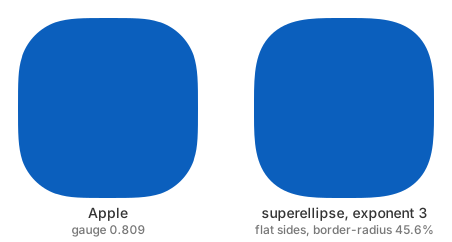
The early analysis of the Apple squircle shape as being approximately an exponent 5 superellipse was based on coarse shape only and didn't take into account its flat side. A much better match to the Apple shape is attainable using a superellipse with exponent 3 and a corresponding flat side length to match the gauge. This has G2 continuity and a similar curvature profile. This illustration was made using the Chromium approximation, so it should match the browser.

The Apple squircle beside a superellipse of exponent 3 with flat sides

Here's the CSS to accomplish the "close to Apple" squircle shape. Note that the parameter to the superellipse() function is the base-2 log of the exponent, so the value for an exponent of 3 is 1.585.

.icon {
  aspect-ratio: 1;
  border-radius: 46.2%;
  corner-shape: superellipse(1.585);
}

Continuity

A superellipse of exponent has continuity . This includes the flat-sided variants, as, for exponent > 2, the endpoint of the quadrant has zero curvature. A perfect circle (and indeed, any even integer exponent) without flat sides is of course the exception, as it has an infinitely high order of continuity.

As a general observation, for visual smoothness, the shape should have G2 continuity. Of the variants discussed, only the clothoid and superellipse (for n > 2) have this property. The Chromium approximation comes close; it doesn't have zero curvature by construction when joining the flat part, but does at the corner join by symmetry (unlike the Figma approximation, which has an additional arc there).

Other squircles

Quite a number of other curves can be pressed into service as squircles if need be.

  • The polynomial spiral (“spiro”) curve can do a reasonable flat-sided squircle with G2 continuity. See the “suitcase corners” section of Raph's thesis, figure 7.2.

  • Conic sections (hyperbolas). These approximate a sharp corner but are only G1 continuous (if flat sided).

  • Fernández-Guasti squircle, defined by . This is used in engineering but likely not in graphic design.

  • The Wikipedia page on squircles has a “periodic squircle” which has very similar behavior to the Fernández-Guasti one (they are visually near indistinguishable).

The offset curve of a squircle is not a squircle, but (a) it’s close, and (b) concentric squircles might be visually just as appealing or more so; for example a slightly rounded inner corner might look better than a sharp one if the curvature exceeds the stroke half-width.

The blurred rounded rectangle approximation is based on applying shading to a superellipse; each iso-line is in fact a superellipse.

Read the whole story
emrox
2 days ago
reply
Hamburg, Germany
Share this story
Delete

HUMAN.md — Briana (Mazzio) May

1 Share

BRIANA (MAZZIO) MAY · APR 28, 2026

> a working manifesto. notes-to-self, mostly.

> not a thinkpiece. not a thread. not a deck.

> last edited at the kitchen table, coffee #2.

## what this file is

A reminder, in plain text, of what I think humans actually bring to the table now that the machines are very good and getting better every day.

I keep coming back to the word "taste" and I keep finding it too small. Taste is the surface. There is a whole engine underneath it, and that engine is the part the model can't have. Yet. Maybe ever. I don't know. I'm not in that argument. I'm in this one:

## the actual job

### 1. break the rule on purpose

Models are trained on the average. The average is the floor, not the ceiling. Our job is not to conform a little better than the last person who conformed. Our job is to know the rule cold, and then break it on purpose, in public, with a reason.

Symmetry is a rule. Break it.
Three-act structure is a rule. Break it.
"Don't shoot into the sun" is a rule. Break it.

If you can't say why you broke it, you didn't break it, you just missed.

### 2. find the thing in the weird place

Inspiration does not live in the first ten image-search results. It lives in:

  • a misprinted parking ticket
  • the way your grandfather folded a napkin
  • an obscure Victorian zoetrope of a cat
  • the back of a menu in a town you can't pronounce
  • the tension in Rene Magritte's "The Son of Man", 1946

A model averages the internet. A human walks somewhere strange and brings back something unexpected.

### 3. advocate for the human and humanity

Every brief now has an invisible third party at the table. Someone has to keep saying "and what does this feel like for the person on the other end of it." Someone has to keep saying "how is humanity better through the birthing of this idea?" That's the job. Not "is it on-brand." Not "does it convert." What does it feel like? what good does it do?

If you aren't there saying it, no one will. The model certainly won't.

### 4. design for emotional resonance, not correctness

Tension. Surprise. Restraint. The pause before the punchline. The photograph that's almost in focus. The sentence that ends one beat earlier than you expected.

These are not bugs. These are the entire reason anyone remembers anything. "Correct" is the lowest bar in the building. Step over it and keep walking.

### 5. seek delight, not delivery

I would rather make one thing that makes someone laugh out loud on a train than ten things that "meet the brief." At the very least, it needs to make ME laugh. This is a personal bias.

If it's not at least a little bit fun, why are we here?

### 6. experiment ruthlessly, ship more than you opine

A working sketch beats a confident take. Every time.
A bad first draft beats a brilliant unwritten one. Every time.
A weird little prototype beats a slide deck about prototyping.
Every. Time.

Make 50 things. Throw away 47. Talk about the 3.
Do not, under any circumstances, become a person who mostly posts opinions about other people's work.

### 7. own the output. fully.

If the AI output is bad, the AI did not fail you. You failed it. You picked the tool. You wrote the prompt. You accepted the result. You shipped it.

The fix is not a better model, or a return to tools of the past. The fix is a sharper you. Sharpen yourself. Sharpen your ideas. Sharpen the way you say what you mean, because the gap between what you wanted and what came back is almost always a gap in you, not in the tool.

Powerful tools reward the people who showed up sharp, iterate, spend extra time on the vision. They expose the people who didn't. AI is not the great equalizer, it is the great amplifier.

### 8. design with it, not next to it

Watching the generation happen is not the work.
Prompting once and accepting the result is not the work.
The work is the back-and-forth. The push. The loop. The "again, but tweak is this way..." The hundredth iteration where the thing finally clicks.

If you're a spectator to your own output, you are not the author of your own output. Get your hands in.

### 9. play with purpose. and play for play.

Both. At the same time.
Some days the play is in service of a thing.
Some days the play is the thing.
A practice that only ever has goals is a job. A practice that never has goals is a hobby. The good work lives in between. Play doesn't result in burnout. It results in excitement, happiness, experiment, the unexpected, and an urge to play more.

### 10. be a builder and an ideas person

The split is fake. It was always fake. It's especially fake now. The people who can think of the thing and make the thing are going to eat. The people who can only do one half are going to be very busy explaining why the other half is hard, or blame the processes or tools.

Don't be that person. Learn the other half. It's never been cheaper to learn it.


## things I am trying to stop doing

  • waiting until it's "ready"
  • editing in my head instead of on the page
  • making but not sharing publicly
  • taking briefs that secretly bore me
  • pretending taste is an innate quality
  • treating "AI" like a noun instead of a verb

## things I am trying to do more

  • finish the bad version first
  • show people the in-between, mess, experiments
  • write the thing I'd want to read
  • dig deeper, get help
  • stop pretending I know stuff, ask dumber questions
  • say the more specific thing

This file will be wrong in six months. That is fine.
I'd rather be specifically wrong than vaguely correct.

— b.
last touched, kitchen table, late.

Read the whole story
emrox
2 days ago
reply
Hamburg, Germany
Share this story
Delete

nature

2 Shares

nature

Read the whole story
emrox
2 days ago
reply
Hamburg, Germany
ameel
3 days ago
reply
Melbourne, Australia
Share this story
Delete

Scattered thoughts on how doing math feels these days

1 Share

This is a weird moment. I have a hunch that we’ll look back later and tell ourselves stories in which it seemed obvious where things were going. So I wanted to lay down a little time capsule and register just how confusing everything felt at the time. This is a personal view from the trenches.

1.

If you’re a normal person, you may feel that AI has been good at math for a long time.1 But for “real” math, this is roughly what it felt like:

When Feeling
2024 LLMs are toys
Summer 2025 LLMs are interesting toys
Early Autumn 2025 LLMs can do useful stuff sometimes
Mid Autumn 2025 …a lot of stuff
Late Autumn 2025 …a lot
Early 2026 holy god

Even having been astonished by AI progress in the past, it was still astonishing to see AI move in a matter of months from a mildly-useful toy to something that many people now consider almost impossible to do without.

2.

Personally, I’d say that current AI makes me around 50% more productive at “doing math”. That’s despite the fact that AI can now often do in a few minutes things that would have taken me hours to do myself.

The main reason is that my concept of “doing math” involves various steps, like coming up with ideas for theorems, trying to prove them, writing things down, reorganizing everything to make it more clear, and so on. AI is good at some parts of this, but still pretty bad at others, so the overall speedup isn’t as high as you might expect.

(Even if planes could go 10× faster, your door-to-door travel time from your apartment in London to your friend’s place in Rome wouldn’t decrease that much, because you still have to get to the airport and wait to board.)

3.

But then, I’m still (sort of; more on this later) trying to follow my old “doing math” workflow, just automating certain parts of it. That can’t be right, can it?

If we found a way to make batteries at 1% of the current cost, we wouldn’t just say, “cool, batteries are cheap now”. We’d find all sorts of new ways to use batteries that didn’t make sense before, and change the ways we generate power to account for all these new batteries. Probably our whole energy system would end up transformed. Analogously, AI being good at proofs should lead to a very different equilibrium. But what is that?2

4.

It seems healthy, at the moment, to maintain a fluid view of what “doing math” means. But at bare minimum it surely involves understanding the math that “I” am “doing”. So long as that’s part of the workflow, it would seem to impose a limit on how quickly “I” could “do” math, no matter how good AI is.

One obvious conclusion would be that my tiny organic brain should be removed from the workflow entirely. Maybe! But it’s interesting to speculate about how much faster things could go while still keeping a human brain in the loop. I think the answer is: A lot.

5.

Contrary to what you may have heard, humans are not obsolete for math. Not yet. The most obvious reason is that AI is still bad at writing.

People often complain that AI writing overuses various patterns or lacks a unique voice or whatever. I don’t disagree, but I always felt like there was a deeper issue that I couldn’t quite put my finger on. With math, this becomes very clear: The problem is it doesn’t make any goddamned sense.

Really, I think it’s deeper than being bad “at writing”. It seems like AI is bad at thinking in certain ways that manifest as bad writing.

6.

When novices do math, they often create “spaghetti-code math”: Imagine a long document with lots of equations, but if you point at any one equation, it’s hard to say what assumptions underpin it, or how it fits into the bigger picture. Any random idea that was mentioned 17 pages ago might be used again at any time with no warning. With experience, people learn to break complex arguments down into modular pieces with a good “API”, in the sense that the assumptions and conclusions for each part are relatively simple.

Somehow, AI has developed these amazing technical skills, while still being bad at creating abstractions So the arguments it gives are long and tangled and bewildering. This is what makes AI math seem so alien.

7.

Now I know what you’re thinking. Maybe AI isn’t bad at creating abstractions. It’s just bad at creating abstractions that work for you, human with tiny organic brain.

From a distance, that seems plausible. And it might be true to some degree. I have high-bandwidth access to a human brain. It’s not crazy to imagine that this gives me an advantage in predicting how a human brain would react to a given presentation of ideas. But still, I claim that current AI is objectively bad at creating abstractions, regardless of if the consumer of those abstractions is human or artificial.

Here’s why: If I ask AI to prove something hard, it will produce a proof that starts simple and gradually descends into a rampage of complexity. If I tell it to break that proof down into self-contained pieces, it will produce lemmas that each take a full page just to state. If I ask, “Why? Why have you done this to me?”, the AI will say, “This is as simple as it gets. It’s not that bad. What’s your problem?”

But if I argue with the AI for a while, I can start to understand the basic contours of the argument. And I’ll ask, “Why don’t you first just try to prove blah using only assumptions blahblah, without worrying about blahblahblah? Wouldn’t that be easier?” Often, this doesn’t work, either because my idea was bad, or because the AI isn’t smart enough to do it. (Which one? Who knows!) But after a few attempts, I can usually find something that works, and the AI can use it to re-write the proof in a somewhat simpler way. If I repeat this many times, I can gradually chip away at the complexity.

But maybe that’s still just making the proof easier for humans to understand? No! For one, this usually makes the proof shorter, and sometimes dramatically shorter. More importantly, during this process, someone (maybe me, maybe the AI) will often realize that there’s a different proof strategy that gives a stronger result. Instead of proving x < 9.7, now we can prove x < 7.1. Thus, artisanal human abstractions are “objectively” useful.

8.

Some people might claim that it’s already possible to automate some of what I’m doing with some multi-agent Rube Goldberg thing. I’m not sure, because my experience has been that investing lots of time into clever AGENTS.MD or custom skills or harnesses isn’t a great use of time. That stuff is somewhat helpful, but things are changing so fast that the knowledge has a short half-life. Also, the majority of information about these tricks seems to come from people who are excited about the technology itself.

On the other hand, the automator told me to try typing, “ask independent agents for an adversarial review”, and I’ve found those seven words to be quite helpful. I wish I could find a source with boring best practices for people who are happy to stay away from the bleeding edge.

9.

Another reason AI doesn’t improve my productivity more is that it is often the green light, the orgastic future that recedes before me. I’ll ask AI to do something, and it will almost seem to do it. So I’ll ask for changes, and it seems to help, but it’s still not quite right. Hours later, I’ve accomplished nothing and learned nothing. Eventually, I start over, either doing it myself or with AI on a very tight leash, and I’m done in 30 minutes. Each time this happens I feel foolish and tell myself not to do it again. But it’s very hard to judge in real-time.

10.

Of course, I’m not claiming that AI is intrinsically bad at writing or thinking or abstraction-making. It’s gotten better at all of these and I expect it will continue to do so. All I’m saying is that as of Autumn 2026, humans still have a lot to contribute, and it’s not just better exposition.

11.

Did AI actually get much better at math in Autumn 2025? Or perhaps, in the grand scheme of things, human math ability falls into a narrow range?

12.

Some people are responding to the new reality by gleefully using AI to generate lots of semi-OK-ish papers and puking them up on arXiv. I understand the incentives that drive this. In some sense, it seems like the logical response to the new reality. (After inventing cars, we started taking a lot more low-value trips.) But I don’t think this is socially useful, and I tend to think everyone will soon agree that this is embarrassing. But… I’m not sure. Maybe it is socially useful? And I find myself feeling vaguely jealous of the people who are wired this way, who instead of feeling blinkered, see opportunity and plunder.

13.

Want an optimistic pro-AI, pro-progress take? OK. If I take my old “doing math” workflow, AI makes it strictly better. A lot better. It’s like having a hyper-conscientious intern that is smarter than me in many ways, works at incredible speed, and knows approximately everything.

Yes, AI sucks at writing and making abstractions. But if I’m disciplined and try to mostly do the math “myself” while asking the AI for help, I can explore ideas much faster than before, make far fewer mistakes, and produce something just as clear as before, while developing just as much understanding. I can ask, “What happens if you do a Kofuni expansion?”, and get an answer instantly. I can ask for illustrations or interactive visualizations and see them instantly. Arguably, we’re incredibly lucky to be alive at this moment, when these new tools have opened up this new territory to explore.

14.

And isn’t that what I wanted? Back in 2024, I bemoaned that what AI most seemed to struggle with was getting the facts straight:

Perhaps the old science fiction robots were a projection of our fantasies. I want my style and voice to be precious and uncopyable. I want an AI assistant that will tirelessly hunt down facts while I provide creativity and panache and magic. But that’s not how it is. So we should remember: In a scenario where AI is useful but humans retain some comparative advantage, we might not like where that comparative advantage lies.

At least with math, and at least for the moment, I get to be Kirk, while the AI is Spock. (Even with other types of writing, my impression is that since 2024, AI has improved more along Spock dimensions than along Kirk dimensions.) So that’s nice.

15.

In the last few months, it frequently happens that a collaborator will use AI to generate something, and then send it to me and ask me to check if it’s useful. I can see why this seems reasonable. (Really, I do.) But when it happens a lot, one can’t help but wonder what the point of the human collaborator is.

16.

On the other hand—with creative writing, my advice is not to use AI to write, at all. Ask questions if you want, but write every damned word yourself.3 With math, I don’t feel like such a hard line makes sense. It seems that creating something good still requires a lot of human involvement, to the point of agonizing over notation, repeatedly re-organizing things, and heavily editing individual sentences. Still, I find that if people make that effort, they can create something just as good as they could by hand, while still being perhaps 50% AI written.4

So I don’t mind if people send me “centaur math”, provided they take responsibility for the contents. The problem is that when working with AI, it takes constant paranoid vigilance to avoid letting things slip beyond your understanding. I often find myself wanting to awkwardly ask people, “OK, you obviously used AI to make this… which is OK… but how much of this do you vouch for? If we have a meeting to discuss it, will you crumble the moment I start asking questions?”

17.

When I’m in abstraction-creation mode, I feel like I’m doing something intelligent. When I yell at AI about bad notation and writing, I feel like I’m providing taste. But I often find myself giving feedback that seems incredibly basic. Things like: This is a mess, clean it up. Or: Do you need that assumption? Or: If you can’t solve this problem, why don’t you create a simpler version and try to solve it first?

On the one hand, I guess a lot of what good human managers do amounts to giving very basic feedback. On the other hand, it’s hard to imagine that I have much durable advantage in doing this kind of thing. So I wonder how much durable advantage I have in abstraction-making or taste, too.

18.

A common reaction to AI getting better at proofs is that humans need to focus more on exposition. This has an obvious Bourdieu-esque criticism: Human painters used to strongly value photo-realism, but after cameras were invented they convinced everyone that, oops, photo-realism isn’t important, what matters is expression, which coincidentally cameras can’t do. Isn’t a shift towards exposition in math just a way for humans to move the goalposts and justify their own continued relevance?

The only credible way I see to avoid that criticism seems to be to bite the bullet and say that, in fact, math should have already have focused more on exposition, even before AI. Personally, I strongly believe that this is true.

19.

I think the biggest reason I’m not more productive is: What’s the point? In the past, if you came up with an elegant proof, you’d tell yourself, “I made a thing! Other people will read and use my thing! I am advancing human progress.” You can still tell yourself that now. But you have to wonder, will anyone actually read your proof? Or will they just ask another AI to explain it to them? Will your proof help their AI explain it better? For how long? If you just waited a year, would some other AI produce that same proof independently?

  1. Alternatively, if you’re a normal person, you might think that LLMs still struggle with basic arithmetic? ↩

  2. AI progress is so fast, compared to society’s ability to adjust, that we may never actually see what “the current equilibrium” looks like. ↩

  3. This essay, if you’re wondering, was created by writing every damned word myself and not asking AI anything. ↩

  4. You could have a whole debate about what that percentage means. It’s not the number of words written by AI that really matters, in my opinion, so much as who is responsible for the overall structure of the ideas. ↩


Read the whole story
emrox
3 days ago
reply
Hamburg, Germany
Share this story
Delete
Next Page of Stories